HARDWARE BUYING GUIDE · 9 KITS · MINI X TESTED IN GERMANY · 23 SEPTEMBER 2026
Starlink hardware compared: V5, Mini and Standard kits
Starlink availability: interactive world map
Select a country on the map or search for its name. Check local availability and offers directly with Starlink.
The interactive map is loaded. Without JavaScript, you’ll find all countries further down the “All countries by status” list.
USUnited States
Available
Starlink started here. Which tariffs, which hardware price and which actions apply to your address, shows the address checker on the Starlink card.
- Address verification free of charge and done in one minute
- Tariffs, hardware price and actions immediately visible
- No account needed to check availability
+1 month freewhen ordering via our referral link – according to Starlink in most places
Check availability at my addressStarlink prices in Germany
Status according to Starlink card data, as of 15.10.2026. The address verification at Starlink is binding.
Data base: public map data from Starlink, read out on 15.10.2026. Map basis: Natural Earth (general), German border representation, simplified. Small island states are presented as points.
Choose your market: current Starlink plans
Checked on 15 October 2026. Residential 100 Mbps and 200 Mbps are available only in selected areas and have download speed caps. Max uses the maximum available speeds; no speed is guaranteed. Roam data allowances, taxes, equipment, shipping and promotions depend on the country and service address. Prices below are monthly advertised service prices, not a binding quote.
| Country or territory | Residential 100 / 200 / Max | Roam |
|---|---|---|
| United States · USD | 55 / 85 / 130 USD / month | 100GB: 55 USD · 300GB: 80 USD · Unlimited: 175 USD |
| United Kingdom · GBP | 40 / 60 / 80 GBP / month | 100GB: 55 GBP · Unlimited: 100 GBP |
| Canada · CAD | 75 / 115 / 150 CAD / month | 100GB: 75 CAD · 300GB: 110 CAD · Unlimited: 200 CAD |
| Australia · AUD | 75 / 110 / 150 AUD / month | 100GB: 85 AUD · Unlimited: 210 AUD |
Some links are referral or affiliate links. Eligible orders may earn us a credit or commission. Referral benefits depend on the applicable Starlink conditions.
Choosing a Starlink kit affects installation, Wi-Fi coverage, power use and everyday practicality. Mini and Mini X are different packages; Standard 4 and Standard 4 X include different routers, while Standard Actuated is an older generation. This guide compares all nine kits in Starlink’s technical overview using original images, specifications, box contents and an interactive comparison. We also unpacked and set up the Mini X ourselves and photographed its components. That hands-on experience applies to the Mini X; the other kits are compared using the stated source data. Check which kits are actually offered at your service address.
Eligible new customers · 1 service month free
First find the right kit, then check the concrete offer
Use the model finder directly underneath. After the address query, Starlink shows which hardware and tariffs are offered for you. For eligible new customers, the order can be linked to a free service month via our referral link.
Recommendation link: Registration directly with Starlink, new account, activation and at least two months subscription. Credit in the second month on eligible household/Roam plans; no hardware discount. Conditions and Transparency.
Which Starlink kit suits you?
Choose your bet and compare two kits directly. You can immediately see what is different in terms of antenna, router and power demand. With your own electricity price, you can then calculate the running costs.
Transparency: Our flagged Starlink referral links may bring us a remuneration or other referral benefit. Eligible new customers receive a free service month, according to Starlink. The technical data come from manufacturer documents; this article is a data comparison and not a series of measurements of all nine devices.
All devices, images and data are listed in full below.
Your Starlink Compatibility
Two kits. Your decision.
Find out which hardware fits your everyday life.
For home: V5 saves space and energy. Standard 4 X adds Router 3 to the larger terminal.
You are comparing the same kit to yourself. Choose a second model to see differences.
The Differences at a Glance
There is no difference in these comparative values.
Manufacturer specifications, no own measurements. Mini X: Additional router not quantified in the specified consumption.
Calculate electricity costs – with your electricity price and your useful life
Applies to the mini-kit. With Mini X, it remains the documented terminal value without a numbered additional router.
Please enter valid values: 0–2 €/kWh, 0–24 hours per day and 1–366 full days.
Watt ÷ 1,000 × hours × days × electricity price. The margin is based on the average producer consumption. Additional devices, standby plans and conversion losses of a mobile power supply are not considered separately.
The main differences in 20 seconds
V5: 35–50 W
Compact home kit with mini-router and lower manufacturer consumption range than standard 4.
Mini: Wi-Fi built-in
Antenna and WLAN in one device. Mini X complements a separate Router Mini – unpacked in its own test.
4 or 4 X?
Central terminal data the same, router package different: mini router versus router 3.
Enterprise / Performance
For special installations. The listed kits do not include a WLAN router.
Starlink Hardware in Comparison: Measures, Weight, Router and Electricity
The table compares the terminal hardware and documented kit content. A tariff is different: bandwidth, priority and permitted use also depend on the booked service. The technical specification list also includes older devices and does not prove that all nine kits are offered at your address.
On small displays, the table can be moved laterally.
| Kit | Terminal dimensions | Weight | Field of view | Ø Consumption | Router included |
|---|---|---|---|---|---|
| Starlink V5 | 384 × 306 × 34 mm | 1,1 kg | 110° | 35–50 W | Mini router · Wi-Fi 6 |
| Starlink Mini | 298,5 × 259 × 38,5 mm | 1,10 kg | 110° | 25–40 W | Integrated in the terminal · Wi-Fi 5 |
| Starlink Mini X | 298,5 × 259 × 38,5 mm | 1,10 kg (mini-terminal) | 110° | 25–40 W* | Integrated Wi-Fi 5 + Mini-Router with Wi-Fi 6 |
| Starlink Standard 4 | 594 × 383 × 39,7 mm | 2,9 kg | 110° | 75–100 W | Mini router · Wi-Fi 6 |
| Starlink Standard 4 X | 594 × 383 × 39,7 mm | 2,9 kg | 110° | 75–100 W | Router 3 · Wi-Fi 6 · Tri-band |
| Starlink Standard Actuated | Antenna surface area 513 × 303 mm | 2,9 kg without additional cable | 100° | 50–75 W | GEN2 router · Wi-Fi 5 |
| Starlink Enterprise | 594 × 383 × 39,7 mm | Not specified in the data sheet | 110° | 75–100 W | No wireless router in the kit |
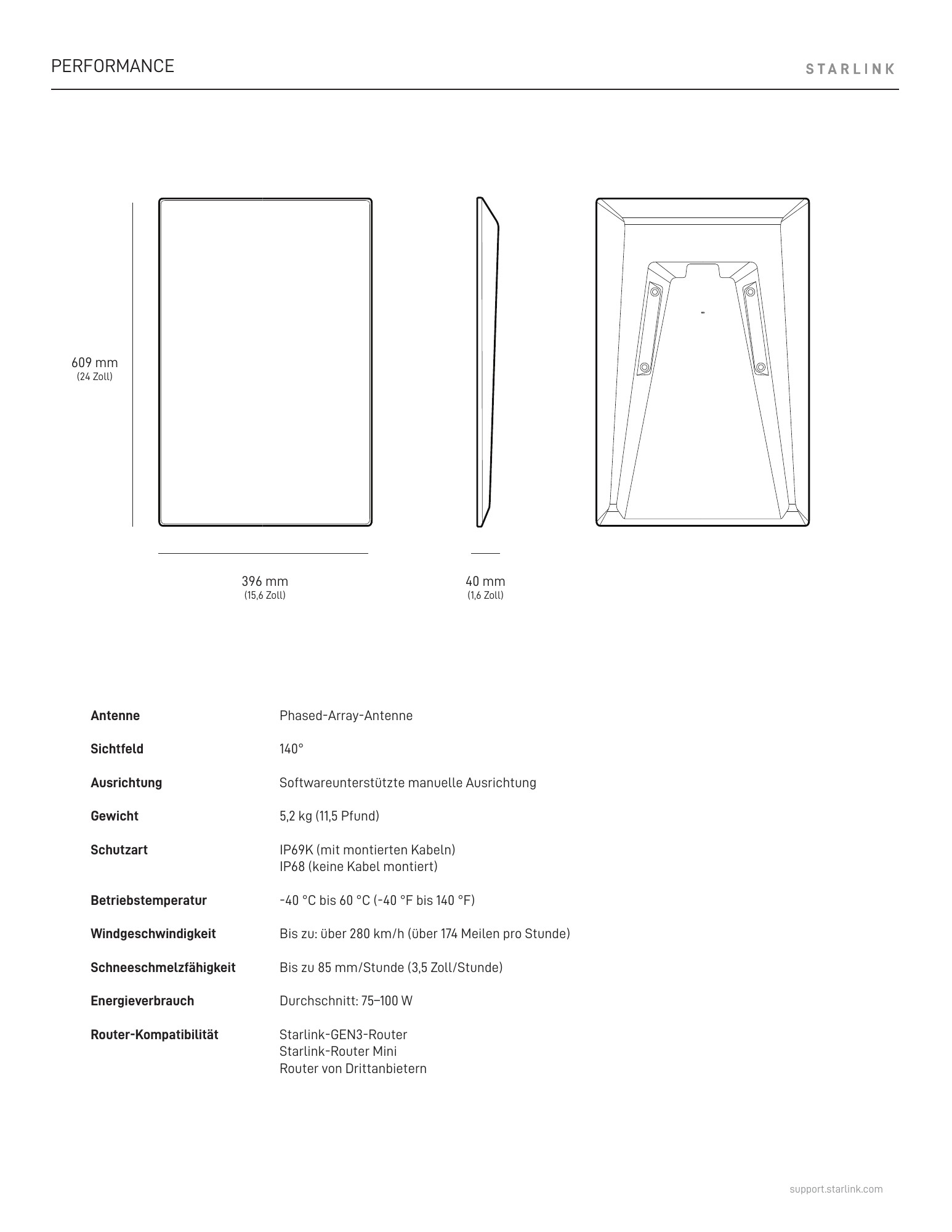
| Starlink Performance (GEN3) | 609 × 396 × 40 mm | 5,2 kg | 140° | 75–100 W | No wireless router in the kit |
| Starlink Performance (GEN2) | 575 × 511 × 41 mm | 5,9 kg | 140° | 110–150 W | No wireless router in the kit |
*Mini X: Consumption range of the mini terminal; the excess consumption of the additional router is not specified separately. In the case of the standard with motor, 513 × 303 mm refers to the antenna surface, not to the entire device with mast. For the Enterprise terminal, no weight was taken from a similar model.
V5 terminal and V3 satellite are different things
The model number of the kit denotes your hardware on the ground. The designation of new Starlink satellites in orbit is part of another product line. Even a larger antenna or a better Wi-Fi router cannot simply remove a tariff limit.
Understand Starlink technology: What the data really says
A Starlink kit does not simply consist of a “satellite dish”. The receiving and transmitting technology includes the power supply, the local network and the mechanical attachment. This is precisely why an inconspicuous difference in the scope of delivery can be more important than the next generation number: an integrated router saves one device, a separate power supply enables other installations, and a longer original cable can make the better antenna location accessible in the first place.
1st terminal: connection to the satellite
Here count field of view, orientation, clear sky view, environmental conditions and connection type. The dimensions of the terminal do not yet describe the entire installation.
2. Router: Connect to your devices
WLAN generation, radio technology, Ethernet and placement determine the local distribution. A good satellite reception does not eliminate a Wi-Fi gap in the back room.
3 Power supply and cable: supply and connection
Input voltage, cable type, cable length and plug must fit together. The value on a power supply is not automatically the average consumption of the entire system.
4. tariff: permitted use and service
The tariff regulates the booked service. A robust antenna alone does not unlock mobile use or higher priority or a specific data throughput.
Phased array and alignment: electronic is not motorized
The datasheets describe the terminals as phased array antennas. In this case, the radio direction is electronically influenced by the interaction of a plurality of antenna elements. The basic position of the entire device can be distinguished from this: V5, Mini and the Standard 4 family call a software-supported manual orientation. In the older standard with motor, a motorized self-alignment is added. “Without a motor” therefore does not mean that the radio connection can only point rigidly in a single direction.
Practically, the location counts first. Anyone who places the terminal next to a high house wall or under trees cannot compensate for such obstacles with a newer router. The alignment aid and the obstacle test in the app are part of the location decision. Subsequent, good assembly is often more complex than a cleanly planned first body.
100°, 110° or 140° field of view: more angles is not a tempo promise
The standard with motor calls 100°, the compact and standard kits predominantly 110°, both performance terminals considered here 140°. The field of view describes a geometric working range, no Wi-Fi range and no guaranteed download value. A large field of view is therefore a technical feature for operational planning, but not a substitute for clear view and a suitable tariff.
Information such as “up to 400 Mbit/s” in a product sheet must also be distinguished from own measurements. An announced Gigabit development for Performance GEN3 is not proof that a specific connection today delivers Gigabit at every address. For a purchase comparison, the secured differences in construction, connections, routers, environmental conditions and energy demand are more resilient.
Compare weight and dimensions correctly
Terminal weight, weight with stand, weight with cable and shipping weight are different sizes. In the Mini, for example, 1.10 kg stands for the terminal, 1.16 kg with stand and 1.53 kg with stand and 15 m cable. The parcel weight must therefore not be treated as a weight on a roof support or in a daypack. For the standard with motor, 513 × 303 mm refers to the antenna surface; the entire height depends on the position.
The combination of device, holder and mounting substrate also counts for assembly. A wind value specified in the data sheet is not a blanket clearance for each self-built bracket. The same care is required for the power supply: 100 W USB-PD requirement and 25-40 W average consumption of the Mini do not contradict each other, but describe different requirements.
All nine Starlink kits: images, technical data and scope of delivery
The following images show the respective manufacturer product views and the associated kit images. Via „All technical data“ you can also reach router, power supply and accessories values as well as the original technical drawing. The representation of the product images among each other is not true to scale.
Starlink V5
Compact entry for the home
Light home kit with a separate mini router and a lower consumption range than standard 4 and 4 X.


The Starlink V5 is aimed at households looking for a compact, easy-to-mount solution. The terminal measures 384 × 306 × 34 mm and, according to the data sheet, weighs 1.1 kg. This makes it significantly smaller and lighter than the standard 4 variants. The comparison becomes particularly interesting when the kit runs all year round: Starlink calls for V5 on average 35 to 50 watts, for Standard 4 and Standard 4 X, however, 75 to 100 watts.
The V5 includes a separate mini-router with Wi-Fi 6. The satellite terminal can therefore stand outside with a clear view of the sky, while the router in the house supplies the devices. The compact router cannot be equated with the WLAN integrated in the mini-terminal. The V5 datasheet specifies up to 204 m² of coverage and two 1 Gbit/s RJ45 connections for the mini-router. Range and throughput still depend on walls, floors and position.
V5 is especially worth a closer look if a manageable power requirement and a small antenna are more important to you than a router package as extensive as possible. Which hardware you actually get with your tariff, shows the concrete offer. A new generation number alone makes the connection neither faster nor more stable.
Our classification:Check home first if a compact kit and ongoing electricity costs are important.
Important for this kit: The datasheet shows a separate power supply, although the web kit list does not contain its own line. V5 is not listed in the currently reviewed list of supported hardware for use in motion.
Scope of delivery according to the model page
- Starlink
- Stand
- Mini-router with stand
- Pipe adapters
- Starlink cable 15 m
- Electrical cable 1.5 m
- Ethernet cable 2 m
All technical data, components and dimensional drawing
Terminal · Data Sheet Page 3
| Specification | Manufacturer’s information |
|---|---|
| Dimensions | 384 × 306 × 34 mm |
| Antenna | Electronic phased array antenna |
| Field of view | 110° |
| Alignment | Software-assisted manual alignment |
| Weight | 1,1 kg (bowl) |
| Kit weight | 3,8 kg |
| Ingress protection | IP67 Type 4 |
| Operating temperature | −30 to +50 °C |
| Wind | Operational up to 265 km/h, mounted |
| Snow melting | Up to 40 mm/h |
| Average consumption | 35–50 W |
| Display | LED on top |
Mini router · Datasheet page 6
| Specification | Manufacturer’s information |
|---|---|
| Wi-Fi | Wi-Fi 6 |
| Radio | Dual band 2 × 2 MU-MIMO |
| Ethernet | Two 1-Gbit/s RJ45 ports |
| Coverage | Up to 204 m² |
| Dimensions | 138 × 83,6 × 27 mm; stand dimension 71,6 mm |
| Weight | 0,12 kg |
| Operating temperature | −30 to +50 °C |
| Security | WPA2 |
| Ingress protection | IPX0 indoors only |
| Connected equipment | Up to 235 |
| Mesh | GEN2 router, router 3, mini router and mini kit; no GEN1 or third-party mesh |
| Connection Recommendation | Wired; Cat5e or higher shielded for other Starlink routers; mini accessories cables for mini-connection |
Power supply · Data sheet page 5
| Specification | Manufacturer’s information |
|---|---|
| Dimensions | 153 × 75 × 36 mm |
| Weight | 0,40 kg |
| Ingress protection | IP66 Type 4 with installed included cables |
| Operating temperature | −30 to +50 °C |
Brackets · Datasheet page 4
| Specification | Manufacturer’s information |
|---|---|
| Stand | 147 × 91 × 18 mm |
| Pipe adapters | 154 × 91 × 58 mm |

Starlink Mini
Compact for travel and electricity budget
Small terminal with integrated WLAN, DC input and comparatively low energy requirements.


The Starlink Mini combines satellite antenna and WLAN in one housing. This saves a separate router device on the go and reduces the setup. With 298.5 × 259 × 38.5 mm and 1.10 kg without stands and additional cables, it is the obvious comparison for camping, changing locations and small power reserves. With stand Starlink calls 1.16 kg, with stand and 15-m cable 1.53 kg.
The integrated WLAN works with Wi-Fi 5, dual-band and 3×3 MU-MIMO. Starlink specifies up to 112 m² of coverage and up to 128 connected devices. These are manufacturer upper limits, no assurance for a metal caravan or a house with several floors. The antenna must have clear visibility; its ideal location is not automatically the best location for Wi-Fi.
The DC input is specified as 12 to 48 volts and 60 watts. For Starlink USB-C accessories, the datasheet requires a USB-PD source with 100 watts, at least 20 volts and 5 amperes. This requirement must not be confused with the average operating consumption: a small power bank with nominally 30 watts is therefore not enough automatically.
Our classification:The first comparison option for mobile use, when pack size and energy demand count.
Important for this kit: The mini datasheet mentions 25–40 W, the current power demand support article 20–40 W. The hardware tables use 25–40 W; in the power calculator, the support value can alternatively be selected for the mini-kit. IP67 applies only with the provided cables and plugs.
Scope of delivery according to the model page
- Starlink with integrated WLAN
- Stand
- Mini-raw adapter and flat holder
- DC power cable 15 m
- Power supply unit
- Starlink plug
All technical data, components and dimensional drawing
Terminal · Data Sheet Page 3
| Specification | Manufacturer’s information |
|---|---|
| Dimensions | 298,5 × 259 × 38,5 mm |
| Antenna | Electronic phased array antenna |
| Field of view | 110° |
| Alignment | Software-assisted manual alignment |
| Weight | 1,10 kg; 1,16 kg with stand; 1,53 kg with stand and 15 m cable |
| Ingress protection | IP67 Type 4 with mounted power cable and Starlink plug/cable |
| Operating temperature | −30 to +50 °C |
| Wind | Operational: >96 km/h |
| Snow melting | Up to 25 mm/h |
| Average consumption | 25–40 W |
| Entry | 12–48 V, 60 W |
| USB PD | 100 W; at least 20 V/5 A with Starlink USB-C to hollow socket accessories |
Integrated WLAN · Datasheet page 4
| Specification | Manufacturer’s information |
|---|---|
| Wi-Fi | Wi-Fi 5; 802.11a/b/g/n/ac |
| Radio | Dual band 3 × 3 MU-MIMO |
| Ethernet | A locking LAN port with Starlink plug |
| Coverage | Up to 112 m² |
| Security | WPA2 |
| Connected equipment | Up to 128 |
| Mesh | Compatible with Starlink mesh systems; no third-party mesh |
Power supply · Data sheet page 5
| Specification | Manufacturer’s information |
|---|---|
| Dimensions | 91 × 44 × 51 mm |
| Weight | 0,2 kg |
| Ingress protection | IP66 Type 4 |
| Operating temperature | −30 to +50 °C |
| Entry | 100–240 V AC, 1,6 A, 50–60 Hz |
Packaging · Data sheet page 2
| Specification | Manufacturer’s information |
|---|---|
| Weight | 2,89 kg |
| Dimensions | 430 × 334 × 79 mm |
Brackets and connections · Data sheet page 8
| Specification | Manufacturer’s information |
|---|---|
| Note: | With standard RJ45 cable, the IP67 classification is eliminated according to the data sheet. Dimensional drawings for pipe adapters and flat holders on page 8; stand on page 6. |

Starlink Mini X
Mini kit with additional router
The same central mini-terminal format, supplemented by mini-router, router power supply and router stands.
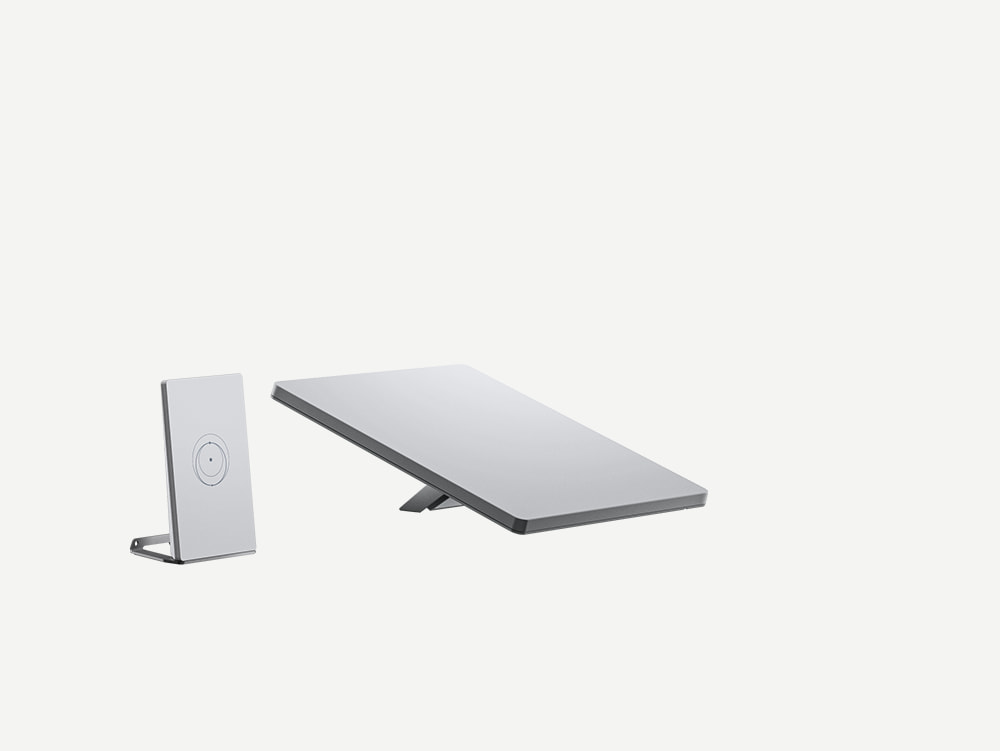

Mini X is to be understood as a kit: The compact terminal data correspond to the Mini in the archived data sheet, plus a separate mini router with its own power supply and stand. So you do not automatically get a larger antenna or a higher booked satellite throughput. The added value lies in the construction of the local network and the possibility of placing an additional router closer to the users.
This can be interesting if the antenna has to be outside the motorhome or in a convenient place on the house, while better Wi-Fi is needed inside. If and how the devices are connected, you should plan based on the Mini-X interior manual and the intended accessories. The parts documented in the kit are listed in full below.
With the mini-router, a particularly precise source view is worthwhile: The mini-X datasheet mentions up to 120 m² and a locking LAN connection; V5 and standard 4 datasheets mention up to 204 m² and two RJ45 connections for the mini-router. The drawing in the Mini-X sheet also shows two sockets. This information does not allow a blanket standardization of LAN counting and coverage.
Our classification: Check if you need the mobility of the Mini and additionally a separate router.
Important for this kit: 25–40 W is the range of the mini terminal specified in the Mini-X datasheet. The additional router is not separately numbered and is not tacitly treated as a free consumer in the computer.
Mini X in our own hands-on test: scope of delivery and details
Own photos ·Drohnen.de · September 2026
The information above comes from the Starlink datasheets. We also unpacked, assembled and commissioned the Mini X ourselves. The following photos show what is actually in the carton and how the parts belong together. Measurements, app screenshots and the complete setup document our hands-on test with speed test and latency measurement.
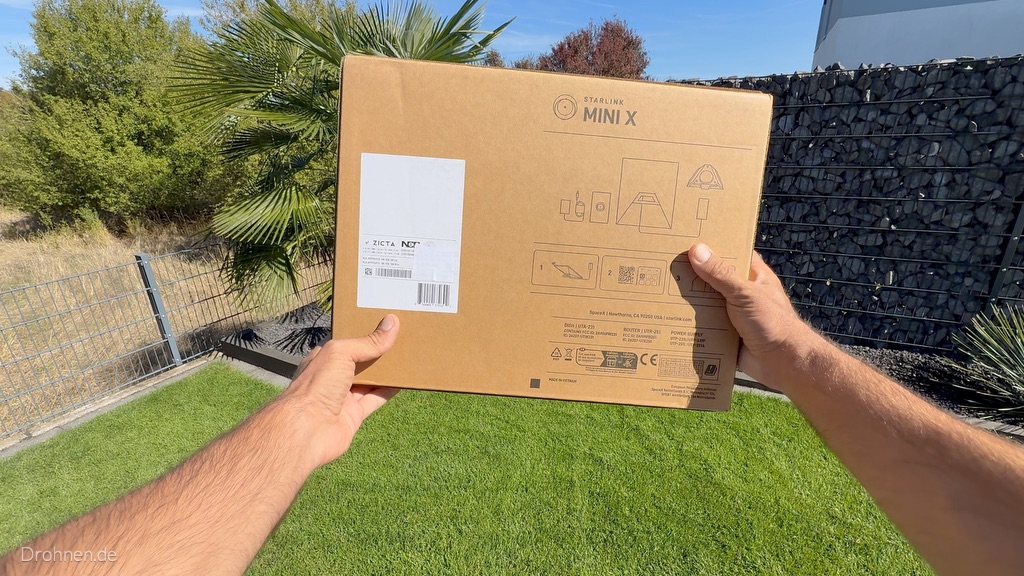
Cartonboard and scope of delivery
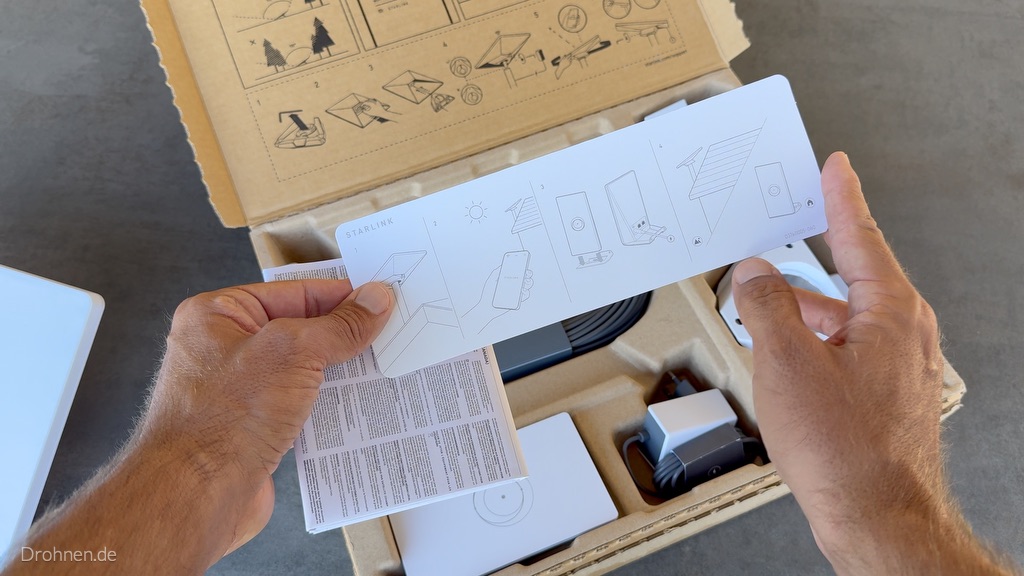
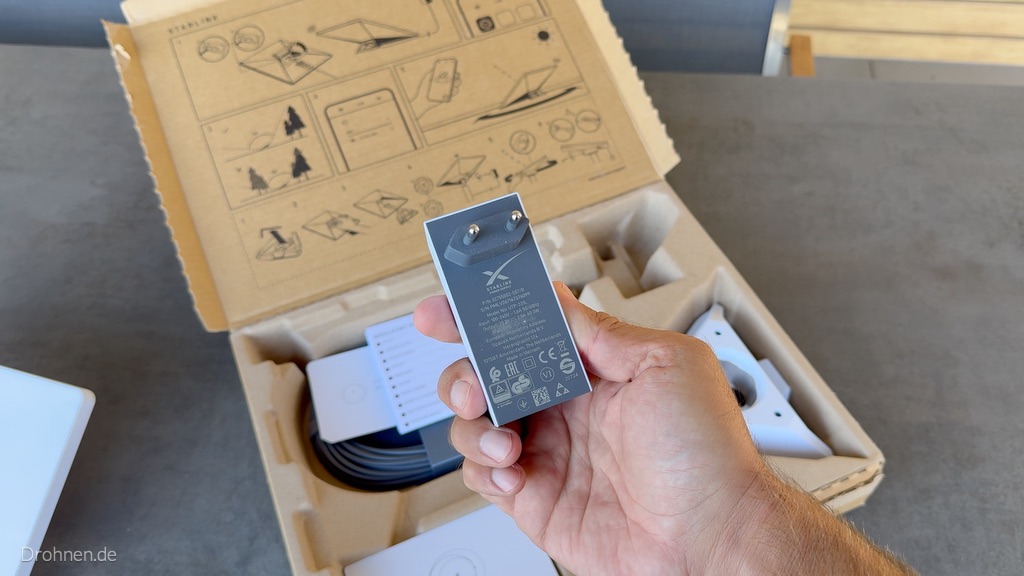
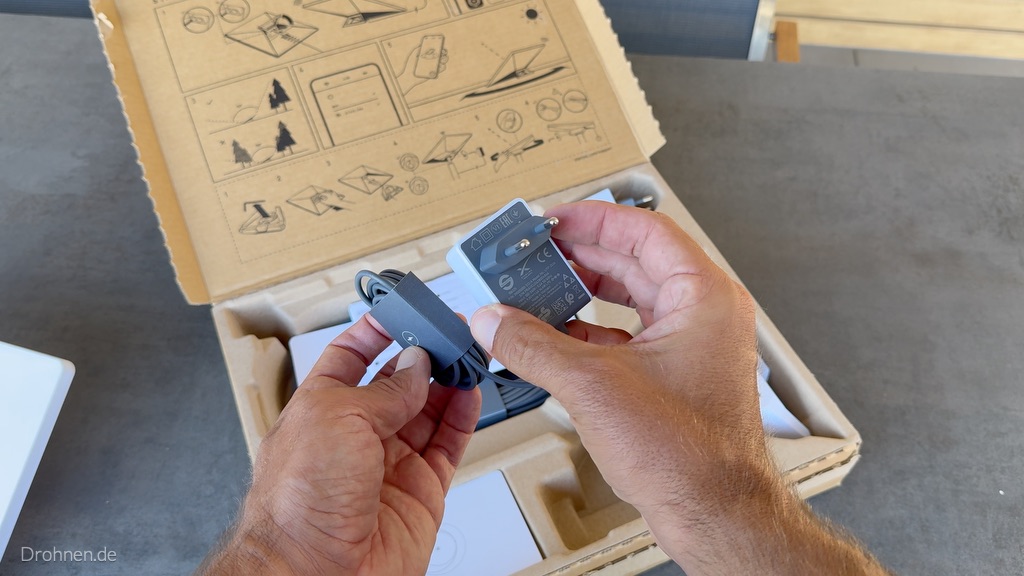
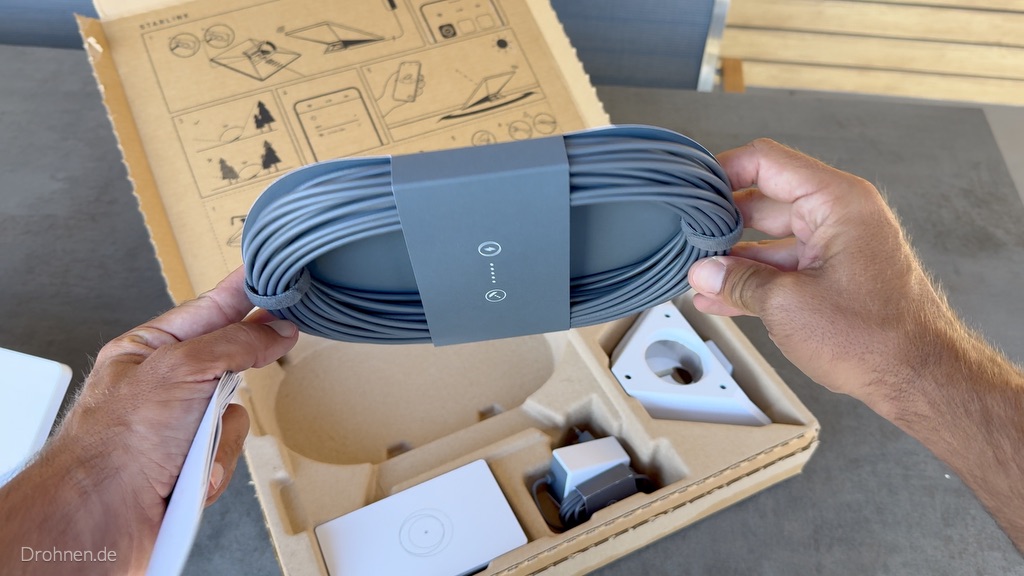
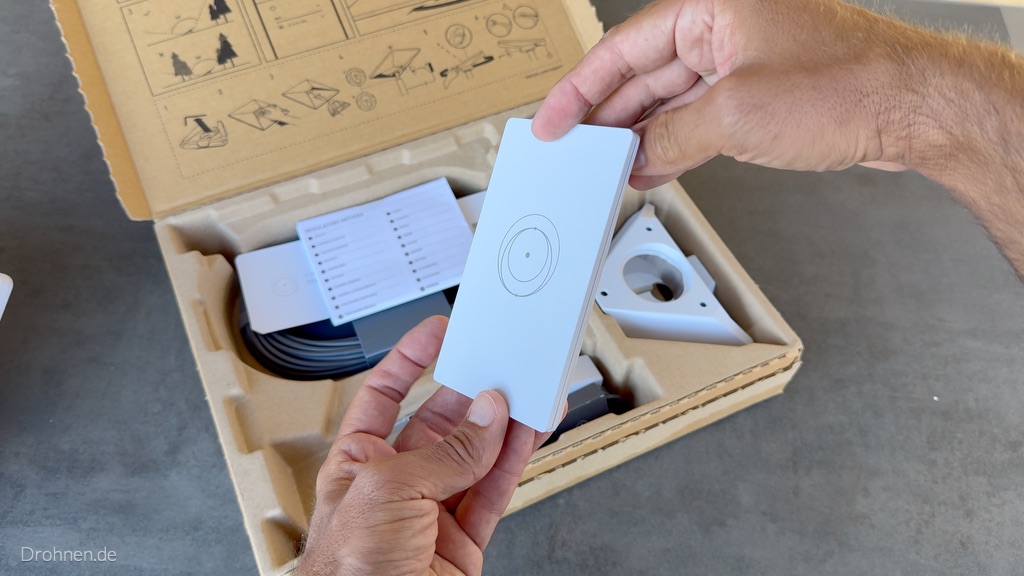
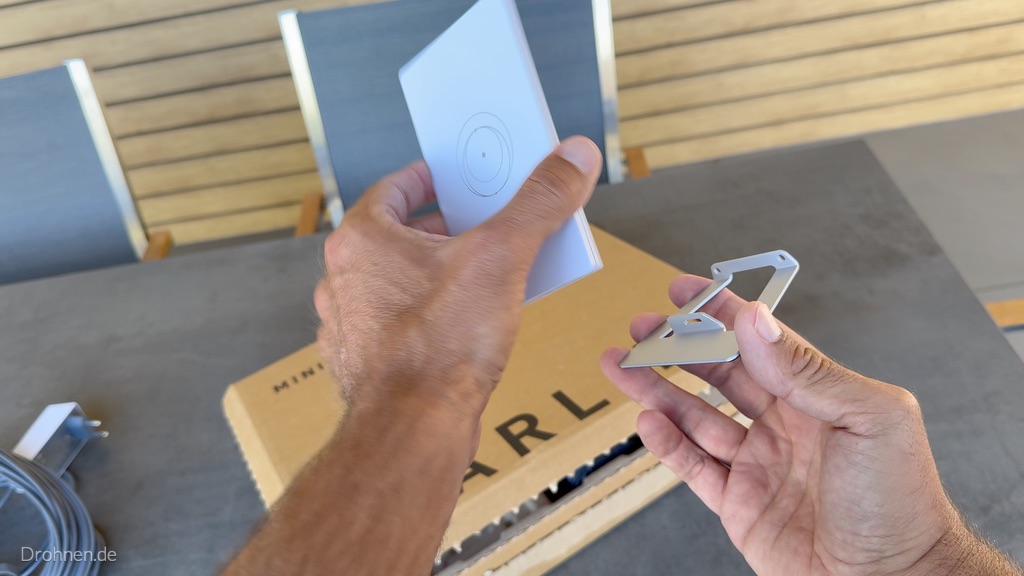
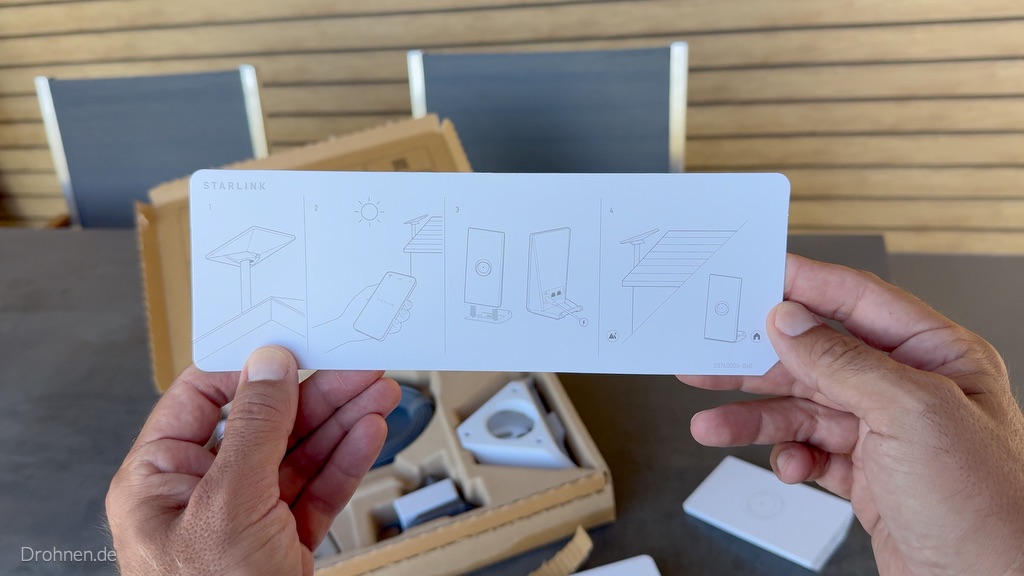
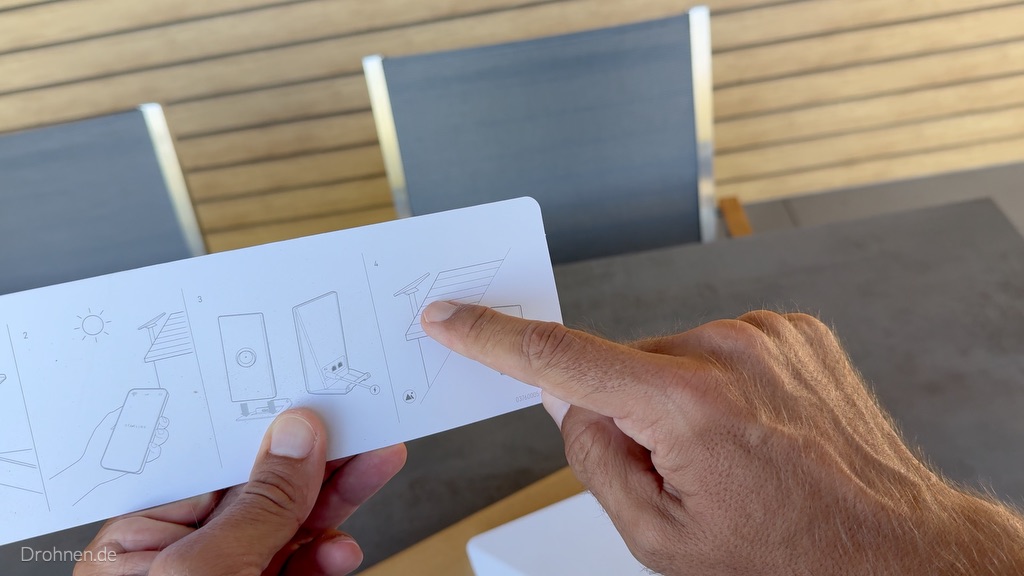
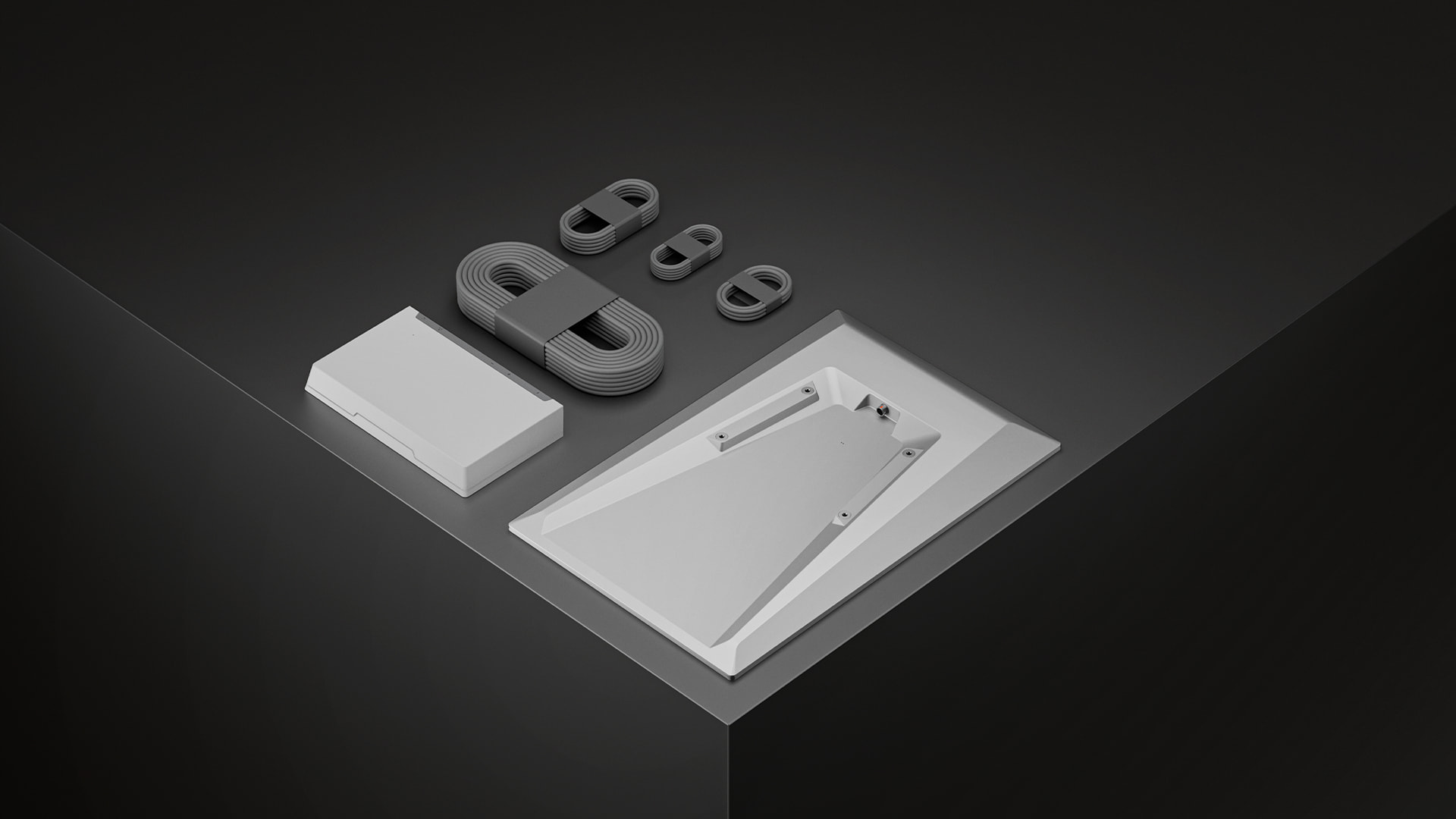
The carton back covers all components. In the carton itself were our kit: the mini-terminal with folding stand, the elongated terminal power supply with EU plug, the separate Router Mini with its own compact power supply, the router stand, the wound grey DC power cable, the triangular pipe adapter and an illustrated short guide with further documents. In practice, two power supplies also mean: at the location of the router, you need two free sockets, as long as the terminal power supply is also plugged in there.
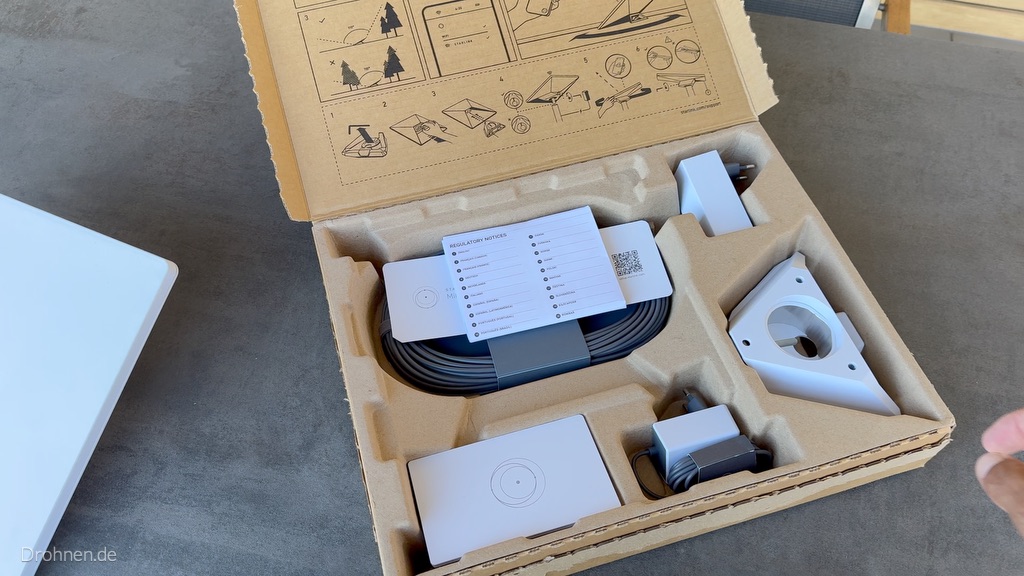
Terminal and Router Mini in detail
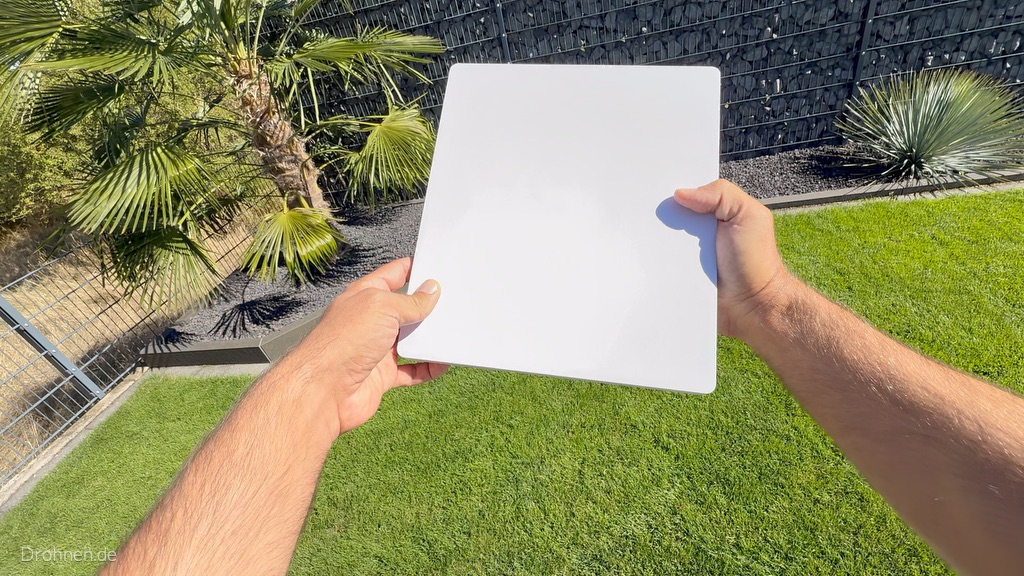
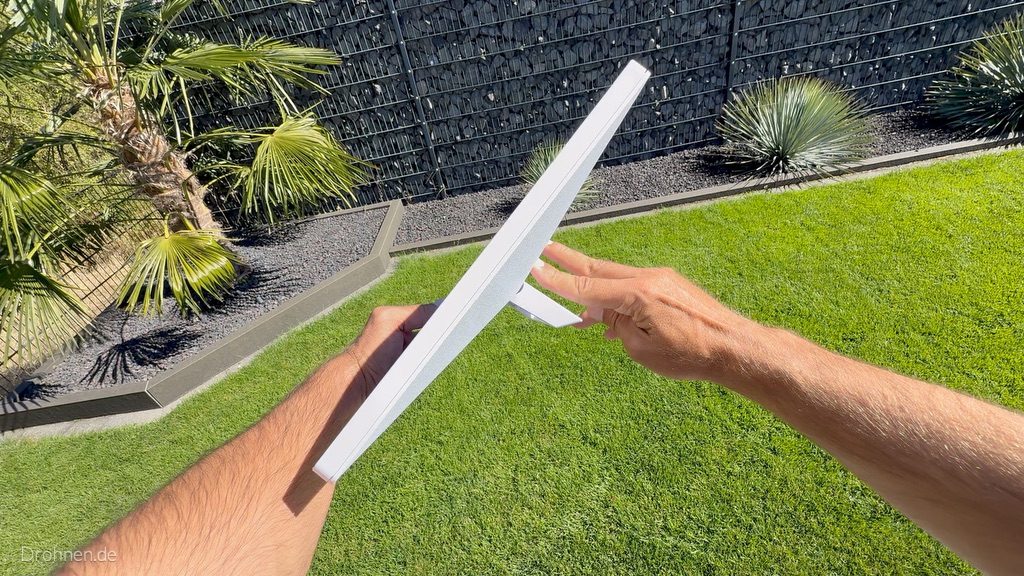
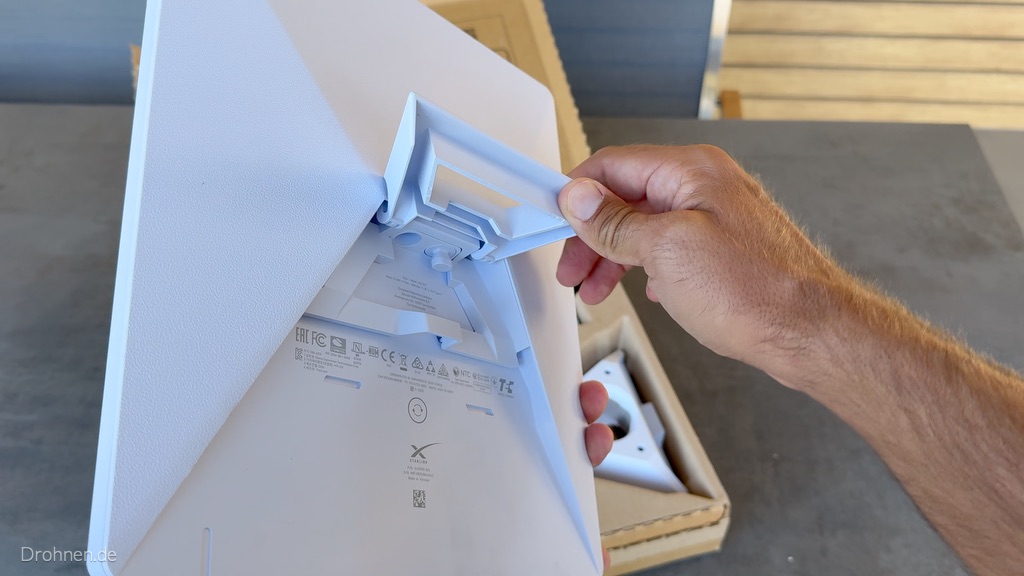
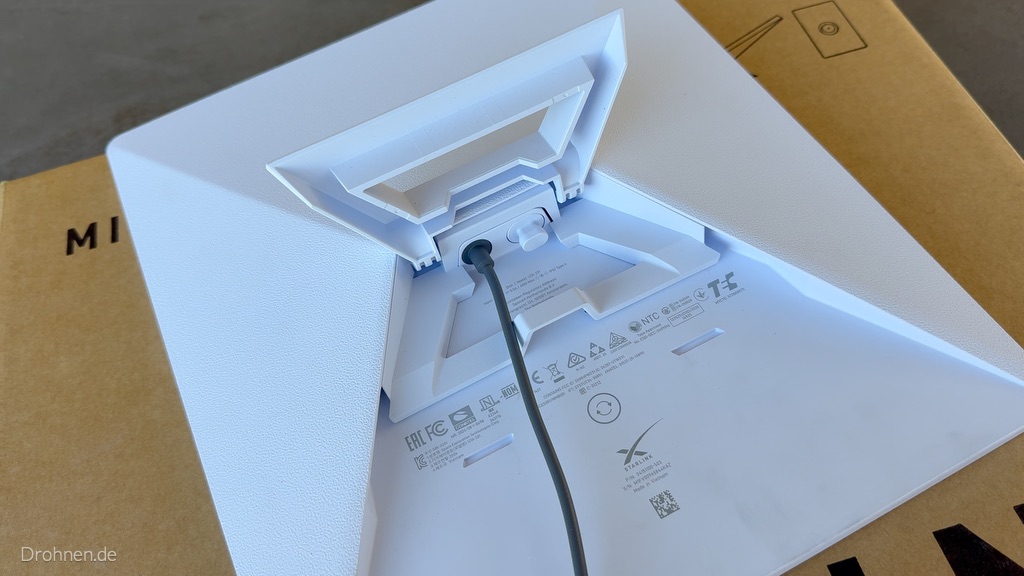
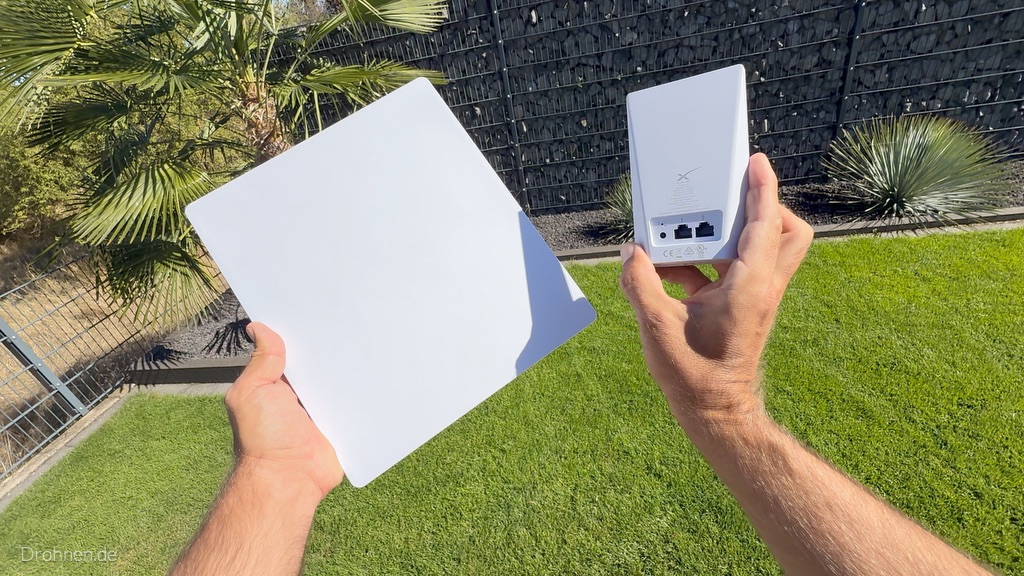
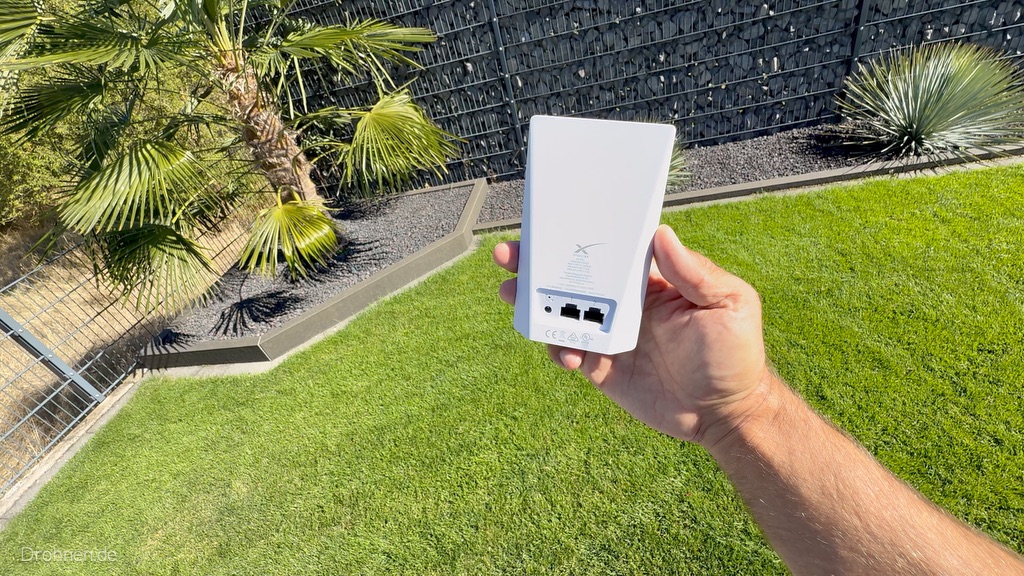
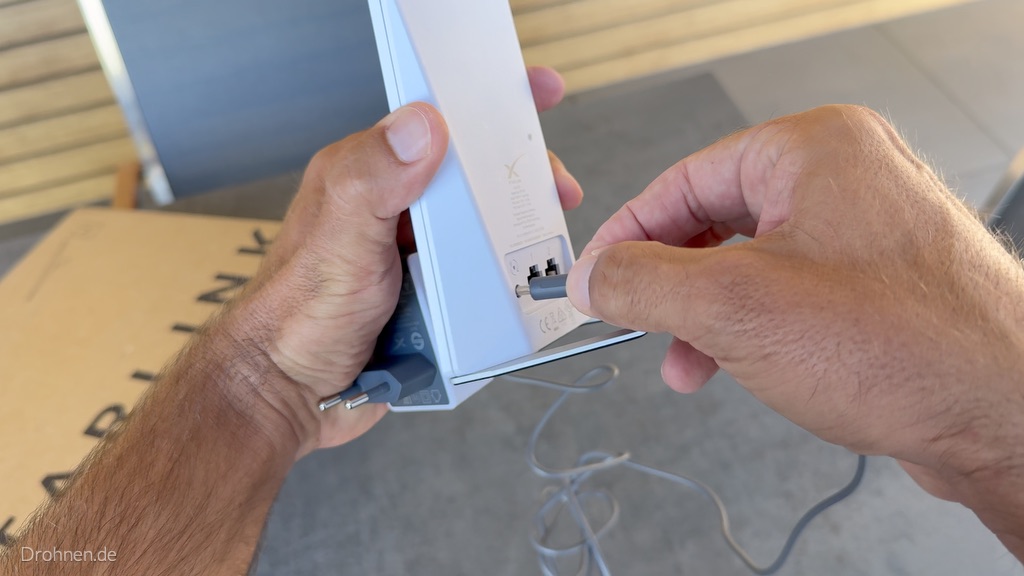
The terminal, with its rectangular antenna surface and flat housing, actually looks compact; the folding stand is firmly mounted on the rear and is simply folded out for the inclined installation. On the rear is the power connection for the DC cable, next to it, the Ethernet connection remains covered in the delivery state. The Router Mini is an independent white device. On our test device on the back , a round power connection and two Ethernet jacks are visible – this fits the drawing in the Mini-X datasheet, which counts differently in its LAN table.
Build and Connect Router Mini
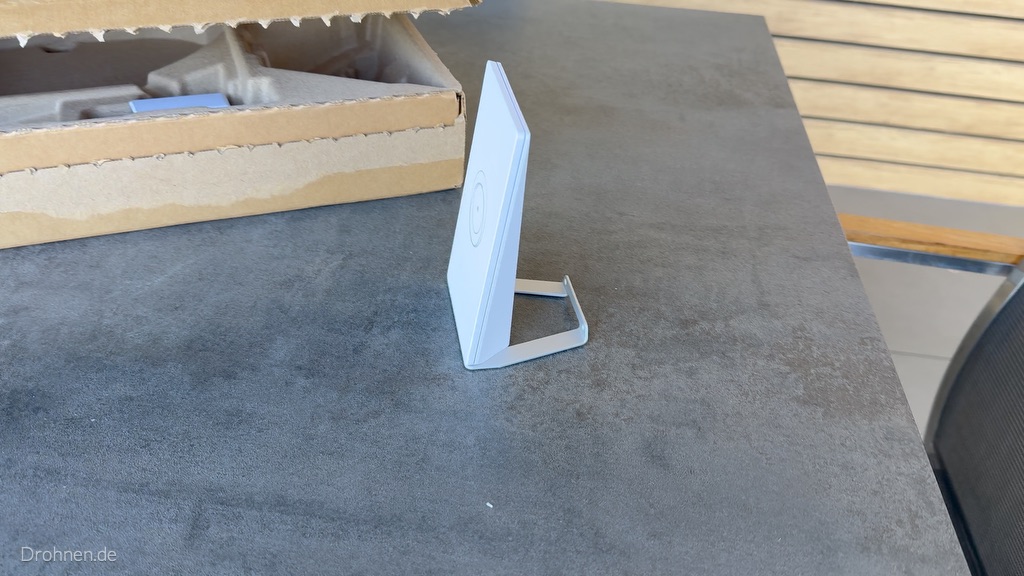
The Router Mini is set upright with a separate stand. The foot is placed from below, after which the router is stable on the table. The router power supply comes into the round power socket next to the Ethernet connections. The image guide in the carton clearly shows the intended principle: terminal outside with clear view of the sky, router inside where the WLAN is needed.
This has convinced
Complete kit without tool requirements, clearly sorted form inserts, clear image instructions and an app setup in about 17 minutes up to the first statistics.
This is what you should plan for.
Two power supplies for terminal and router, a cable path from the outside location to the inside and a socket at the router square. The app showed in the test in the start-up phase about 18 W power consumption on average.
If you plan the kit for a garden or arbor, you will find the appropriate power supply and tariff logic in the guide Starlink in the allotment garden and Schrebergarten.
Scope of delivery according to the model page
- Starlink with integrated WLAN
- Stand
- Mini-raw adapter and flat holder
- Mini router
- Mini router power supply
- Mini-router stands
- Power supply unit
- DC power cable 15 m
- Starlink plug
All technical data, components and dimensional drawing
Terminal · Data Sheet Page 3
| Specification | Manufacturer’s information |
|---|---|
| Dimensions | 298,5 × 259 × 38,5 mm |
| Antenna | Electronic phased array antenna |
| Field of view | 110° |
| Alignment | Software-assisted manual alignment |
| Weight | 1,10 kg; 1,16 kg with stand; 1,53 kg with stand and 15 m cable |
| Ingress protection | IP67 Type 4 with mounted power cable and Starlink plug/cable |
| Operating temperature | −30 to +50 °C |
| Wind | Operational: >96 km/h |
| Snow melting | Up to 25 mm/h |
| Average consumption | 25–40 W for the mini-terminal according to the data sheet; additional consumption of the separate router not quantified |
| Entry | 12–48 V, 60 W |
| USB PD | 100 W; at least 20 V/5 A with appropriate Starlink accessories |
Integrated WLAN · Datasheet page 4
| Specification | Manufacturer’s information |
|---|---|
| Wi-Fi | Wi-Fi 5; 802.11a/b/g/n/ac |
| Radio | Dual band 3 × 3 MU-MIMO |
| Ethernet | A locking LAN port with Starlink plug |
| Coverage | Up to 112 m² |
| Security | WPA2 |
| Connected equipment | Up to 128 |
| Mesh | Starlink mesh systems, not a third-party mesh |
Additional mini-router · Datasheet page 6
| Specification | Manufacturer’s information |
|---|---|
| Wi-Fi | Wi-Fi 6 |
| Radio | Dual band 2 × 2 MU-MIMO |
| Ethernet | A locking Ethernet LAN port according to table; drawing shows two jacks |
| Coverage | Up to 120 m² according to the Mini X datasheet; different from V5/Standard 4 datasheet |
| Dimensions | 138 × 83,6 × 27 mm; stand dimension 71,6 mm |
| Weight | 0,12 kg |
| Operating temperature | −30 to +50 °C |
| Security | WPA2 |
| Ingress protection | IPX0 indoors only |
| Connected equipment | Up to 235 |
| Mesh | All Starlink routers except GEN1; no third-party mesh |
Mini Power Supply · Data Sheet page 5
| Specification | Manufacturer’s information |
|---|---|
| Dimensions | 91 × 44 × 51 mm |
| Weight | 0,2 kg |
| Ingress protection | IP66 Type 4 |
| Operating temperature | −30 to +50 °C |
| Entry | 100–240 V AC, 1,6 A, 50–60 Hz |
Mini-Router Power Supply · Data Sheet page 7
| Specification | Manufacturer’s information |
|---|---|
| Dimensions | 62 × 43 × 28 mm as shown in the table; in addition, the drawing shows a deviation of 68 mm |
| Weight | 0,03 kg |
| Ingress protection | IPX0 indoors only |
| Operating temperature | −30 to +50 °C |
| Entry | 100–240 V, 1,6 A, 50–60 Hz according to data sheet |
Packaging · Data sheet page 2
| Specification | Manufacturer’s information |
|---|---|
| Weight | 6,73 kg according to data sheet; conspicuous indication not to be used as terminal weight |
| Dimensions | 430 × 334 × 79 mm |

Starlink Standard 4
Standard terminal with mini-router
Large standard terminal with 110° field of view; the compact mini-router is in the kit.


Standard 4 combines the 594 × 383 × 39.7 mm terminal with the mini router. The antenna weighs 2.9 kg without stand and cable, 3.2 kg with stand and 3.8 kg with stand and 15 m cable. It is aligned manually with the support of the app. An engine that rotates the bowl mechanically does not belong to this generation.
Compared to standard 4 X, the central terminal dimensions, the field of view of 110° and the manufacturer’s consumption range of 75 to 100 watts are the same. The most important difference is in the kit: Standard 4 contains the mini router, Standard 4 X the router 3. The power supply unit data are also different. If you only look at the rectangular antenna, you can therefore assign the wrong WLAN and accessories data.
The mini-router in the standard 4 datasheet offers Wi-Fi 6 with dual-band and 2 × 2 MU-MIMO. It mentions two 1-Gbit/s RJ45 ports, up to 204 m² of coverage and up to 235 devices. For a permanent installation, this is a clear starting point; the real WLAN coverage must still be planned on the building.
Our classification: A suitable standard option if the offered kit and the mini-router cover your structure.
Important for this kit: The mini-router table calls −30 to +40 °C, but next to it −22 to +122 °F, which corresponds to +50 °C. The contradiction is not replaced by an invented uniform value.
Scope of delivery according to the model page
- Starlink
- Stand
- Power supply unit
- Mini router
- Mini-router stands
- Starlink cable 15 m
- Starlink Ethernet cable 2 m
- Electrical cable 1.5 m
All technical data, components and dimensional drawing
Terminal · Data Sheet Page 3
| Specification | Manufacturer’s information |
|---|---|
| Dimensions | 594 × 383 × 39,7 mm |
| Antenna | Electronic phased array antenna |
| Field of view | 110° |
| Alignment | Software-assisted manual alignment |
| Weight | 2,9 kg; 3.2 kg with stand; 3,8 kg with stand and 15 m cable |
| Ingress protection | IP67 Type 4 |
| Operating temperature | −30 to +50 °C |
| Wind | Operational capability: 96 km/h+ |
| Snow melting | Up to 40 mm/h |
| Average consumption | 75–100 W |
Mini router · Data sheet page 5
| Specification | Manufacturer’s information |
|---|---|
| Wi-Fi | Wi-Fi 6; IEEE 802.11a/b/g/n/ac/ax |
| Radio | Dual band 2 × 2 MU-MIMO |
| Ethernet | Two 1-Gbit/s RJ45 ports |
| Coverage | Up to 204 m² |
| Dimensions | 83,6 × 138 × 27 mm |
| Weight | 112 g |
| Operating temperature | Contradiction in the original: −30 to +40 °C, next to −22 to +122 °F (= +50 °C) |
| Security | WPA2 |
| Ingress protection | Interior |
| Connected equipment | Up to 235 |
| Mesh | Starlink GEN2, GEN3 and mini-router; no third-party mesh |
Power supply · Data sheet page 6
| Specification | Manufacturer’s information |
|---|---|
| Dimensions | 194 × 98 × 35,75 mm |
| Weight | 0,65 kg |
| Ingress protection | IP66 Type 4 |
| Operating temperature | −30 to +50 °C |
| Entry | 100–240 V AC, 2,5 A, 50–60 Hz |
Packaging · Data sheet page 2
| Specification | Manufacturer’s information |
|---|---|
| Weight | 6,45 kg |
| Dimensions | 652,4 × 451,7 × 97,9 mm |
Stand · Data sheet, page 4
| Specification | Manufacturer’s information |
|---|---|
| Dimensions | 184 × 142 × 27,4 mm |

Starlink Standard 4 X
Standard terminal with router 3
Standard terminal with router 3; interesting if the WLAN package is the deciding factor.
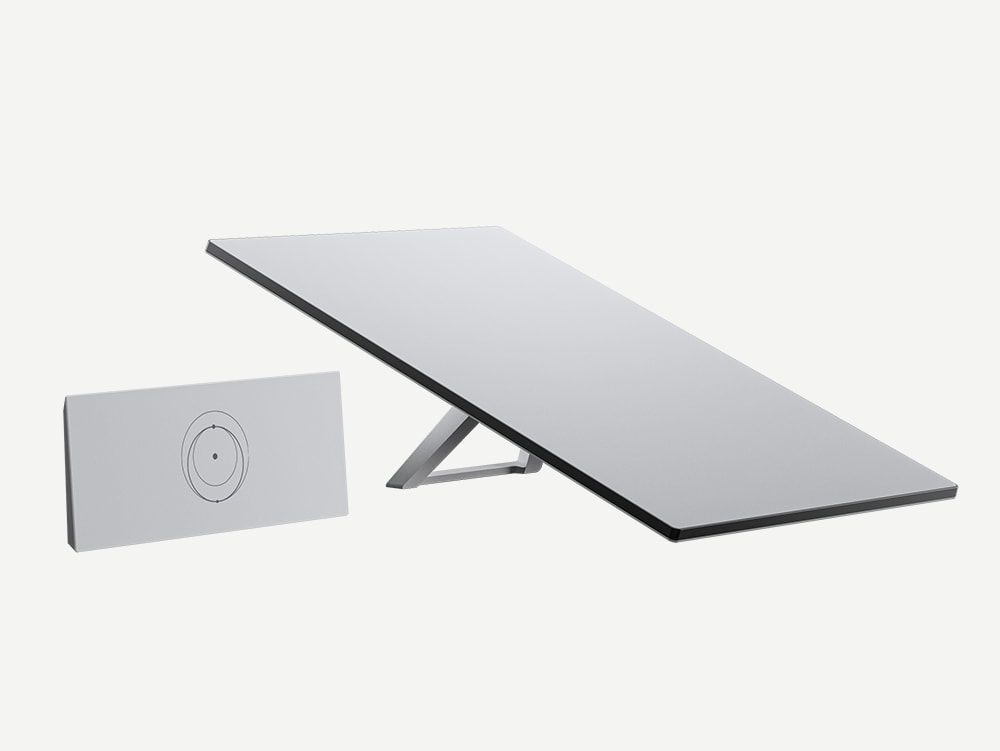

Standard 4 X uses the same central terminal format as Standard 4, but comes with Router 3. This works with Wi-Fi 6, tri-band and 4×4 MU-MIMO. Starlink lists up to 297 m² of Wi-Fi coverage, up to 235 connected devices and two interlocking Ethernet LAN ports. This makes the router the decisive distinguishing feature of the kit.
The larger manufacturer coverage indication does not mean that every home is fully supplied without an additional access point. Massive walls, reinforced concrete ceilings and an unfavorable router position can greatly limit the advantage. A central location and, if necessary, a wired extension usually make more sense than hiding the router at the outermost edge of the house during cable bushing.
With an average of 75 to 100 watts, the standard 4 family is significantly more energy-hungry than V5 in continuous operation. This is not an automatic exclusion criterion: if the specific package and router fit your home, the higher consumption can be an acceptable part of the total cost. Calculate it with your own electricity price beforehand.
Our classification:Compare with V5, if you pay special attention to the included WLAN package.
Important for this kit: In the data sheet, Router 3 is explicitly described for indoor use despite IP56. The web kit list contains the unusual line “Power supply 1.5 m”; the actual power supply dimensions are separately in the PDF.
Scope of delivery according to the model page
- Starlink
- Stand
- Router 3
- Starlink cable 15 m
- Electrical cable 1.5 m
- Netting 1,5 m
All technical data, components and dimensional drawing
Terminal · Data Sheet Page 3
| Specification | Manufacturer’s information |
|---|---|
| Dimensions | 594 × 383 × 39,7 mm |
| Antenna | Electronic phased array antenna |
| Field of view | 110° |
| Alignment | Software-assisted manual alignment |
| Weight | 2,9 kg; 3.2 kg with stand; 3,8 kg with stand and 15 m cable |
| Ingress protection | IP67 Type 4 |
| Operating temperature | −30 to +50 °C |
| Wind | Operational capability: 96 km/h+ |
| Snow melting | Up to 40 mm/h |
| Average consumption | 75–100 W |
Router 3 · Data sheet page 5
| Specification | Manufacturer’s information |
|---|---|
| Wi-Fi | Wi-Fi 6; 802.11a/b/g/n/ac/ax |
| Radio | Tri-band 4 × 4 MU-MIMO |
| Ethernet | Two interlocking Ethernet LAN ports with removable cover |
| Coverage | Up to 297 m² |
| Dimensions | 43,4 × 298,6 × 120,4 mm according to the table; drawing indicates 120,8 mm |
| Weight | 0,57 kg |
| Operating temperature | −30 to +50 °C |
| Security | WPA2 |
| Ingress protection | IP56 intended for indoor use |
| Connected equipment | Up to 235 |
| Mesh | GEN2 Starlink and GEN3 mesh access points; up to 3 Starlink access points according to sheet; no third-party mesh |
Power supply · Data sheet page 6
| Specification | Manufacturer’s information |
|---|---|
| Dimensions | 173 × 93 × 35,75 mm |
| Weight | 0,65 kg |
| Ingress protection | IP66 Type 4 |
| Operating temperature | −30 to +60 °C |
| Entry | 100–240 V AC, 2,5 A, 50–60 Hz |
Packaging · Data sheet page 2
| Specification | Manufacturer’s information |
|---|---|
| Weight | 6,73 kg |
| Dimensions | 652,4 × 451,7 × 97,9 mm |
Stand · Data sheet, page 4
| Specification | Manufacturer’s information |
|---|---|
| Dimensions | 184 × 142 × 27,4 mm |

Starlink Standard Actuated
Older generation for stock comparison
Motor-oriented older standard kit; important for used purchase, spare parts and existing equipment.

The standard with engine is its own generation. The antenna area measures 513 × 303 mm; the apparatus stands on a mast and is oriented by motor. The 34 mm shown in the drawing refers to the mast diameter and must not slide into a comparison table as the antenna body thickness. Depending on the position, the data sheet shows different overall heights.
Starlink calls for the terminal 100° field of view, IP54 and an average of 50 to 75 watts. This includes a GEN2 router with Wi-Fi 5, dual-band and 3×3 MU-MIMO. With a coverage of up to 185 m², its data sheet cannot be equated with the router 3 or the mini router. Cables and adapters must fit this generation.
For owners of a working kit, it is first crucial whether a problem actually has to be solved: high consumption, defective parts, impractical assembly or limited Wi-Fi. In the case of a used offer, complete delivery, proper release or transmission and the condition of the cables are added. A purchase from an account transfer is not eligible for the free month under the terms of recommendation.
Our classification: Classify as existing and used equipment; do not make a new purchase solely at the low offer price.
Important with this kit: Motorized Starlinks are not recommended for use in motion according to the current Help Center. The technical web page does not list separate kit content for this model; original documents and the specific offer are decisive.
Scope of delivery according to the model page
The model page does not mention a separate kit list. Check the furnishing manual and when buying especially terminal, router, matching cables, power supply and the included holder.
All technical data, components and dimensional drawing
Terminal · Data Sheet Page 1
| Specification | Manufacturer’s information |
|---|---|
| Dimensions | Antenna area 513 × 303 mm; heights 380 and 544 mm respectively; mast diameter 34 mm |
| Antenna | Electronic phased array antenna |
| Field of view | 100° |
| Alignment | Motorised self-alignment |
| Weight | 2.9 kg without cable; 3.6 kg with 15.2-m cable |
| Ingress protection | IP54 |
| Operating temperature | −30 to +50 °C |
| Wind | Operational: 80 km/h+ |
| Snow melting | Up to 40 mm/h |
| Average consumption | 50–75 W |
Router · Data Sheet Page 2
| Specification | Manufacturer’s information |
|---|---|
| Wi-Fi | Wi-Fi 5; 802.11ac |
| Radio | Dual band 3 × 3 MIMO |
| Coverage | Up to 185 m², depending on placement, disturbances and building materials |
| Dimensions | 254 × 180 × 65 mm |
| Weight | 1 kg |
| Operating temperature | −30 to +50 °C |
| Security | WPA2 |
| Ingress protection | IP54, intended for indoor use |
| Connected equipment | Up to 128 |
| Mesh | Up to 12 Starlink nodes according to archived sheet |
Base · Data Sheet Page 3
| Specification | Manufacturer’s information |
|---|---|
| Dimensions | 563 × 328 × 122 mm |
Cable and Kit · Data Sheet Page 1
| Specification | Manufacturer’s information |
|---|---|
| Delivery scope | Dish, base, router, Starlink cable 15.2 m, AC cable 1.8 m |
| Cable details | Page 4: CAT5e, 24 AWG and pin assignment |

Starlink Enterprise
Fast company location with its own network technology
Kit for installation flexibility with 50 m cable, separate power supply and connection of own network devices.


The enterprise kit is aimed at location-based business applications. Its practical difference is the structure: a 50-meter-long enterprise cable facilitates the connection between a favorable antenna location and building technology. Added to this are power supply, power supply holder, a 5-m Ethernet cable and fastening material. A Starlink Wi-Fi router is not included in the listed kit list.
The terminal is described with 594 × 383 × 39.7 mm, 110° field of view, IP67 and an average consumption of 75 to 100 watts. An own terminal weight is not specified in the archived Enterprise data sheet. Even if the dimensions fit the standard 4 family, we do not take their 2.9 kg as a supposedly proven enterprise value.
For companies with their own firewall, own access points or several building areas, direct network integration can be the deciding factor. However, the hardware does not replace a check of the required IP functions or the appropriate service tariff. Prioritization, guaranteed services and the role as a backup line must fit separately to the operation.
Our classification: The first comparison option for a permanent company installation with existing network technology.
Important with this kit: No free service month is promised for business/priority tariffs here: The currently tested recommendation conditions only name certain private household and travel tariffs.
Scope of delivery according to the model page
- Starlink
- Power supply unit
- Power supply mount
- Enterprise cable 50 m
- Electrical cable (power supply) 1,8 m
- Ethernet cable 5 m
- Screws 4x
- Dowels 4x
All technical data, components and dimensional drawing
Terminal · Data Sheet Page 3
| Specification | Manufacturer’s information |
|---|---|
| Dimensions | 594 × 383 × 39,7 mm |
| Antenna | Electronic phased array antenna |
| Field of view | 110° |
| Alignment | Software-assisted manual alignment |
| Weight | Not numbered in the archived terminal data section |
| Ingress protection | IP67 Type 4 |
| Operating temperature | −30 to +50 °C |
| Wind | Operational capability: 96 km/h+ |
| Snow melting | Up to 40 mm/h |
| Average consumption | 75–100 W |
Power supply · Data sheet page 4
| Specification | Manufacturer’s information |
|---|---|
| Dimensions | 288 × 133 × 46 mm |
| Weight | 1,5 kg |
| Ingress protection | IP66 |
| Operating temperature | −30 to +50 °C |
| Entry | 100–240 V, 6,3 A, 50–60 Hz |
| Grounding | Separate grounding terminal |
| Assembly | Provided bracket |
| Subsidiaries | Network, Enterprise, Power According to Drawing |
Power supply bracket · Data sheet page 5
| Specification | Manufacturer’s information |
|---|---|
| Dimensions | 298 × 145 × 50 mm |
Packaging · Data sheet page 2
| Specification | Manufacturer’s information |
|---|---|
| Weight | 12,2 kg |
| Dimensions | 478,1 × 685,9 × 160,1 mm |
Router and Cable · Data Sheet Page 2
| Specification | Manufacturer’s information |
|---|---|
| Routers | No Wi-Fi router in the listed kit; Starlink router according to website separately, third-party router possible |
| Cables | Enterprise cable 50 m, Ethernet 5 m, AC 1.8 m |

Starlink Performance (GEN3)
Robust installation and flexible power supply
Robust performance terminal with 140° field of view and advanced power supply for AC and DC input.
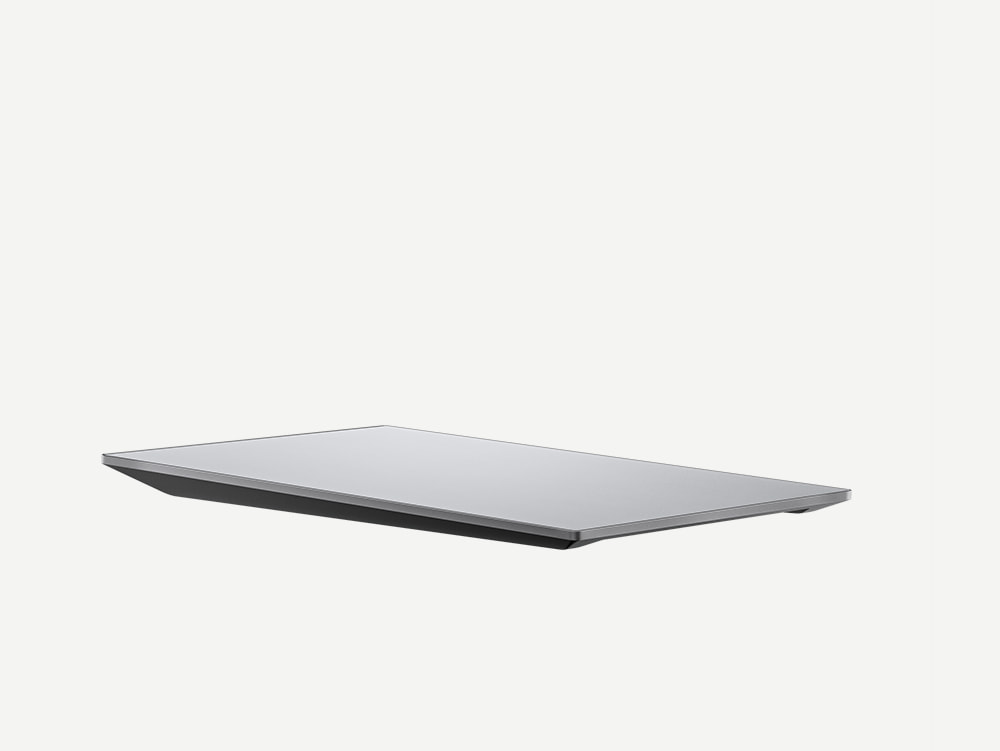
Performance GEN3 is designed for challenging environmental conditions, high vibrations and suitable use in motion. The terminal measures 609 × 396 × 40 mm and, according to the data sheet, weighs 5.2 kg. With a 140° field of view, a temperature range of −40 to +60 °C and up to 85 mm of snowmelt per hour, it is clearly positioned differently than the standard kits.
A central component is the extended power supply: The Advanced Power Supply supports 100 to 240 volt AC and 12 to 56 volt DC. The website also describes diagnostic functions, a LAN connection and a DC backup battery for uninterrupted operation. This is an architectural advantage for demanding installations; it is not a statement that such a battery is included in the scope of delivery.
The protection classes must be read with their conditions: IP69K is called with connected cables, IP68 without connected cables. Starlink calls for the kit an average of 75 to 100 watts. In the wind and speed specifications, the website and the data sheet differ from one another. Therefore, the documented hardware equipment serves as a basis for decision-making, not an acute peak number.
Our classification:Check when temperature, environmental influences, vibrations or a demanding power supply determine the use.
Important with this kit: The Gigabit development announced for 2026 does not occupy a Gigabit tariff available at every address today. The data for 270/280 km/h are also not congruent between the manufacturer sources.
Scope of delivery according to the model page
- Starlink
- Extended power supply
- Performance cable 25 m
- AC power cable 1.5 m
- Power cable DC 1.5 m
- Ethernet cable 5 m
All technical data, components and dimensional drawing
Terminal · Data Sheet Page 4
| Specification | Manufacturer’s information |
|---|---|
| Dimensions | 609 × 396 × 40 mm |
| Antenna | Phased array antenna |
| Field of view | 140° |
| Alignment | Software-assisted manual alignment |
| Weight | 5,2 kg |
| Ingress protection | IP69K with mounted cables; IP68 without cable |
| Operating temperature | −40 to +60 °C |
| Wind | Table Page 4: over 280 km/h; Highlights Page 2: up to 270 km/h; Website: 270+ km/h. Keep the contradiction open. |
| Snow melting | Up to 85 mm/h |
| Average consumption | 75–100 W |
| Routers | Compatible with Router 3, Mini Router and third party routers; not in the listed kit |
Extended power supply · Data sheet page 5
| Specification | Manufacturer’s information |
|---|---|
| Dimensions | 310 × 180 × 40 mm |
| Weight | 2,1 kg |
| Ingress protection | IP68 with mounted/plugged cables |
| Operating temperature | −40 to +60 °C |
| Entry | 100–240 V AC; 12–56 V DC |
Packaging and cable · Data sheet page 3
| Specification | Manufacturer’s information |
|---|---|
| Weight | 11,8 kg |
| Dimensions | 686 × 454 × 121 mm |
| Cables | Performance 25 m; AC 1.5 m; DC 1.5 m; Ethernet 5 m |
Manufacturer Highlights · Data Sheet Page 2
| Specification | Manufacturer’s information |
|---|---|
| Speed | PDF: up to 400 Mbit/s; Website: over 400 Mbit/s. No self-measured speed. |
| View | Gigabit Network Improvements and Tariff Upgrades Announced for 2026; No Live Availability Derived From It |
| Durability | Designed for 10 years mission lifetime; not an equivalent guarantee promise |
| Water | 1 m immersion up to 30 minutes and high pressure cleaning according to the manufacturer; conditions in the durability guide |
| Power supply functions | Rack assembly, AC/DC, backup battery support, diagnostics, PoE and LAN according to manufacturer |
Starlink Performance (GEN2)
Previous Flat High Performance
Shallow performance kit for permanent assembly; higher consumption range than GEN3.


Performance GEN2 was formerly known as Flat High Performance. The terminal is designed for permanent assembly and is offered with a wedge holder set. The antenna measures 575 × 511 × 41 mm and weighs 5.9 kg without cable. Together with the 25-m cable, the data sheet mentions 8.1 kg. A Wi-Fi router does not belong to the listed kit list.
With a field of view of 140° and up to 75 mm of snowmelt per hour, the kit remains relevant for robust or mobile installations. The protection rating is IP56, the temperature range −30 to +50 °C. The English data sheet describes the wind value as “survivable”: This is not the same as an explicit commitment that trouble-free operation is guaranteed at this wind strength.
The clearest ongoing difference from GEN3 is the manufacturer’s stated power range of 110 to 150 W. GEN2 can still make sense for an existing installation. For a new project, compare purchase cost, mount, cable route, power supply and expected operating hours together. The generation number alone does not establish an economic need to replace a working kit.
Our classification: Especially relevant for existing flat-high-performance systems and a comprehensible comparison with GEN3.
Important for this kit: Some original CAD bundles contain additional router or power supply files. Such files are not proof that the illustrated parts belong to the kit.
Scope of delivery according to the model page
- Starlink
- Wedge holder set
- Power supply unit
- Power supply mount
- Starlink cable 25 m
- Ethernet cable 5 m
- Electrical cable (power supply) 1,8 m
All technical data, components and dimensional drawing
Terminal · Data Sheet Page 3
| Specification | Manufacturer’s information |
|---|---|
| Dimensions | 575 × 511 × 41 mm |
| Antenna | Electronic phased array antenna |
| Field of view | 140° |
| Alignment | Fixed; drawing indicates 8° mounting angle for rainfall |
| Weight | 5,9 kg without cable; 8,1 kg with 25 m cable |
| Ingress protection | IP56 |
| Operating temperature | −30 to +50 °C |
| Wind | Survivable: 280 km/h+; survival resistance, not express operational capability |
| Snow melting | Up to 75 mm/h |
| Average consumption | 110–150 W |
| LAN | RJ45 cable |
Power supply · Data sheet page 4
| Specification | Manufacturer’s information |
|---|---|
| Dimensions | 288 × 133 × 46 mm |
| Weight | 1,5 kg |
| Ingress protection | IP66 |
| Operating temperature | −30 to +50 °C |
| Entry | 100–240 V, 6,3 A, 50–60 Hz |
| Grounding | Separate grounding terminal |
| Assembly | Provided bracket |
Packaging and cable · Data sheet page 2
| Specification | Manufacturer’s information |
|---|---|
| Weight | 16,25 kg |
| Dimensions | 679 × 613 × 191 mm |
| Cables | Starlink 25 m; Ethernet 5 m; AC 1.8 m |
| Kit | Wedge mount and power supply mount included; no router in the kit list |
Brackets · Datasheet page 5
| Specification | Manufacturer’s information |
|---|---|
| Note: | Dimensional drawings for power supply mount and wedge mount on page 5; former product name Flat High Performance Kit according to website |

Which kit for which use? Concrete purchasing decisions
The following selection is an editorial orientation based on the hardware data. It assumes that Starlink actually offers the respective kit and a suitable tariff for your location. The decisive factor is not to collect as many technical maximum values as possible, but to solve the bottleneck of your own construction.
| Your needs | First compare | Why this choice? | Clarify before buying |
|---|---|---|---|
| Compact connection at home | V5 / Standard 4 X | V5 with 35–50 W and small terminal; standard 4 X with router 3. | Clear visibility, router location, cable length and actual kit offer. |
| Motorhome and limited energy | Mini / Mini X | Mini with integrated Wi-Fi; Mini X with additional router for a separate placement. | DC/USB-PD supply, holder and release when used while driving. |
| House with existing network technology | Standard 4 / Standard 4 X / Enterprise | Router package and connection are more important than a pure size comparison. Enterprise delivers a 50m cable. | Required Ethernet paths, own routers and access points as well as their power requirements. |
| Fixed company location with a long cable path | Enterprise / Performance GEN3 | Enterprise facilitates fixed installations; GEN3 extends protection and power supply options. | Business tariff, power supply, downtime switching and network integration. |
| Rough environment, vibrations, demanding assembly | Performance GEN3 / Performance GEN2 | Larger field of vision; GEN3 with a different protection concept and a lower consumption range than GEN2. | Exact assembly and operating conditions, suitable tariff and original accessories. |
| Operational older installation | Standard with motor / V5 | First check which specific problem would be solved by an exchange. | Residual value, accessory costs, compatibility and economic accounts. |
The Most Important Buying Rule
A better fitting kit is more valuable than a higher model number. For little luggage and small energy reserves, Mini can make more sense than performance. For a house, the separate router can be more crucial than the pure terminal comparison. And for a company, a long original cable or the flexible power supply can be the decisive factor.
Mini Router, Router 3 and Integrated Wi-Fi: What’s the Difference?
Satellite reception and WLAN are two separate routes. The antenna connects your location to the Starlink network. The router then distributes the access in the house, in the vehicle or at the location of use. If only the WLAN is weak, another satellite terminal may not solve the actual problem at all.
Integrated mini-WLAN
Wi-Fi 5 directly in the terminal, up to 112 m² according to data sheet. Practically with little luggage; antenna location and WLAN location are initially connected.
Mini router
Separate device with Wi-Fi 6 and dualband. Included in V5, Standard 4 and additionally in Mini X. The published kit datasheets differ in terms of coverage and follow-up counting.
Router 3
Wi-Fi 6, tri-band and 4 × 4 MU-MIMO. Part of the standard 4 X; up to 297 m² manufacturer coverage. This figure does not replace WLAN planning in the building.
Own network technology
Enterprise and both performance kits do not include a Wi-Fi router, according to the kit list. Own firewalls, access points and their power supply are therefore part of the planning.
More connected devices do not automatically mean more usable throughput per device. The mentioned client numbers are upper limits of the manufacturer. For several floors, a long floor plan or a guest Wi-Fi, location, Ethernet connection and the appropriate network structure are more important than a single square meter.
| WLAN solution | Radio technology | Manufacturer coverage | Devices/connections | Context |
|---|---|---|---|---|
| Mini, integrated | Wi-Fi 5 · Dualband · 3 × 3 MU-MIMO | Up to 112 m² | Up to 128 devices; a locking LAN port | WLAN first stands where the antenna stands. |
| Mini router at V5 | Wi-Fi 6 · Dualband · 2 × 2 MU-MIMO | Up to 204 m² | Up to 235 devices; two 1Gbit/s RJ45 ports | Separate indoor router; IPX0. |
| Mini router at Standard 4 | Wi-Fi 6 · Dualband · 2 × 2 MU-MIMO | Up to 204 m² | Up to 235 devices; two 1Gbit/s RJ45 ports | The kit data sheet contains a temperature resistance. |
| Additional router for Mini X | Wi-Fi 6 · Dualband · 2 × 2 MU-MIMO | Up to 120 m² according to this PDF | Up to 235 devices; LAN counting differs between table and drawing | No tacit acceptance of the 204-m² specification from other kits. |
| Router 3 at Standard 4 X | Wi-Fi 6 · Tri-band · 4 × 4 MU-MIMO | Up to 297 m² | Up to 235 devices; two locking LAN ports | Despite IP56 intended for the interior. |
| GEN2 router at standard with motor | Wi-Fi 5 · Dual band · 3 × 3 MIMO | Up to 185 m² | Up to 128 devices | Independent older router generation; test required connections and adapters. |
Mesh, Ethernet and range: three different questions
A high square foot indication in the datasheet doesn’t tell you how the signal comes through your walls. For several floors, a long building or a remote study, a planned distribution is crucial. First, the Internet access must arrive reliably on the router; then it is checked where additional WLAN coverage is needed. The note “up to 235 devices” describes a manufacturer’s limit, not 235 simultaneously trouble-free video conferencing.
The datasheets also distinguish between Starlink mesh compatibility and the connection of other network technologies. “No third-party mesh” means that a third-party mesh node cannot simply be treated as a Starlink mesh access point. It does not follow from this that an expressly provided Ethernet connection could not supply any other network technology. Decisive are the specific connection type, the operating mode of the router and the instructions of the selected kit.
For a permanent installation, the cabling should fit the location. The V5 datasheet recommends a wired connection for the mini router and calls shielded Cat5e or higher for other Starlink routers. For the connection to the mini, reference is made to matching mini accessories. A plug that fits mechanically into a socket does not yet guarantee an unchanged weather protection class.
Particularly important for the Mini
The mini datasheet indicates that a standard RJ45 cable does not have the IP67 rating. For external use, the connection, seal and cable must therefore be considered together. An additional mini-router also belongs indoors; the protection of the terminal cannot be transferred to the router.
No mixed router data
For Mini X, the PDF calls 120 m², for V5 and standard 4, 204 m². The Mini-X drawing and LAN table count connections differently. For binding planning, check the specific hardware and the current kit data sheet.
Rain, frost, snow and heat: hardware for outdoor operation
With Starlink, often only the antenna and part of the cables are outdoors. Router and power supply may have other conditions. To mention a single type of protection for the complete kit would therefore be misleading. The table describes only the terminals; the values of power supplies and routers are in the complete technical data for each model.
| Terminal terminal | Operating temperature | Ingress protection | Snow melting |
|---|---|---|---|
| Starlink V5 | −30 to +50 °C | IP67 Type 4 | Up to 40 mm/h |
| Starlink Mini | −30 to +50 °C | IP67 Type 4 with mounted power cable and Starlink plug/cable | Up to 25 mm/h |
| Starlink Mini X | −30 to +50 °C | IP67 Type 4 with mounted power cable and Starlink plug/cable | Up to 25 mm/h |
| Starlink Standard 4 | −30 to +50 °C | IP67 Type 4 | Up to 40 mm/h |
| Starlink Standard 4 X | −30 to +50 °C | IP67 Type 4 | Up to 40 mm/h |
| Starlink Standard Actuated | −30 to +50 °C | IP54 | Up to 40 mm/h |
| Starlink Enterprise | −30 to +50 °C | IP67 Type 4 | Up to 40 mm/h |
| Starlink Performance (GEN3) | −40 to +60 °C | IP69K with mounted cables; IP68 without cable | Up to 85 mm/h |
| Starlink Performance (GEN2) | −30 to +50 °C | IP56 | Up to 75 mm/h |
Snowmelt is not a consumption guarantee
Mini calls up to 25 mm/h, V5 and the standard family up to 40 mm/h, Performance GEN2 up to 75 mm/h and GEN3 up to 85 mm/h. These are manufacturer data on the performance under the manufacturer’s conditions. They must not be interpreted as a measured guarantee for any type of snow, ice, wind or assembly. At the same time, the heating function explains why average consumption and current power consumption can be different.
Location remains important: a snowy tree or hidden line of sight is not cleared by the fact that the antenna surface is heated. Plan how to reach the facility safely if necessary, without having to do improvised work on the roof. For cleaning and maintenance, the respective installation and manufacturer instructions apply.
Do not confuse wind resistance and driving speed
The documents use different terms: The mini and the standard terminals are referred to as operational capability; the GEN2 performance sheet calls “survivable”. In the case of GEN3, the 270-/280-km/h data differ between the overview page and the table. From these figures, a uniform ranking list of safe vehicle speeds cannot be derived.
A mobile installation requires a suitable attachment and a clearance for hardware, tariff and location. The wind value of a mounted terminal is not a promise of a loose table stand on the vehicle. Conversely, a power supply suitable for outdoor use does not replace the correct execution of cable bushings, plug connections and strain relief.
Assembly, cable and power supply: What you should plan before buying
A kit can be technically suitable and still fail at the wrong assembly location. Therefore, plan the clear sky view first, then the route to the router and the power supply. The Starlink app supports location check and orientation. The terminal needs a suitable outdoor location; a photo on a workspace illustrates the product comparison and is not an installation manual.
1Check view
Assess trees, roof edges and buildings at the intended antenna location with the obstacle test in the app. Only then select the mount.
2Measure cable path
Measuring path including arches and building introduction. Standard kits usually call 15 m, Enterprise 50 m and Performance kits 25 m. Cables are not interchangeable across generations.
3Place router meaningful
Bring WLAN as centrally as possible to the users. In the mini, an additional router can be useful if the antenna is good outside, but the signal inside is weak.
4Coordination of power and accessories
Select power supply, cable, plug and holder to match the exact kit. For mobile sources, test voltage, output power and usable capacity separately.
Mini at 12 Volt, USB-C or Powerstation
“12 Volts” alone is not a complete compatibility statement. The mini input is specified as 12–48 V and 60 W. For the official USB-C accessory, the datasheet requires a 100W USB-PD source with at least 20 V/5 A. The right cable, its length and a stable supply are part of this. A connection with high nominal capacity but inappropriate voltage profile is not a suitable solution.
As a clear energy example, 25–40 W over eight hours result in 200–320 Wh. A mobile power supply must additionally cover conversion losses and other consumers. For Mini X, the separate router is added. The invoice is a planning range based on the mini data sheet, not a measured daily consumption.
Starlink while driving: hardware, tariffs and country rules
“Mobile” can mean two different things: use the kit in changing locations while stationary or operate an active connection while driving. For the second variant, Starlink specifies additional requirements. According to the support text reviewed on September 17, 2026, Roam, Local Priority and Global Priority support the use in movement up to 100 mph and 160 km/h at authorized locations. This tariff limit is not an assembly release for any hardware.
| Tariff group | Moving use according to support | Important borderline |
|---|---|---|
| Roam 50GB, 100GB, 300GB and Unlimited | Supports; Support also identifies inland waterways and territorial waters up to 12 nautical miles. | Observe regional prohibitions on land; tariff designation in support does not guarantee current orderability. |
| Local Priority | Continental land coverage including lakes and rivers; up to 60 days within the region outside the homeland. | No global/ocean coverage; coastal and territorial waters are not allowed under Support. |
| Global Priority | Global land and ocean coverage where Starlink is available and the deployment is authorized. | Up to two terminals per port on the same vehicle or ship according to Support. |
| Residential/private household | Not allowed. | A suitable antenna does not change the tariff rule. |
| Basic connection for paused service | Not intended for use in motion. | Pause or basic connection is not a mobile deployment release. |
Spain and other countries: mobile kit does not mean free use while driving
The provided support stand prohibits the use in motion on land and allows maritime use under the respective conditions in the following regions: Colombia, Costa Rica, Kuwait, Japan, Jordan, Malaysia, Vietnam, Mexico, Spain, South Korea, Indonesia and United Arab Emirates. This list concerns moving use. It must not be read as a blanket ban on any stationary use of Starlink in the respective country.
As supported hardware, Starlink lists Mini, Standard 4, Standard 4 X, Performance GEN2 and Performance GEN3. V5 and Mini X are not separately mentioned in this list. With the Mini X, a release cannot be derived solely from the similar mini-terminal; the concrete kit and the structure must be clarified. Motorized terminals such as standard with motor and performance GEN1 explicitly do not recommend Starlink for this use.
For vehicle and boat owners, data area and billing are added. Support describes an ocean mode that remains on after activation until it is manually deactivated, with billing per GB. Exceeding data limits without additional data can limit the connection on the ocean. These rules belong in the planning before departure, not only at the first connection problem.
Special case Aviation: Why a faster vehicle does not extend a normal roam tariff
Starlink has been offering separate general aviation services in selected markets since March 2026: Local with 50 GB per month for applications up to 300 mph (482 km/h) and Global with 50 GB to 450 mph (724 km/h). The support calls identity verification and possible additional data billing. Local covers land/coastal area described there, globally expanding this by ocean coverage.
This product category is not a blanket statement that any terminal shown in this article would be approved for aviation or suitable in any installation. An Aviation tariff, approved hardware and a suitable installation must be checked separately. For motorhome and camping use, the normal roam/priority and country audit remains relevant.
Source and ongoing update: Starlink Help for Moving and Authorized Locations
Power consumption: What does the hardware cost during operation?
The demand for electricity does not make a favorable monthly tariff a favorable overall solution. For the following comparison we expect 24 hours daily, 365 days and assumed 0.35 €/kWh. This is a transparent example. You can change your operating time and your electricity rate in the Electricity Cost Calculator at the top.
| Model | Ø Manufacturer’s consumption | Energy per year | Electricity costs per year |
|---|---|---|---|
| Starlink V5 | 35–50 W | 306,6–438,0 kWh | 107,31 €–153,30 € |
| Starlink Mini | 25–40 W | 219,0–350,4 kWh | 76,65 €–122,64 € |
| Starlink Mini X | 25–40 W* | 219,0–350,4 kWh | 76,65 €–122,64 € |
| Starlink Standard 4 | 75–100 W | 657,0–876,0 kWh | 229,95 €–306,60 € |
| Starlink Standard 4 X | 75–100 W | 657,0–876,0 kWh | 229,95 €–306,60 € |
| Starlink Standard Actuated | 50–75 W | 438,0–657,0 kWh | 153,30 €–229,95 € |
| Starlink Enterprise | 75–100 W | 657,0–876,0 kWh | 229,95 €–306,60 € |
| Starlink Performance (GEN3) | 75–100 W | 657,0–876,0 kWh | 229,95 €–306,60 € |
| Starlink Performance (GEN2) | 110–150 W | 963,6–1314,0 kWh | 337,26 €–459,90 € |
*Mini X without quantified additional consumption of the additional router. Example values do not contain a separate rest plan. The support article describes consumption data as average AC input power including system components; the specific datasheet ranges and kit conditions remain relevant.
The official sources differ from the Mini: the data sheet mentions 25–40 W, the current help center 20–40 W. The hardware tables and the default setting of the computer use 25-40 W. Alternatively, the support area 20-40 W can be selected for the mini-kit in the computer. For V5 and Performance GEN3 we use their model-specific datasheets. Temperature, snowmelt, load and network equipment can change actual consumption.
For a new purchase, the question makes sense: What concrete advantage do I get for the additional consumption? A more suitable router, a long cable path or robust power supply can justify it. Replacing an existing, functioning device solely for power-saving reasons, on the other hand, requires an invoice including purchase and accessories.
Average and Sleep Mode: the supplemental support values
Starlink support describes the values as average AC input power including terminal, Wi-Fi router, power supply and cables. In a correspondingly described complete system, the supplied router is therefore not added a second time. Separately added network technology and a different power supply, on the other hand, must be considered separately. In the case of Mini X, the additional router is not clearly quantified in the available consumption values.
| Model according to support | Average | Sleep Mode | Calculative costs for year-round rest |
|---|---|---|---|
| Standard Actuated | 50–75 W | 20 W | 175,2 kWh / 61,32 € |
| Standard 4 / Standard 4 X / Enterprise | 75–100 W | 20 W | 175,2 kWh / 61,32 € |
| Mini Mini | 20–40 W in support; 25–40 W in datasheet | 15 W | 131,4 kWh / 45,99 € |
| Performance GEN1 / GEN2 | 110–150 W | 45 W | 394,2 kWh / 137,97 € |
| V5 / Mini X / Performance GEN3 | Use model specific datasheets | Not mentioned separately in the provided support text | No quiescent value taken from another model |
Sleep is not turned off. A system with 20 W still consumes 0.48 kWh per day. The table only extrapolates this state to one year for comparison; it does not claim that the device provides full active Internet operation during this time. Anyone who wants to calculate a time profile must know which state is actually present in the other hours. The example calculation “eight hours active” alone does not assume any additional consumption for the remaining time.
Three comprehensible energy examples
Mini: eight hours on the day of travel
The datasheet range 25–40 W creates 200–320 Wh. With the support area 20–40 W, it is 160–320 Wh. At €0.35/kWh, these ranges correspond to around €0.07–0.11 and €0.06–0.11 without additional devices.
Standard 4 X: permanently at home
75–100 W gives 657–876 kWh at 24 hours and 365 days. At 0.35 €/kWh, this is 229.95–306.60 € electricity per year. The monthly tariff fee is added.
Mini: eight hours active, 16 hours rest
As a pure state model, 25–40 W × 8 h plus 15 W × 16 h gives a total of 440–560 Wh per day. This corresponds to around €0.15–0.20. The prerequisite is that the plant actually spends 16 hours in the described resting state.
500 Wh battery: count with assumed reserve
If, for example, 80% of the nominal energy could be used, 400 Wh remained. At 25–40 W, arithmetic results in about 10–16 hours. The 80% is an assumption, not a measured value and not a blanket efficiency of a power station.
The battery is planned in watt hours, the power supply in voltage and available power. A large battery with inappropriate USB-PD profile can be unsuitable despite high capacity. Conversely, a powerful 100W output does not yet say how many hours its battery can power a terminal. In the case of solar, the daily actually usable generation is added; the rated power of a module alone is not a daily yield.
Is an exchange worthwhile solely because of lower electricity costs?
A meaningful comparison starts with the actual consumption difference and the complete conversion costs. Example: Assuming 30 W less power consumption save 262.8 kWh or €91.98 per year at €0.35/kWh for continuous operation. If a change including accessories and assembly costs an additional 300 €, then a payback period of about 3.3 years results purely mathematically. All three values are calculation assumptions, not offers for a particular kit.
For a camping kit that is only occasionally switched on, the financial advantage is significantly smaller; there, packing size and battery life can be more important. At a company location, on the other hand, failure safety, a longer cable path and the existing network technology must also be evaluated. A mere comparison of the wattage does not yet provide a complete decision.
Buying Starlink hardware: These seven points prevent mis-purchases
- Check the exact kit names in the offer. “Standard” alone does not reveal for sure which router, which power supply and which cables are included.
- assessment location before purchase. Without a sufficient clear view, even more expensive hardware does not automatically become reliable.
- Rate router and antenna separately. Reception problem, Wi-Fi gap and tariff limitation are different causes.
- View the hardware offer at your address. A data sheet page guarantees no availability, no free kit selection and no fixed purchase price.
- Purchase, rent and additional costs differ. The specific offer must clearly indicate hardware, possible fees, accessories and tariff. “No upfront costs” is not automatically a free hardware purchase.
- For used equipment, check transmission and completeness. An incomplete or improperly released kit is not a good offer, even if the price looks low.
- Open recommendation advantage before ordering. The free month applies under conditions for new accounts and direct Starlink orders. It cannot be transferred across the board to dealer and second-hand purchases.
Accessory budget: What can go beyond the carton content
The provided stand is not automatically the final attachment for roof, wall or vehicle. First check which bracket belongs to the exact terminal and whether it is intended for the planned location. This is followed by cable path, building introduction, train relief and the suitable space for power supply and router. If a cable extension or another router is necessary, this belongs in the total bill before the purchase.
- Fixed house installation: matching exterior support, sufficiently long open cable path, interior location for the router and a professionally executed building introduction.
- Mobile construction: Safe transport solution, compatible power supply, suitable connection cable and fitting for the operating case.
- Own network: Router or firewall, access points, required Ethernet cables and the associated power supply.
- Business/Backup operation: documented switchover concept, suitable tariff and, if necessary, a suitable additional power reserve.
Used Purchase: Test Model Generation and Transmission First
For a used system, the exact model identity is more important than a fuzzy designation such as “Starlink Standard”. Please provide a photo of the nameplate and full delivery. Check if router, cable and power supply belong to this generation and if accessory damage is visible. A high shipping weight specification or a CAD file with additional parts does not prove a complete carton content.
In addition, the installation must be properly cleared for the intended account transfer. These Terms of Recommendation exclude account transfers, merchant and reseller purchases from the free month described here. A supposedly cheap purchase should therefore not be counted with an advantage to which he is not entitled according to the conditions.
Detect error before you buy more expensive hardware
Only individual rooms are slow
First check router location, Wi-Fi coverage and local connection. Another terminal does not automatically solve a problem in the home network.
Aborts at antenna location
Check obstacles, clear visibility and the condition of the model-specific wiring. A larger antenna does not replace a suitable assembly location.
Mobile power supply collapses
Control output voltage, power profile, connection cable and available energy separately. Average consumption is not the only requirement.
All devices are similarly limited
Check tariff and connection conditions together with the connection. A new Wi-Fi device does not automatically remove a service limitation.
One service month free: How the recommendation link fits the hardware purchase
The recommendation advantage is a service month as a credit, not a flat-rate discount on the terminal. According to the current Starlink Help Center, eligible new customers must order via a referral link directly on starlink.com, activate the kit and remain subscribed for at least two months. The first month is paid; in the second month, the balance is charged against the invoice. Therefore, a missing immediate deduction on the hardware price at the checkout is not a contradiction.
1Open recommendation link
Before ordering, switch to Starlink via the link and check the offer for your address.
2Choose Eligible Rate
The Help Center lists certain private household and Roam plans. A business/priority entitlement is therefore not promised.
3Activate and stay for two months
A new account and activation are prerequisites. Existing and returning customers are excluded.
4Check second invoice
Starlink confirms the benefit by email. The credit can be checked in the preview of the next invoice.
Excluded according to Starlink kits from resale, retail or account transfer. Relevant are the current official recommendation conditions. The links we use contain the same recommendation code as the other Starlink guides. We can get an advantage through a legitimate recommendation; this does not affect the documented differences and limitations of the hardware.
Eligible new customers · 1 service month free
Your favourite is fixed? Check the actual hardware offer.
Model name, router, scope of delivery and ongoing costs should fit your use. In the next step, Starlink shows what is offered at your address. For this, use the referral link if you meet the requirements for the free service month.
Recommendation link: Registration directly with Starlink, new account, activation and at least two months subscription. Credit in the second month on eligible household/Roam plans; no hardware discount. Conditions and Transparency.
What tariffs does the current recommendation help call?
At private household, the provided support stand lists the offers Lite, private household, 100 Mbps, 200 Mbps and Max. For Travel 100GB, 300GB and Unlimited are mentioned. The fact that a tariff appears in another help text for use in motion does not automatically entitle it to the recommendation program: Roam 50GB is listed in the movement aid, for example, but not in this list of recommendation credits.
Why is there no hardware discount in the checkout? Because the advantage is only implemented as a service credit in the customer account. The first monthly benefit is paid. After confirmed eligibility, the credit will be charged with the next invoice in the second month; Starlink announces a confirmation e-mail for this. In the preview of the next invoice, the advantage can be controlled.
A rigid booking day “exactly 30 days after activation” is not promised in the present text. The robust wording is therefore “second month credit” under the mentioned conditions. Keep the order and confirmation documents and check the invoice preview and Starlink support in case of ambiguity, instead of inferring an error from a lack of immediate deduction alone.
Read more: all Starlink guides on Drohnen.de
From the first question “Is it worth it?” to the finished assembly: Here you will find all Starlink guides from Drohnen.de sorted by topic.
Basics and experience
Own hands-on test with the Mini X: furnishings, speed tests and everyday life.
Starlink vs. Fiber, DSL and 5G
Speed, latency, cost and safety in direct comparison.
All providers, GEO or LEO, cost calculator and technology finder.
Costs and tariffs
Starlink Prices and Free Month
All tariffs, one-time fees, rental and termination in detail.
Starlink in the motorhome and when travelling
Travel fares, use in movement and electricity in the camper.
Hardware and assembly
Principal direction, obstacles and the turning aid of the app.
Roof, wall, mast or balcony – with cable planner.
Starlink brackets in comparison
Original or Amazon: Brackets for Mini and Standard.
Special locations of use
Right, electricity without connection, tariffs and winter break for the arbor.
Internet for long-distance drivers: tariffs, installation and electricity in the cab.
Availability and countries
Starlink availability worldwide
World map with country check and direct link to the Starlink map.
Experience, costs in euros, rental law and cube comparison.
Prices in francs, basic services, Alp and mountain hut.
Frequent questions about Starlink hardware
Which Starlink kit makes the most sense at home?
V5 is a good first point of comparison because of its size and manufacturer consumption range. Standard 4 contains a mini router, standard 4 X a router 3. Decisive are the actually offered kit, the assembly location and the WLAN in the building. A more expensive terminal is not a blanket promise for a faster connection.
What makes Starlink Mini different from Mini X?
Mini X complements the mini-terminal with a separate mini-router including power supply and stand. In our unpacked kit were also the terminal power supply with EU plug, a DC cable, the pipe adapter and a quick guide. Terminal dimensions and the central mini-specifications correspond in the data sheets. The added value concerns the local network, not automatically the satellite speed.
What is the difference between Standard 4 and Standard 4 X?
The central terminal data is the same: 594 × 383 × 39.7 mm, 110° field of view and 75–100 W average. Standard 4 contains the mini router, standard 4 X the router 3. The power supply unit data also differ.
Is V5 the same as a Starlink V3 satellite?
No. V5 refers here to the user terminal or hardware kit. The generation of satellites in orbit is a different range of products and technologies. Terminal and satellite generations must not be equated.
Which model consumes the least electricity?
Among the nine kits compared, the mini datasheet mentions the lowest range with 25–40 W. The current power demand support article mentions 20–40 W for Mini. According to the data sheet, V5 is 35–50 W. These are manufacturer average ranges, not a measurement of your specific installation.
Can I run Starlink Mini on a power bank?
With suitable power supply and suitable accessories yes. For Starlink USB-C accessories, the mini datasheet requires 100 W USB Power Delivery with at least 20 V and 5 A. Capacity in Wh and supported output power shall be tested separately. The terminal itself has a DC input specified at 12–48 V and 60 W.
Which kits can be used while driving?
The manufacturer list reviewed on 17.09.2026 mentions Mini, Standard 4, Standard 4 X as well as Performance GEN2 and GEN3. Appropriate tariff, authorized region and proper assembly are additionally necessary. Private household rates do not allow use in motion. Motorized models are not recommended for this. Mini X and V5 are not listed separately in this list.
Do I need my own router for Enterprise and Performance?
The listed kit content of Enterprise as well as Performance GEN2 and GEN3 do not contain a Wi-Fi router. For WLAN, suitable additional network technology is therefore required. Mini, on the other hand, has already integrated Wi-Fi; Mini X adds a separate mini router.
Is every device from the specification list available for purchase in Germany?
No, there is no general orderability from a published technical page. Offer, country, address and service rate determine which kit can actually be ordered or rented. Check the specific device name in the offer.
Is there also the free month for hardware purchase?
The benefit relates to a free service month on eligible tariffs. It is not a flat-rate discount on the hardware. According to Starlink, new customers must order directly on starlink.com via the referral link, activate their kit and remain subscribed for at least two months. The credit appears in the second month; resellers, retailers and account transfers are excluded.
Are the current values only for the antenna or for the whole kit?
The provided support article describes its information as average AC input power including terminal, Wi-Fi router, power supply and cables. Additional own network technology is to be calculated separately. With the Mini X, the additional consumption of the additional router is not clearly quantified in the available data.
Why do the Mini have both 20-40 W and 25-40 W?
The current support lists 20–40 W, the model-specific data sheet 25–40 W. Both sources are documented. The hardware tables use the datasheet area. In the power calculator you can choose between data sheet and support value for the mini-kit.
How much does Starlink use in sleep mode?
The support lists 20 W for standard with engine, standard 4, standard 4 X and enterprise, 15 W for mini and 45 W for performance GEN1 and GEN2. For V5, Mini X and Performance GEN3 no separate sleep value is mentioned in this text. Sleep mode is not switched off and is not synonymous with active full operation.
Can I use Starlink in Spain while driving?
After the support stand available on 17.09.2026, use in motion on land is prohibited in Spain; maritime use is subject to its own conditions. This is not a blanket statement against any stationary use in Spain. Check the current country, hardware and tariff rules before use.
Can Enterprise and Performance be used completely without a router?
The terminal can be integrated into a suitable own infrastructure via the intended network interface. For distribution to several devices or WLAN you need suitable network technology. A WLAN router is not included in the enterprise and performance kitlists listed here.
Does IP67 mean that all parts of the kit are allowed to stand outside?
No. The protection class applies in each case to the specified component and the documented connection conditions. A mini-router is intended for indoor use. Router 3 is also described in the data sheet as an interior device despite IP56.
Is a higher wind value a clearance for higher cruising speed?
No. Wind resistance, operational capability, survival resistance and permitted use in motion are different indications. For mobile use, shared hardware, suitable assembly, tariff and region must fit together.
Can I automatically get Gigabit by buying a new kit?
No. Hardware, tariff, location and network conditions work together. The Gigabit development described for Performance GEN3 is not evidence of a Gigabit connection already available at every address. This article does not contain its own speed measurements of all nine kits.
Conclusion: The right kit solves your specific need
Check V5 first for compact home setup, Mini for low luggage and limited energy, Mini X for a mini setup with additional router. We set up the Mini X ourselves: The kit is complete, toolless and separates the outdoor antenna and interior router cleanly. Standard 4 and Standard 4 X differ mainly in the router package. Enterprise and performance are shortlisted when cable routes, network integration or environmental conditions become more demanding. The standard with motor remains important for existing plants and used offers.
Use the model finder as a pre-selection, then check the address-related offer and read the exact kit designation. The best decision takes into account hardware, location, tariff and ongoing costs together.
Sources, data status and classification
The basis is the nine official specification pages and their product data sheets, archived on 16.09.2026. The information on the use in motion, the power demand and the recommendation program was checked on 17.09.2026 in the Starlink Help Center. The recommendations and cost accounts are editorial classifications. Our own photos and observations are available for the Starlink Mini X, which we unpacked and set up ourselves in September 2026; measured values are available in the linked hands-on test. For the remaining eight kits, no own measured values were collected.
- Starlink V5 – specification page · Original data sheet (PDF)
- Starlink Mini – specification page · Original data sheet (PDF)
- Starlink Mini X – specification page · Original data sheet (PDF)
- Starlink Standard 4 – Specification page · Original data sheet (PDF)
- Starlink Standard 4 X – Specification page · Other data sheet (PDF)
- Starlink Standard with engine – specification page · Original data sheet (PDF)
- Starlink Enterprise – specification page · original associated data sheet (PDF)
- Starlink Performance (GEN3) – specification page · original data sheet (PDF)
- Starlink Performance (GEN2) – specification page · Original data sheet (PDF)
- Starlink: How much power does my Starlink need?
- Starlink: Can I use Starlink in motion?
- Starlink: How do I use a referral link?
Source deviations are indicated on the affected models. This includes mini-consumption, mini-router data, individual dimensions and wind and speed data from Performance GEN3. Its conflictingly labeled AC/DC pages shall not be used as wiring instructions unchecked. For assembly and electrical connections, the model-specific installation instructions apply.
Image sources: The photos in the section “Mini X in your own hands-on test” come from Drohnen.de. Product views, kit illustrations and technical drawings of the remaining sections are provided by Starlink/SpaceX. Header, Banner and Discovery are editorial photo montages from these original products and generated backgrounds; not on-site test photos. The Discovery font was set separately with a fixed font file.