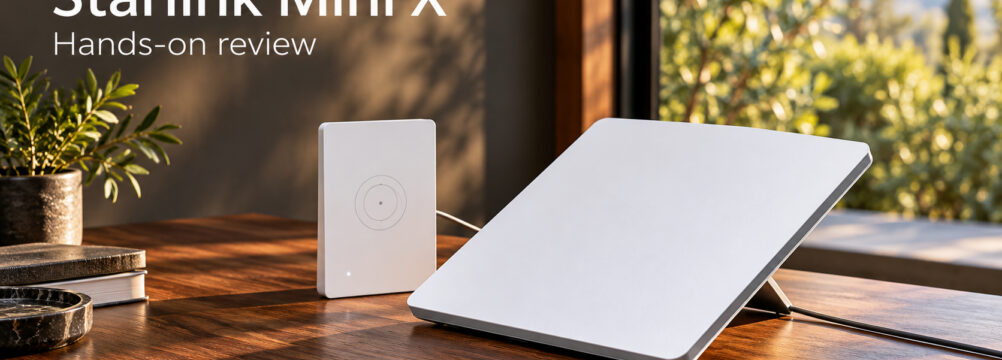
OUR OWN HANDS-ON TEST WITH THE MINI X · IN USE SINCE SEPTEMBER · UPDATED 9 NOVEMBER 2026
Starlink Mini X review: six weeks of everyday use – speed, latency and real-world results
Starlink promotion · sign up by 1 Dec
Starlink promotion until 1 Dec: up to 50 % off – e.g. €17.50 instead of €35 a month in Germany, £28 instead of £40 in the UK
Starlink is running a limited-time promotion in most of its markets for new customers who sign up by 1 December 2026: 50 % off the first three months in Germany, Italy, Poland, Denmark, Sweden, Finland, Indonesia, Vietnam and Japan, and 30 % off the monthly price in the United Kingdom, Ireland, France, Spain, Portugal, the Netherlands, Belgium, Canada, Australia, New Zealand, Mexico and Brazil – for the 30 % markets Starlink does not state how long the reduced rate applies; the order summary shows it before you commit. Residential plans qualify “in select areas”, all Roam plans qualify; the address check on starlink.com shows your local price. The United States has a Roam promotion only. The referral reward for new customers is paid on top and is not affected. The current referral reward is shown during checkout.
Promotion ends in
- –days
- –hrs
- –min
- –sec
Check the promotional price for my address All prices and the referral reward
Advertisement · referral link: your price does not change. Prices, end date and reward per starlink.com and Starlink’s public plan API, checked on 9 November 2026 (reward: 11 November 2026). Starlink may change or end the promotion at any time.
Our verdict
Recommended wherever there is no fast wired connection
Our own hands-on test with the Starlink Mini X (in Germany) · our own photos, screenshots and measurements · referral reward and Roam plans checked on 2 November 2026
What impressed us
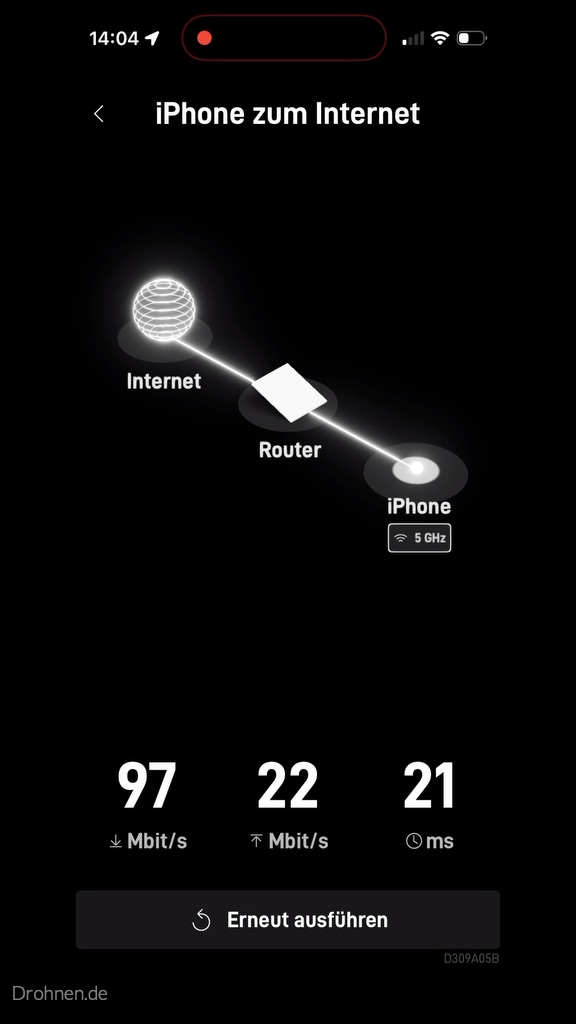
- 97 Mbit/s download, 22 Mbit/s upload and 21 ms latency at setup
- Often 70 to 150 Mbit/s download during the day
- Up and running in about 17 minutes, no technician needed
- Streaming and video calls mostly ran without problems
What you should know
- More often only 40 to 100 Mbit/s in the evening
- Nothing works without a clear view of the sky
- Brief hiccups in video calls or games are possible
- In 24/7 operation, electricity adds noticeably to the cost
From £40 a month in the UK · cancel monthly · 30-day hardware returns · referral reward for new customers via our referral link (the current amount is shown during checkout)
Referral link: your price does not change. We explain all the conditions in the section Referral link, transparency and disclaimer.
Update of 9 November 2026: Starlink’s promotion (discount for sign-ups until 1 Dec) added, plans, hardware prices and referral rewards re-checked with Starlink. →
Starlink availability: interactive world map
Select a country on the map or search for its name. Check local availability and offers directly with Starlink.
The interactive map is loading. If JavaScript is disabled, you’ll find every country in the list of all countries by status further down.
USUnited States
Available
Starlink has launched here. Check your address on the Starlink map for available plans, equipment prices and offers.
- Free address check in about a minute
- See plans, hardware pricing and offers
- No account needed to check availability
+ referral reward for eligible new customers who order via our referral link – cash or credit. The current referral reward is shown during checkout.
Check availability at my addressOur Starlink price guide
Status based on Starlink map data as of 15 October 2026. Only the address check with Starlink is binding.
Data source: Starlink’s public map data, retrieved on 15 October 2026. Base map: Natural Earth (generalised), borders shown from the German point of view, simplified. Small island states are shown as dots.
Choose your market: current Starlink plans
Residential prices checked on 19 October 2026; UK and US Roam prices re-checked on 2 November 2026 (Canada and Australia: 19 October 2026). The UK and US Residential pages now show prices only after you enter an address. Residential 100 Mbps and 200 Mbps are available only in selected areas and have capped download speeds. Max delivers the highest available speeds; no speed is guaranteed. Roam data allowances, taxes, hardware, shipping and promotions depend on the country and service address. The prices below are advertised monthly service prices, not a binding quote.
| Country or territory | Residential 100 / 200 / Max | Roam |
|---|---|---|
| United States · USD | 55 / 85 / 130 USD / month | 100GB: 55 USD · 300GB: 80 USD · Unlimited: 175 USD |
| United Kingdom · GBP | 40 / 60 / 80 GBP / month | 100GB: 55 GBP · Unlimited: 100 GBP |
| Canada · CAD | 75 / 115 / 150 CAD / month | 100GB: 75 CAD · 300GB: 110 CAD · Unlimited: 200 CAD |
| Australia · AUD | 75 / 110 / 150 AUD / month | 100GB: 85 AUD · Unlimited: 210 AUD |
Some links are referral or affiliate links. They do not change your price. Referral rewards depend on Starlink’s current terms.
Is satellite internet good enough for working from home, 4K streaming and online gaming? With Starlink, the short answer is: in most cases, yes – but not for every household, not equally well everywhere and not equally well at every time of day. We unboxed the Starlink Mini X ourselves, set it up with the app and have used it in Germany several times a week since mid-September. During setup, the app recorded 97 Mbit/s download, 22 Mbit/s upload and 21 ms latency; in everyday use, many daytime tests came in at roughly 70 to 150 Mbit/s, while evening results were more often in the 40 to 100 Mbit/s range. We documented every step with our own photos and screenshots and describe how streaming, video calls and gaming actually felt. This review keeps our own measurements separate from Starlink’s published specifications, explains the technology and its limitations, and estimates annual electricity costs. Performance at a different address may vary. We also cover Starlink’s 30-day return policy; check the current conditions for your market before ordering.
Editor’s recommendation
Order Starlink directly from SpaceX – with a cash or credit bonus for new customers
No more free month: if you order via a referral link as a new customer, Starlink now gives you a reward once you have kept your service for two months – as cash or service credit; the amount depends on the sign-up country. The current referral reward is shown during checkout. The reward applies to new customer accounts on starlink.com and to eligible Residential and Roam plans. It is not a discount: your price stays the same.
For home
Residential
Check price+ referral reward
- Unlimited data on all Residential plans
- Three tiers: 100 Mbps, 200 Mbps and Max
- Cancellable monthly, 30-day return policy
On the move
Roam
Check price+ referral reward
- For use in motion and at changing locations
- Hardware from €199 in selected regions, according to Starlink
- Pause at any time with Standby Mode
Plans and promotion last checked on 9 November 2026, referral reward on 11 November 2026
Prices and availability reflect starlink.com for Germany; monthly prices and referral rewards were last retrieved on 2 November 2026. They can change daily. The exact hardware price depends on the service address.
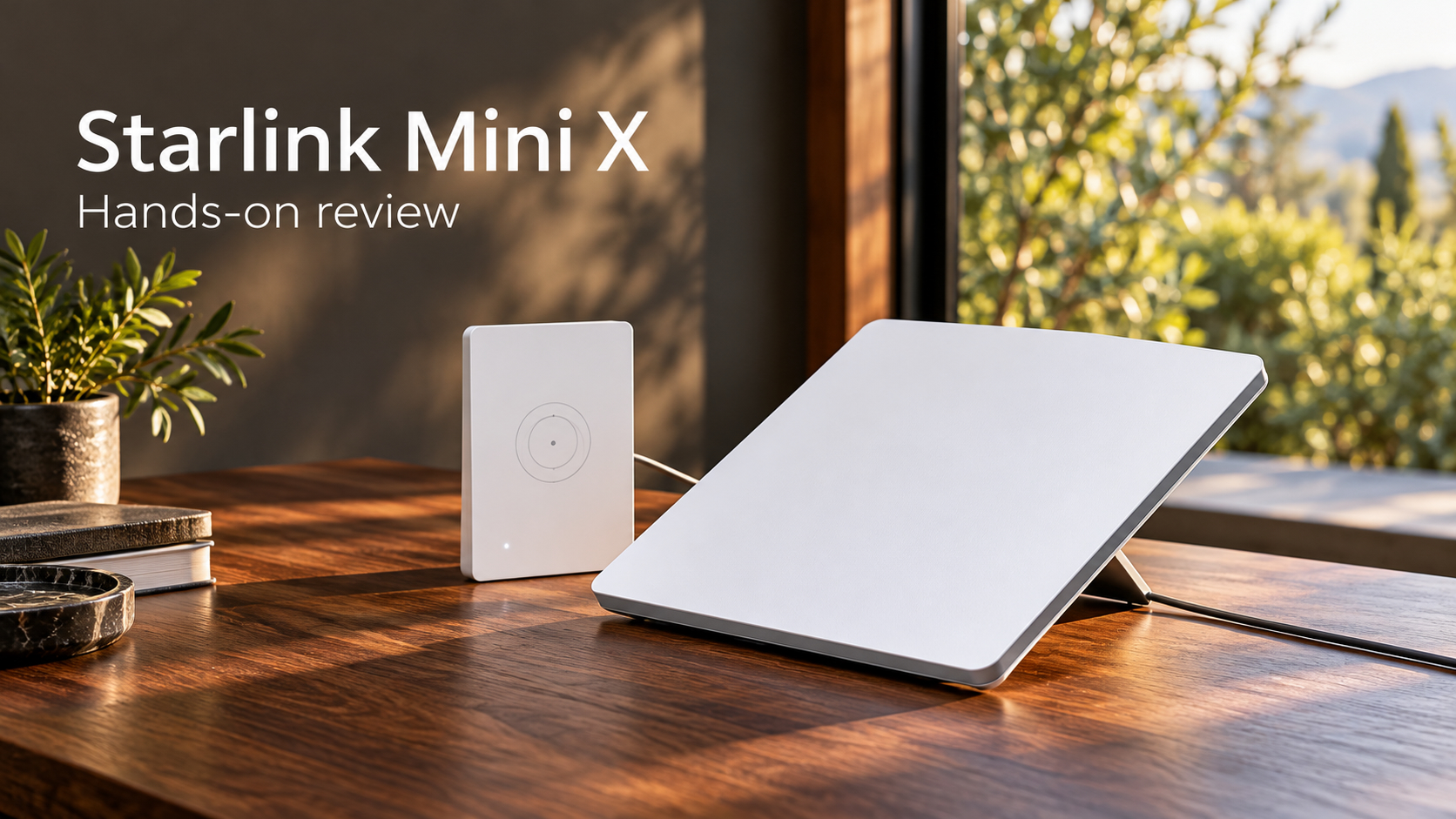
Referral disclosure: The Starlink links in this article are referral links. If you open an eligible new customer account through one of them, Starlink gives you a referral reward once your service has been active for two months. Your price does not change.
The key facts in 20 seconds
In our test: 70 to 150 Mbit/s
Mini X since September: often 70 to 150 Mbit/s during the day, more often 40 to 100 in the evening. Initial measurement 97/22 Mbit/s at 21 ms.
Latency
Starlink reports a median of 25.7 ms at peak times – measured in the US.
Power
25 to 100 W depending on the model – roughly €80 to €300 a year.
Risk
30-day returns with a full hardware refund; no partial refunds after that.
Costs
UK Residential £40, £60 or £80 a month; Roam from £55 (UK) or $55 (US). Referral reward: £40 in the UK, US$100 in the US (as of 11 November 2026).
Availability
Available in the US, UK, Canada and Australia. Only the address check shows whether there is capacity where you live – the map above is a good place to start.
Our hands-on test: Starlink Mini X unpacked, set up and measured
Our own hands-on test · Drohnen.de · in use several times a week since mid-September 2026
For this test, we unboxed, assembled and set up the Starlink Mini X kit from a German Roam order ourselves, using the Starlink app on an iPhone. Since mid-September, it has been in use several times a week, mostly on the terrace and in the garden: the terminal outdoors, the separate Router Mini indoors. All photos and screenshots in this section were taken during this test. The figures directly below come from the initial setup and are individual measurements at a single location; how speed, streaming, video calls and gaming held up in the weeks that followed is covered further down.
97 Mbit/s
Download
App speed test during setup, from the iPhone to the internet over 5 GHz Wi-Fi
22 Mbit/s
Upload
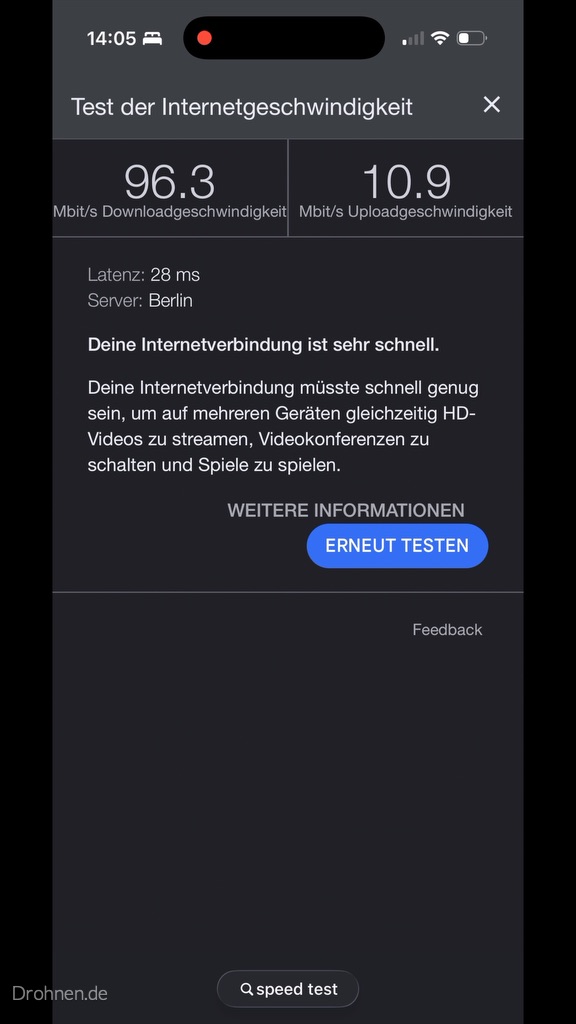
Same measurement; 10.9 Mbit/s in the browser test
21 ms
Latency
App speed test; browser test 28 ms, start-up phase 35 ms median
18 W
Power consumption
App reading, average over the first nine minutes
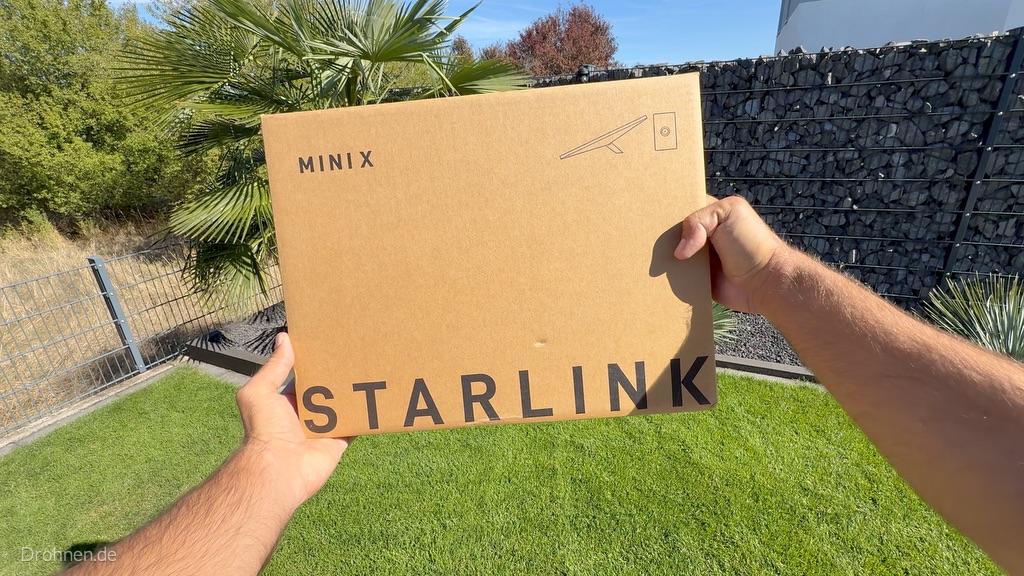
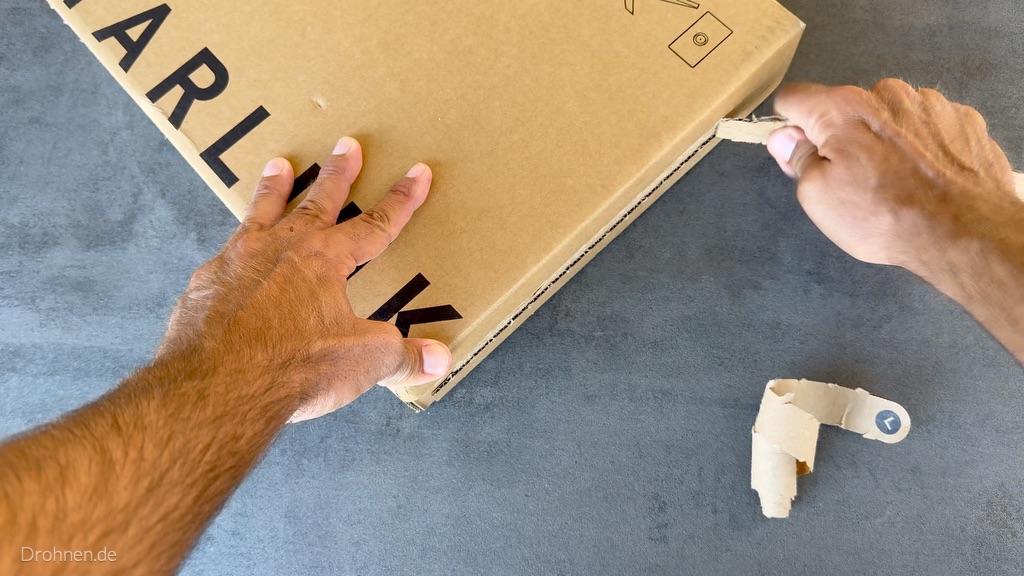
Unboxing: a first look inside the Mini X box
The Mini X comes in a plain brown cardboard box with a tear strip. Under the lid, the terminal, its power supply and the triangular pipe adapter sit in snug moulded inserts; underneath are the separate Router Mini, its own power supply, the coiled cable and the paperwork. No tools are needed to set it up on the fold-out kickstand. We show every item in the box in detail in our Starlink hardware comparison.
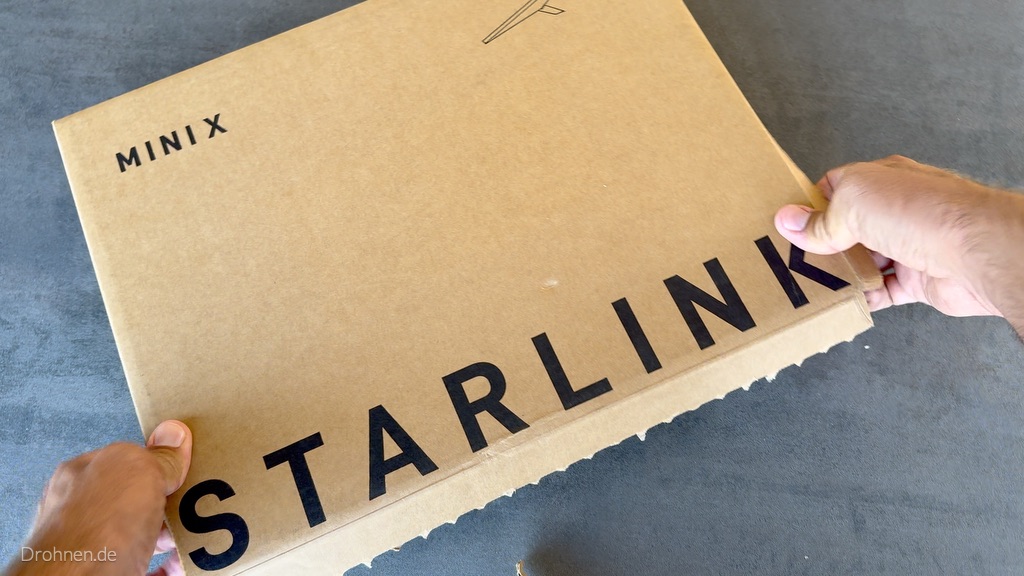
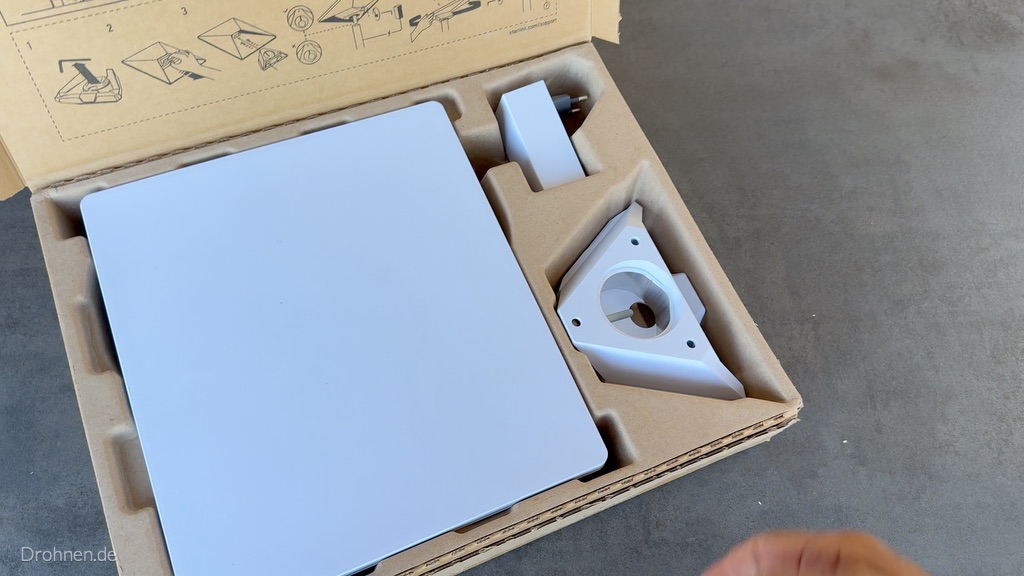
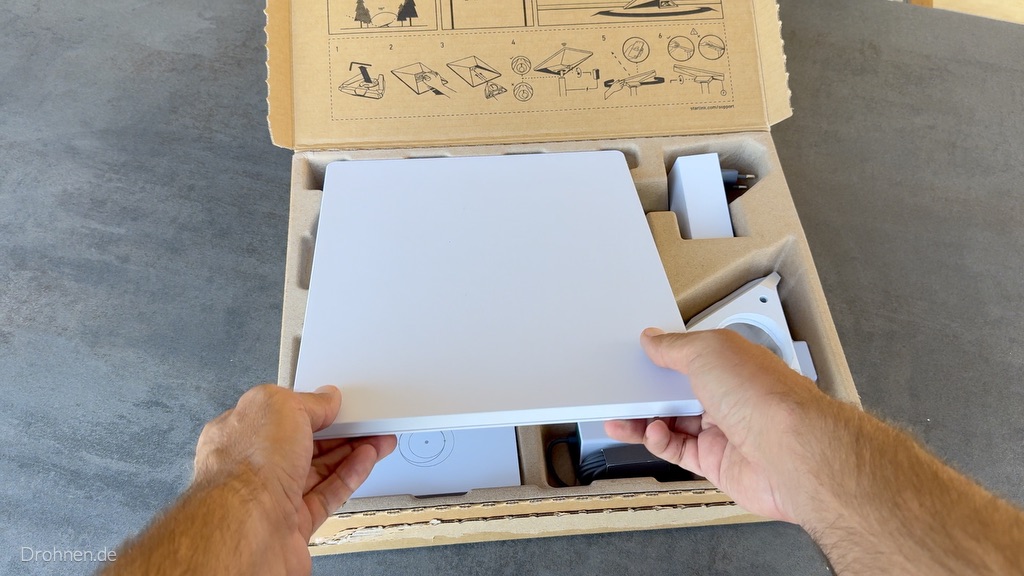
Setup: terminal outside, router inside
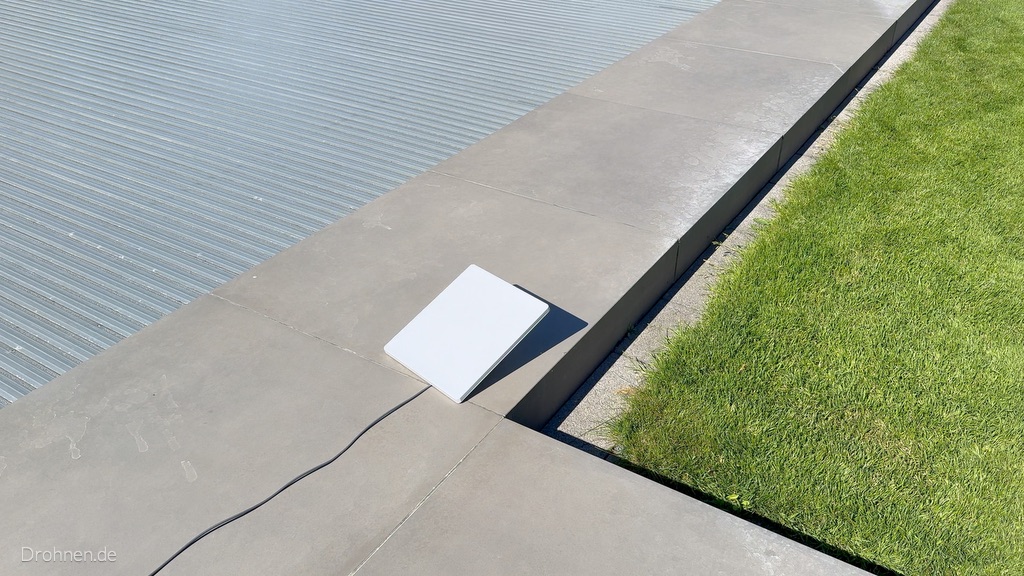
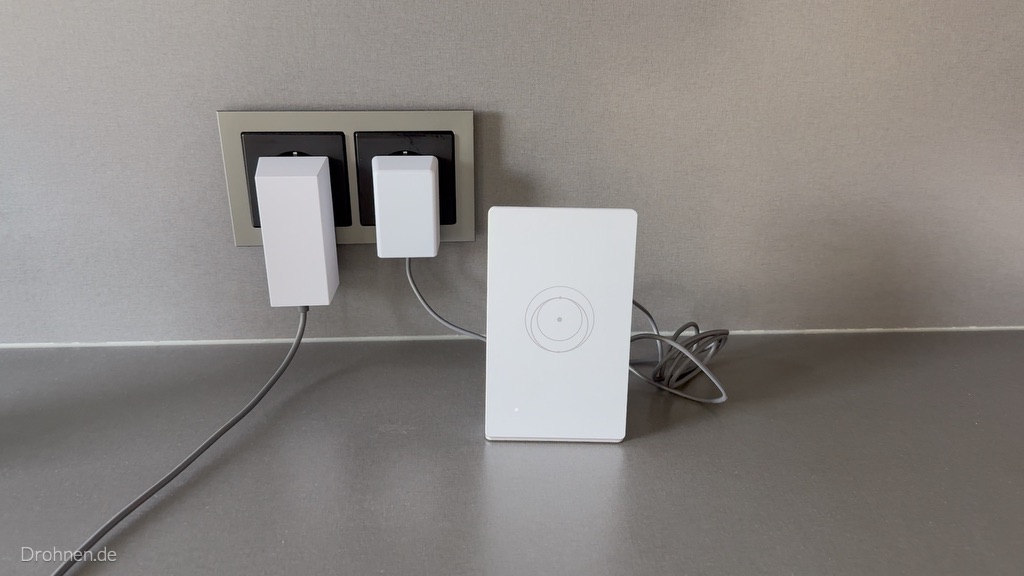
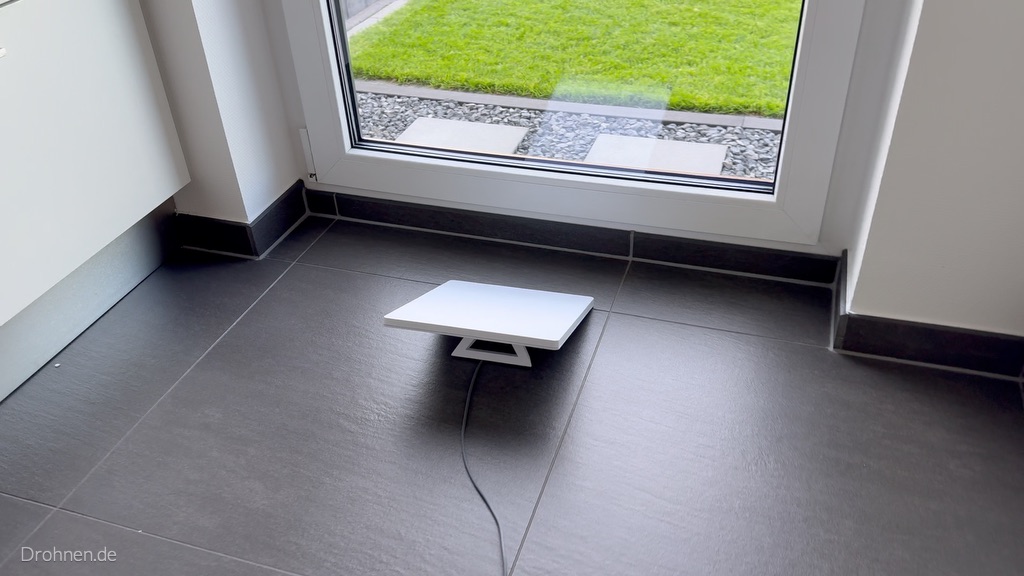
During the initial setup, the terminal sat flat on its unfolded kickstand on a paved area between the lawn and the terrace, fairly close to the house because power was easy to reach there; the cable ran visibly across the ground to the power supply. The Router Mini stood indoors next to a double socket into which both of the kit’s power supplies were plugged. This split matches the illustrated instructions in the box: antenna outside with a clear view of the sky, router wherever you need Wi-Fi. In the weeks that followed, a spot further out on the open lawn proved more practical. The trade-off was a cable running across the terrace – no problem for occasional set-ups, but something you would want to route properly for everyday use. As a trial, we also placed the terminal indoors directly in front of a glass door; our images do not document a reception result for this position. For permanent use, the terminal belongs outdoors, because the app’s obstruction check requires a clear view of the sky.
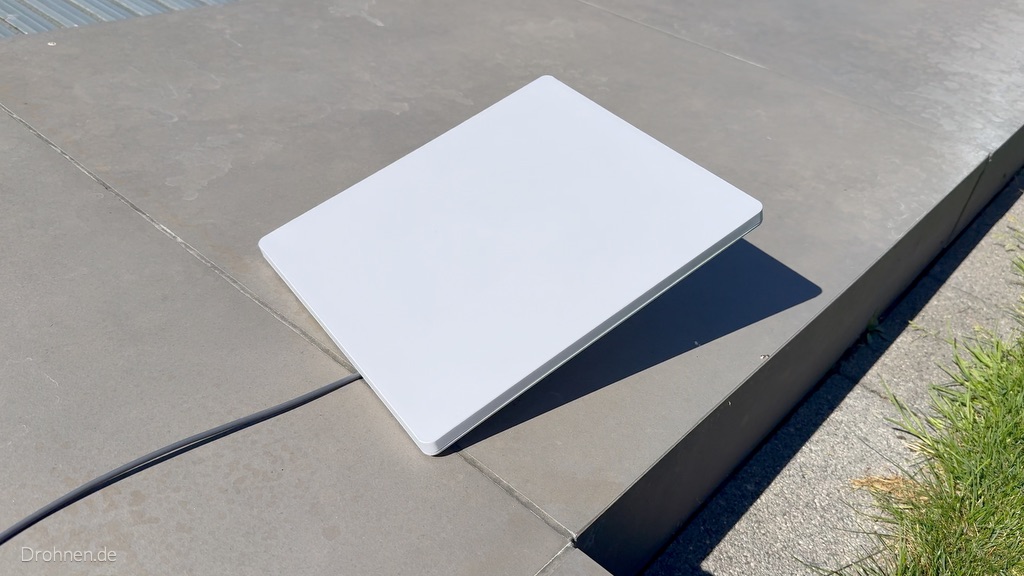
Setup in the app: from download to connection
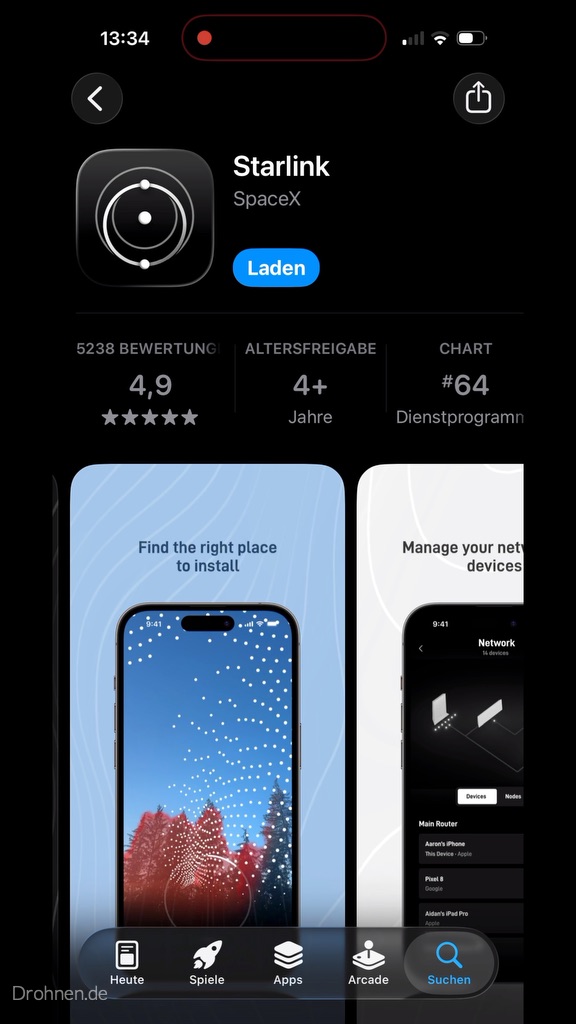
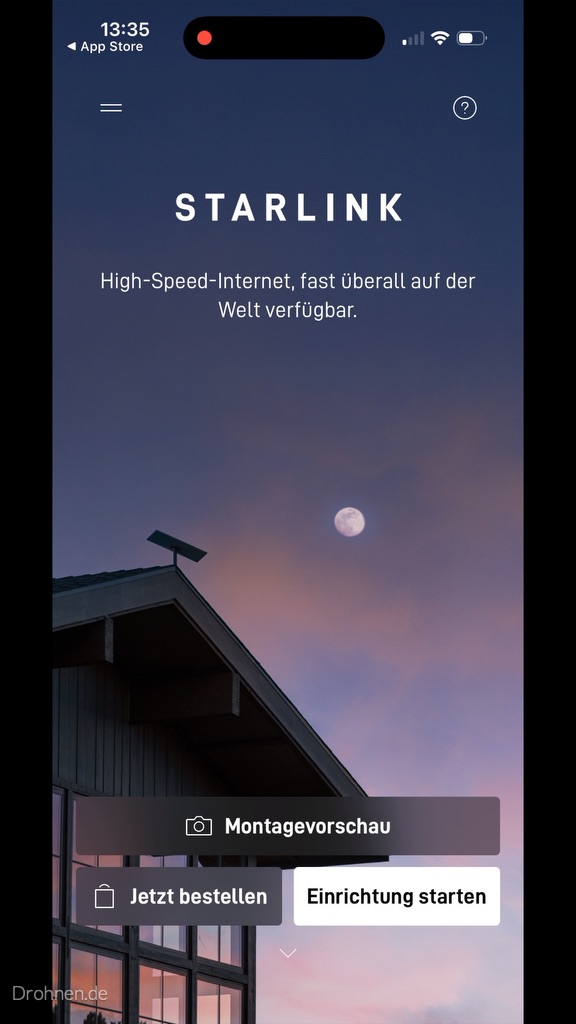
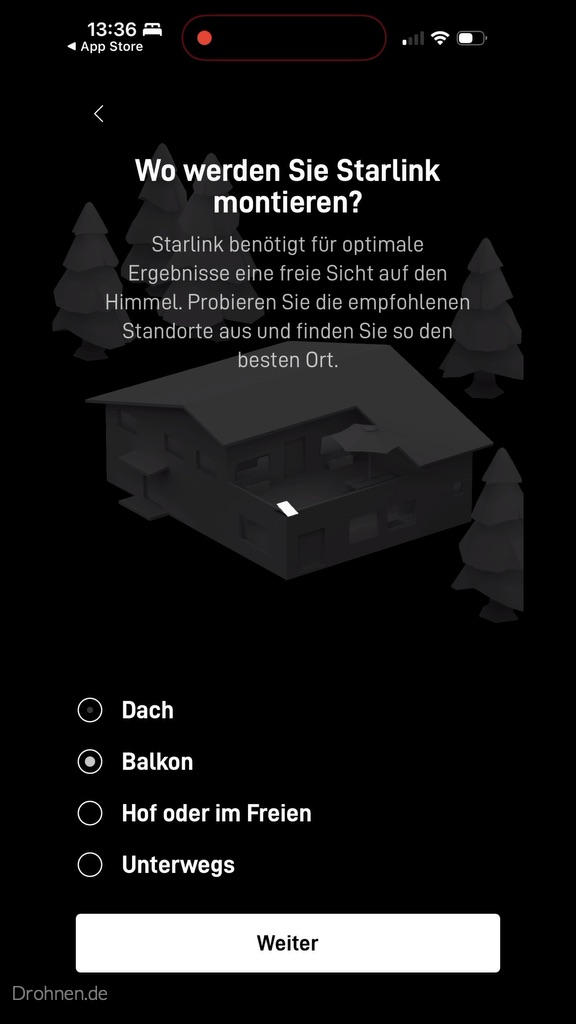
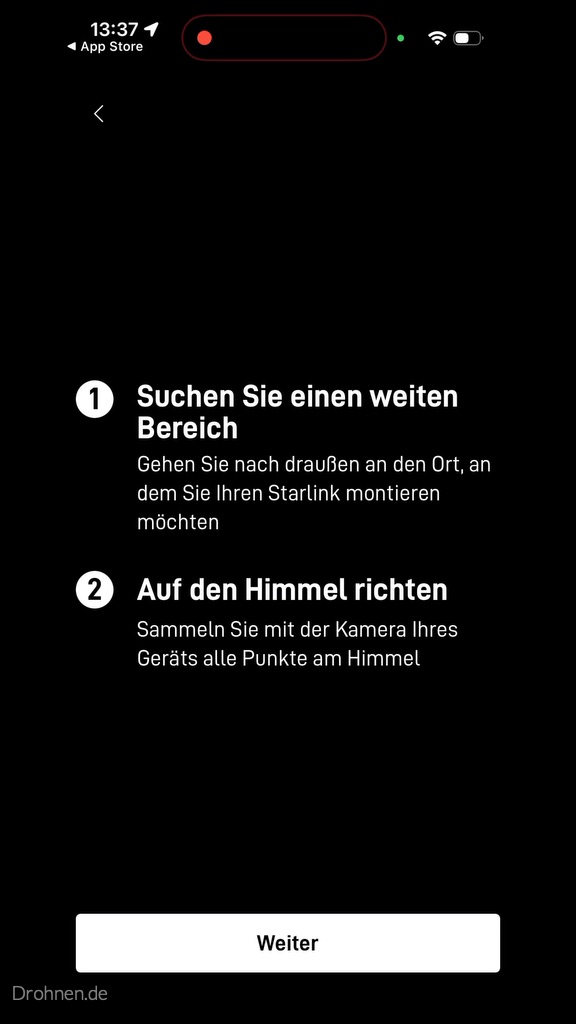
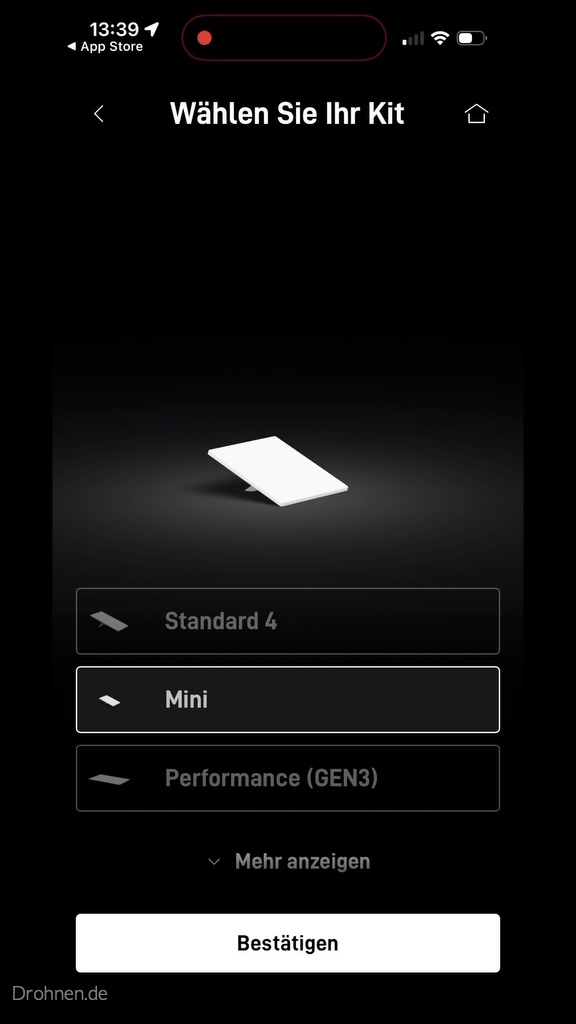
Setup is handled entirely in the free Starlink app. It first asks where you plan to install the kit, uses the phone’s camera to check the view of the sky, lets you select your kit and then guides you through connecting power and Wi-Fi. According to the timestamps on our screenshots, about 17 minutes passed between opening the app’s App Store page at 13:34 and the first statistics for the live connection at 13:51 – including several sky scans and photos for this review. The first setup remained the most time-consuming part, partly because we tried out several positions at first. Later set-ups were quicker; the main effort lay in laying out the cable and choosing the spot. Even so, we would not switch the kit on and jump straight into an important video call – we always allowed a little lead time.
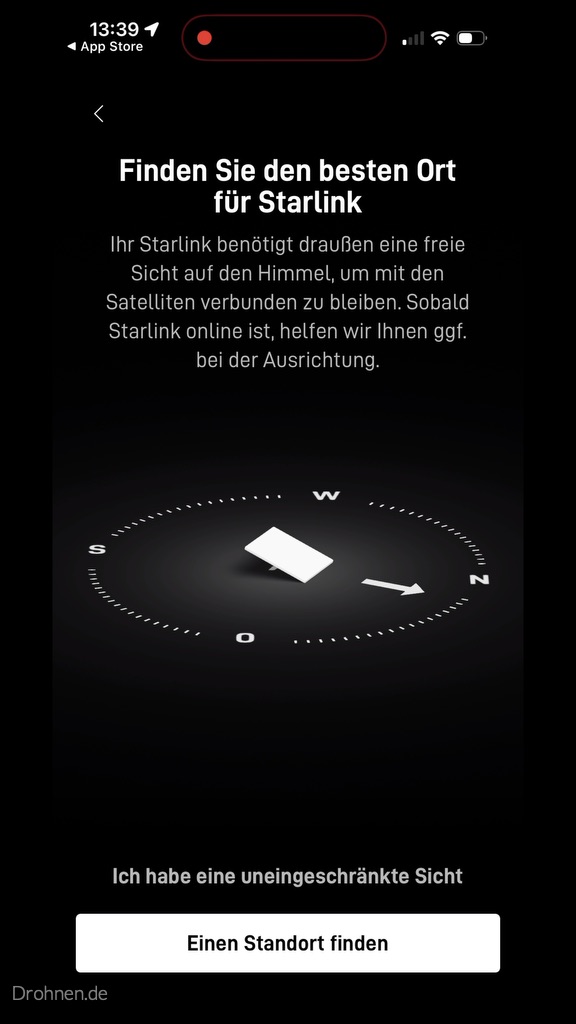
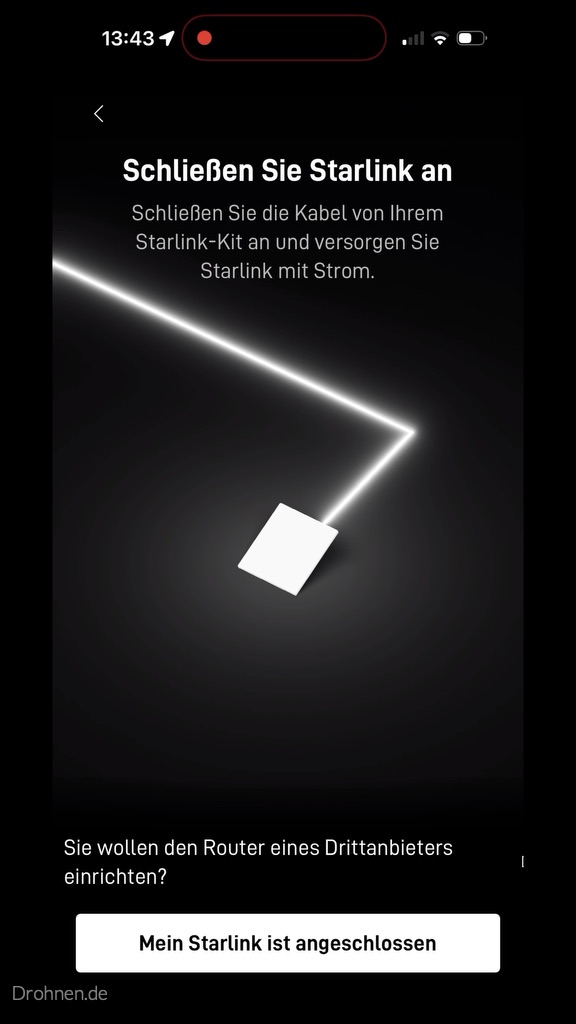
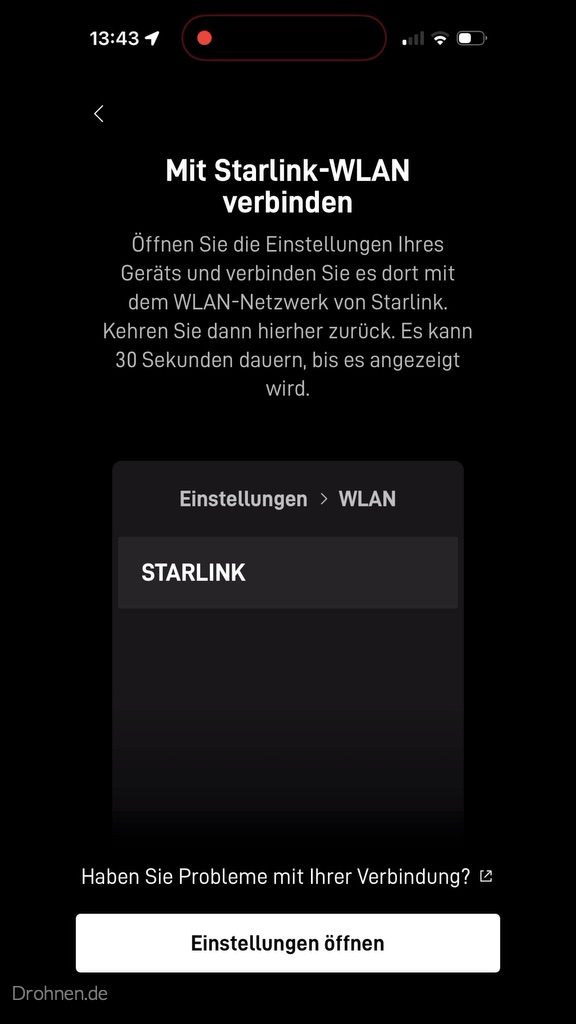
Obstruction check: scanning the sky with the camera
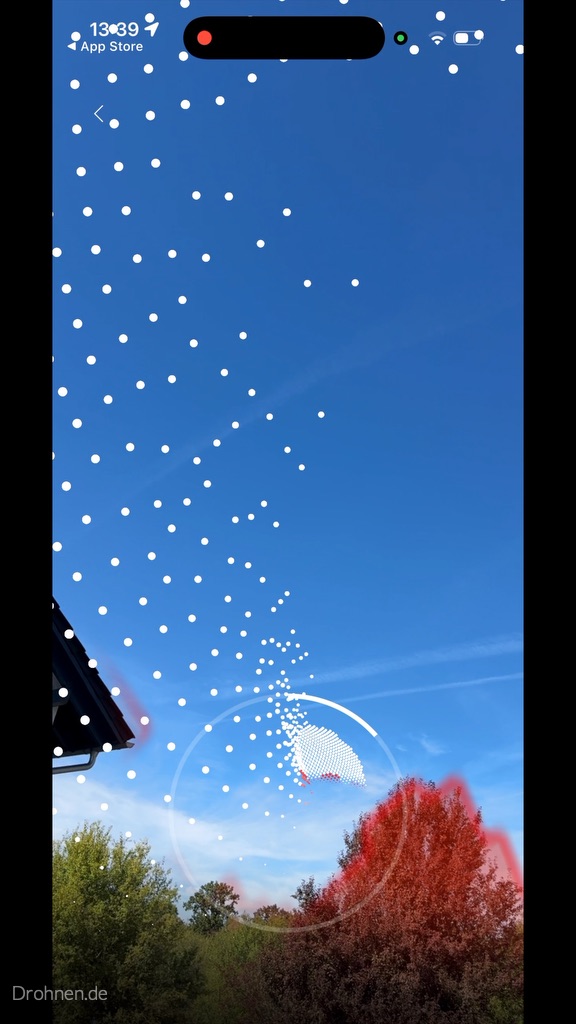
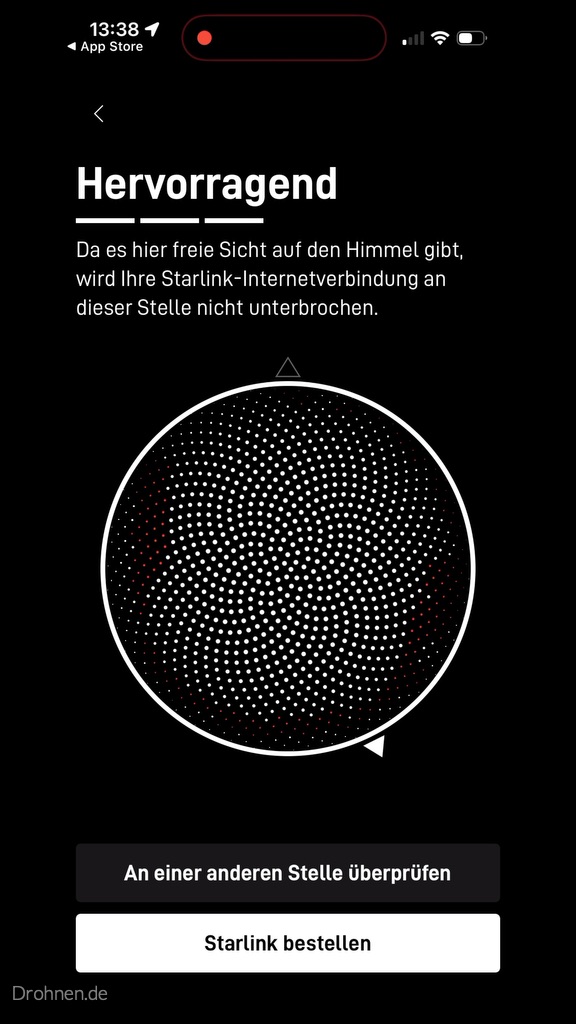
The most important setup step is the sky scan: you point your smartphone camera upwards and “collect” white dots in the sky. The app highlights obstructed areas in colour. Our first scan picked up the roof edge and trees; a second scan showed a treetop at the right edge of the frame. At the spot we finally chose, the app rated the view as “Excellent”. That is an assessment made before the kit goes into service – not proof that there will never be interruptions at this spot.
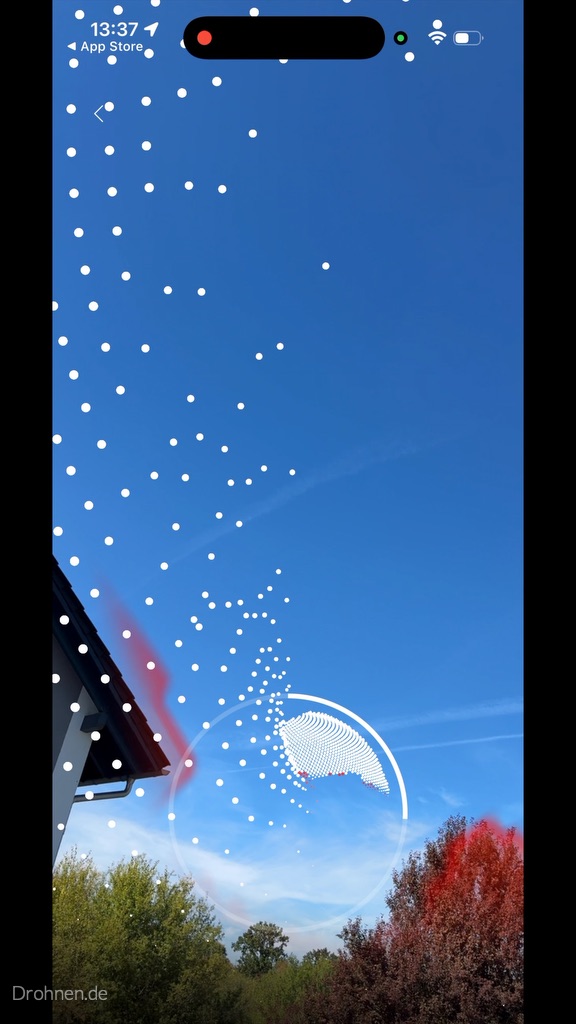
Alignment and calibration
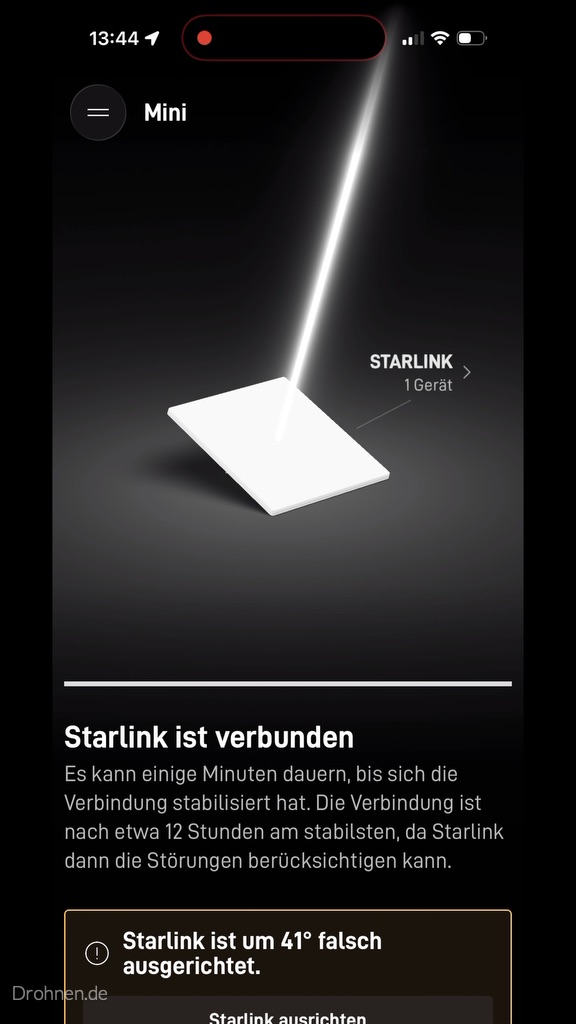
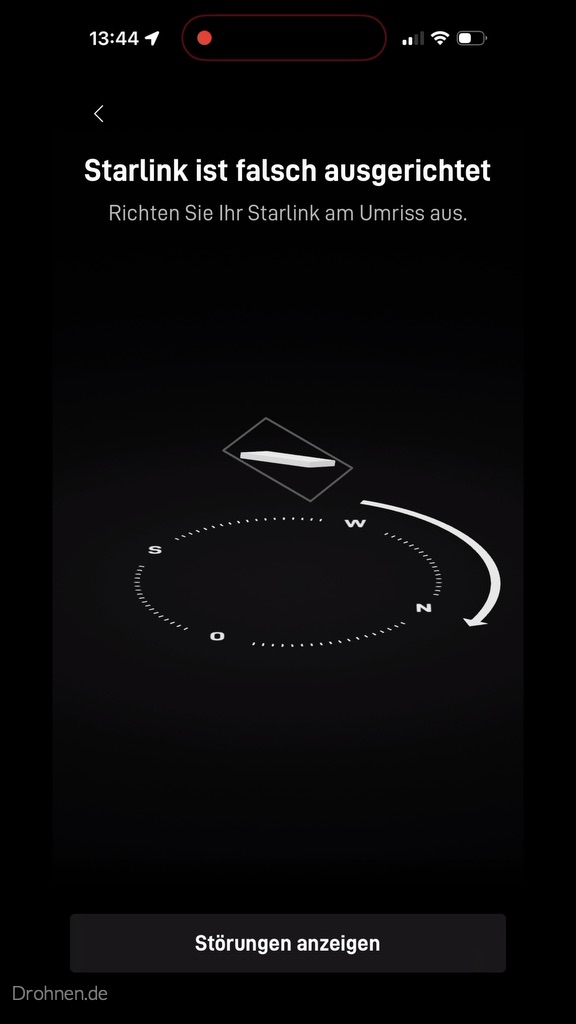
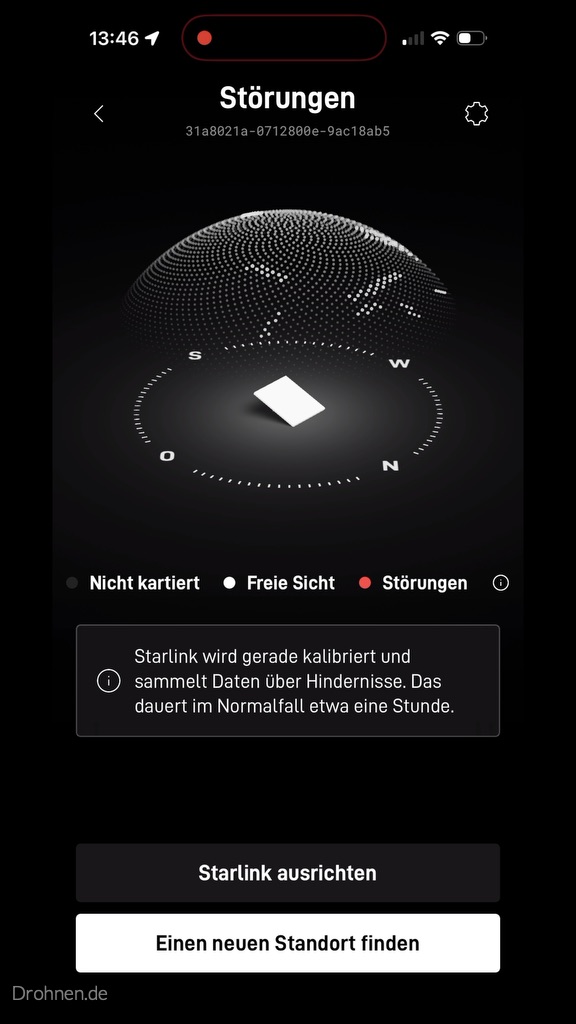
As soon as the kit was powered up, the app reported a connection – and, at the same time, that the terminal was misaligned by 41 degrees. The alignment aid then shows a target outline and the direction to turn; with the Mini, you simply rotate the terminal on its kickstand. The app also notes that the connection is most stable after about twelve hours, once Starlink has been able to take obstructions into account. When we took our screenshot, the obstruction map was still calibrating, which the app says normally takes about an hour.
First statistics, mesh prompt and router status
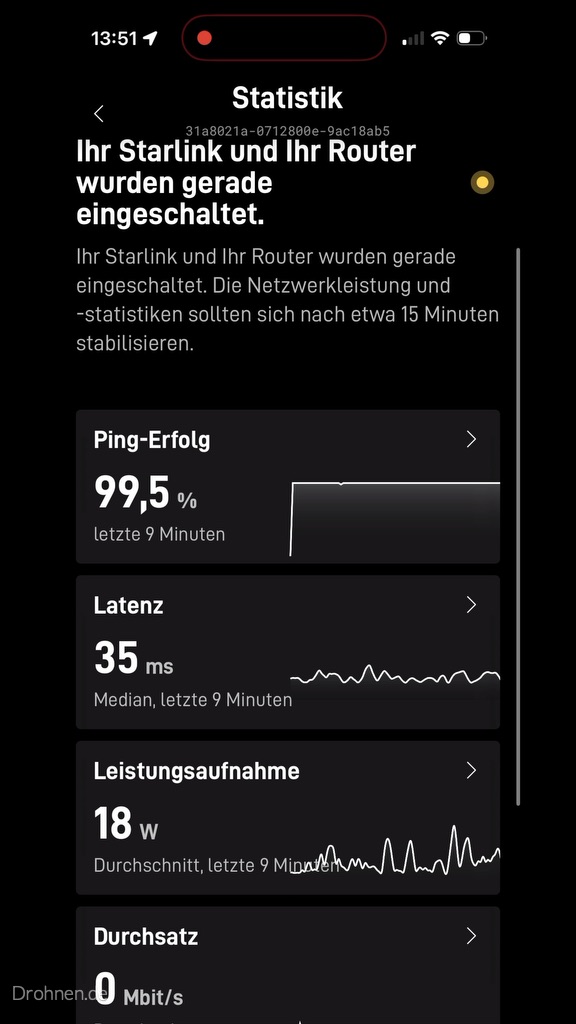
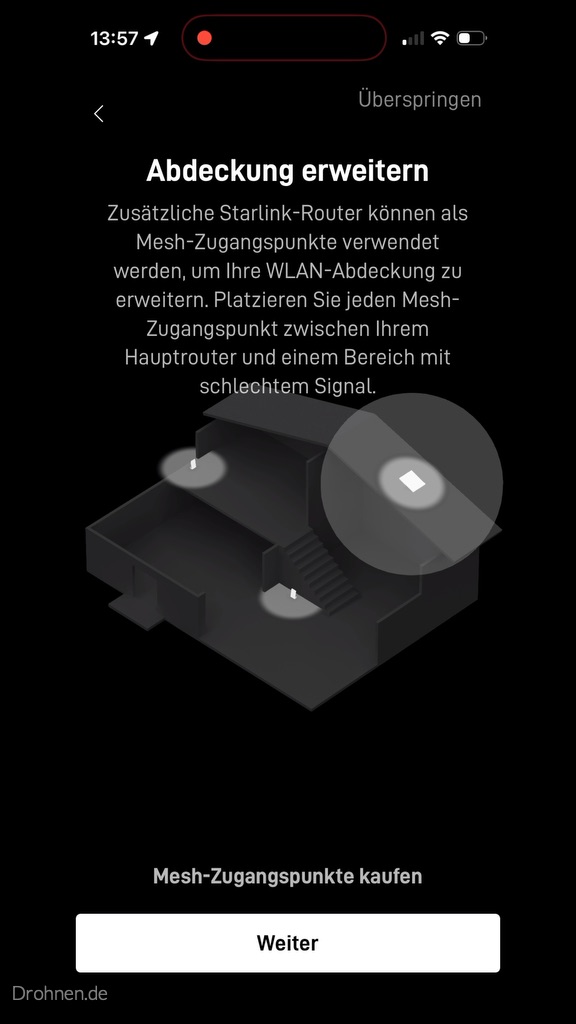
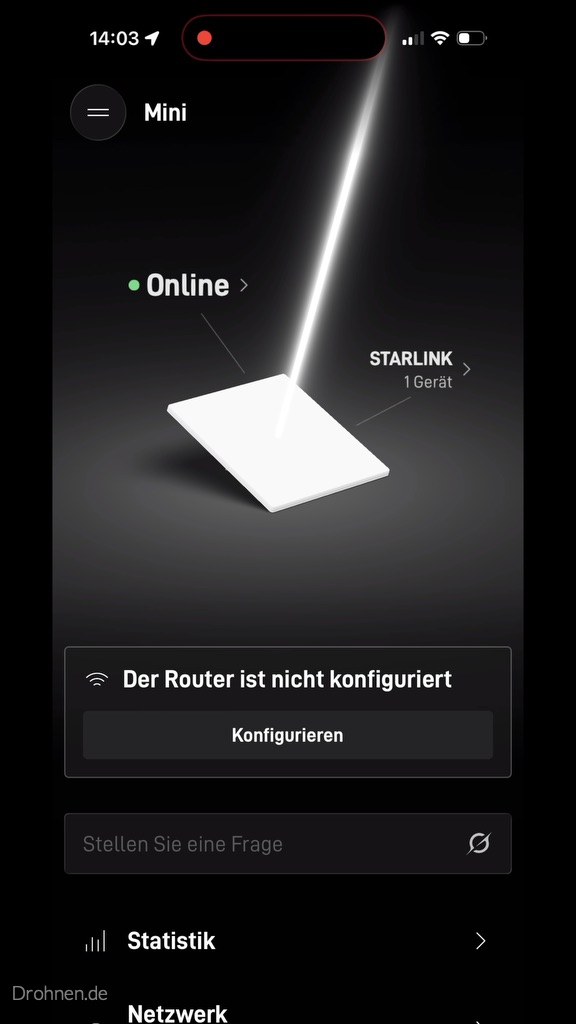
The statistics for the first nine minutes showed 99.5 per cent ping success, a median latency of 35 milliseconds and an average power draw of 18 watts. The app explicitly labels these figures as a start-up phase and says the statistics should settle after about 15 minutes. The 18 watts are an app reading over a short window, not an external power measurement of the whole kit; Starlink itself quotes an average of 20 to 40 watts for the Mini. The app then offered to extend Wi-Fi coverage with additional mesh access points and reported the terminal as online – noting that router configuration was still pending.
Speed tests during setup: app and browser compared
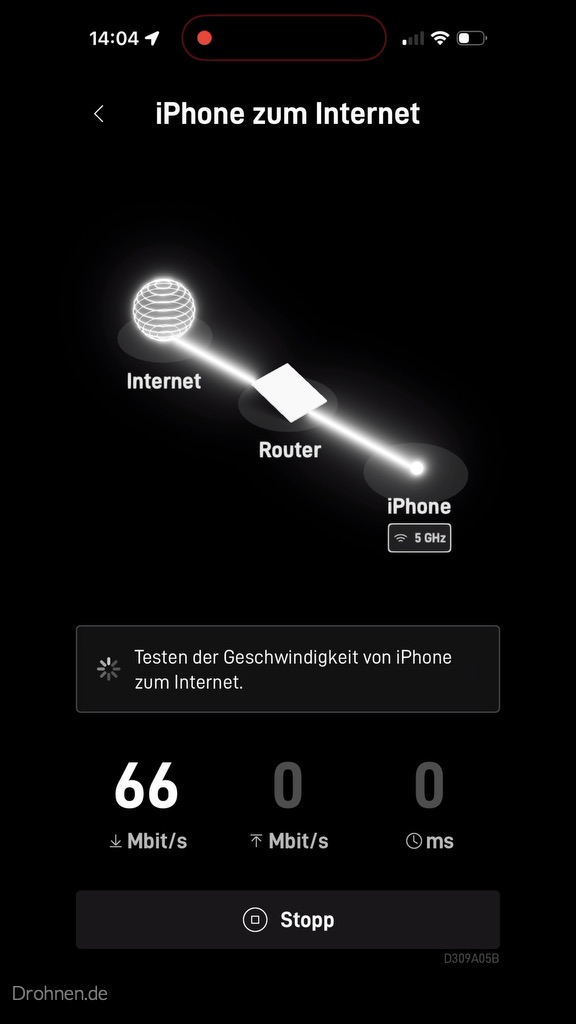
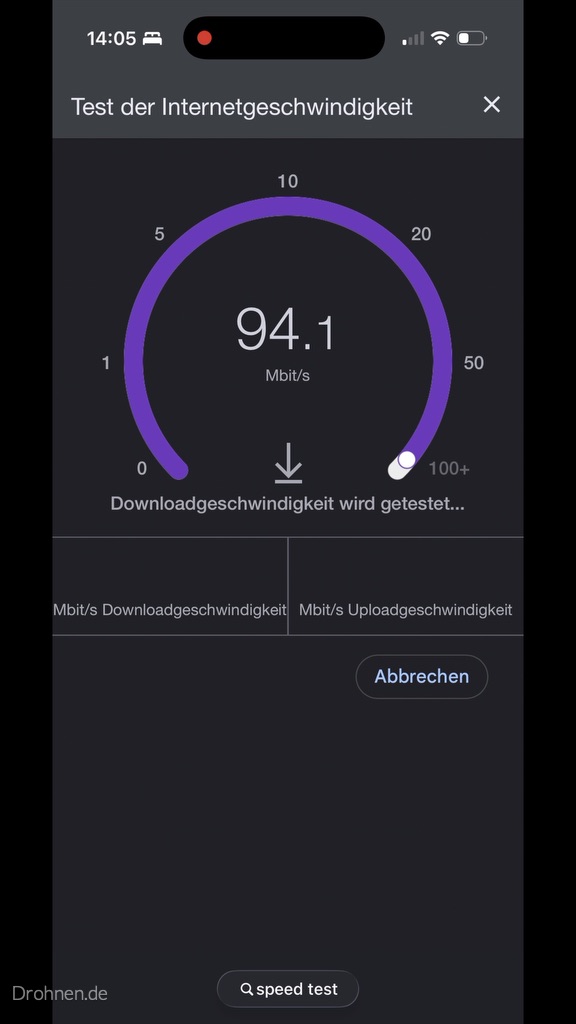
Directly after setup, we measured twice: with the Starlink app’s speed test, which checks the route from the iPhone via the router to the internet, and with a browser-based speed test. Both delivered almost identical download results, while the app measured a noticeably higher upload. Because the 5 GHz Wi-Fi link was part of the measurement, the figures describe the performance that actually reached the device – not the satellite link alone.
| Measurement | Download | Upload | Latency | Context |
|---|---|---|---|---|
| Starlink app speed test | 97 Mbit/s | 22 Mbit/s | 21 ms | iPhone via 5 GHz Wi-Fi through to the internet |
| Browser speed test | 96.3 Mbit/s | 10.9 Mbit/s | 28 ms | Test server in Berlin; provider not clearly named in the screenshot |
| App statistics, start-up phase | – | – | 35 ms (median) | First nine minutes, 99.5% ping success, 18 W power draw |
Six weeks in use: speed during the day and in the evening
After setup, we used the Mini X several times a week from mid-September, mostly on the terrace and in the garden. The connection usually ran for a few hours at a time, and on some weekends from late morning until late in the evening. Typically, two smartphones and a laptop were connected, occasionally a TV as well.
The speed tests from this period show a clear pattern. During the day, many measurements came in at roughly 70 to 150 Mbit/s download, with upload often between 8 and 20 Mbit/s. Between about 7 pm and 10 pm, results were more often lower, for example 40 to 100 Mbit/s. The spread was also striking: two measurements started in quick succession could differ noticeably.
| Time | Download | Upload | What we noticed in practice |
|---|---|---|---|
| Initial measurement during setup | 97 Mbit/s | 22 Mbit/s | App speed test with 21 ms latency |
| During the day | Often around 70 to 150 Mbit/s | Often 8 to 20 Mbit/s | Browsing, email and working with lots of browser tabs mostly unremarkable |
| Evening, about 7 pm to 10 pm | More often lower, around 40 to 100 Mbit/s | Not evaluated separately | Mainly noticeable with larger downloads; series usually played without issues |
In everyday use, the difference was smaller than the figures suggest. When browsing, emailing and working with several browser tabs open, the fluctuation was mostly barely noticeable; in the evening, it showed up mainly when downloading larger files. Carrying on with a series usually worked without a hitch – even though a speed test started straight afterwards showed considerably less than in the afternoon. After the first few sessions, we therefore ran speed tests less often: what mattered more was whether a call stayed intelligible and the film kept playing without interruption. How streaming, video calls and gaming behaved in detail is described in the section Streaming, video calls and gaming in everyday use.
What impressed us
Tool-free setup, clear step-by-step guidance in the app, often 70 to 150 Mbit/s during the day and, at setup, latency of 21 to 35 ms – in line with the medians Starlink itself publishes.
Good enough for everyday use
Browsing, working from home, and a stream plus a video in parallel mostly ran without problems. Upload speeds of often 8 to 20 Mbit/s are enough for video calls; we started large cloud uploads after our meetings.
What you need to plan for
More often lower speeds in the evening, an occasional frozen picture in a video call, individual delays in games – and a cable that needs routing properly if the terminal stands out in the open. At setup, the app also warned of a 41-degree misalignment, the obstruction map needs around an hour to calibrate, and even a roof edge or a treetop shows up in the scan. Location is everything.
How we interpret the figures
The figures are typical ranges from repeated speed tests at one location, not continuous logging; we did not record an outage rate. In a busy cell or with obstructions, results may be lower. Run your own tests at different times of day within the 30-day return window, especially in the evening.
Want to try it yourself? In a German Roam order, the Mini X costs €199 plus €19 shipping, with no minimum term and a 30-day return window. Eligible new customers who order via our referral link in Germany also receive a referral reward as cash or service credit once their service has been active for two months. The current referral reward is shown during checkout.
New in November 2026: what has changed since our test
In short: our test result stands – and we re-checked prices and referral rewards for the UK and the US on 2 November 2026. A lot has been happening behind the scenes, though: new satellites, satellite service for smartphones, competition from Amazon and multi-billion-dollar deals at SpaceX. The timeline puts the developments of recent weeks into context and separates what matters for your connection today from what is still years away.
- 2 Nov 2026Prices and referral rewards re-checked
In the UK, Roam costs £55 (100GB) and £100 (Unlimited) a month; in the US, Roam is $55 (100GB), $80 (300GB) and $175 (Unlimited) – all checked on 2 November 2026. UK Residential plans were last listed at £40, £60 and £80 a month on 19 October; like the US page, the UK Residential page now shows prices only after you enter an address. According to Starlink, new customers who order via our referral link receive £40 in the UK, US$100 in the US, CA$140 in Canada or A$220 in Australia (A$110 as of 11 November 2026) as cash or service credit; Starlink gives no end date.
- 29 Oct 202611,190 Starlink satellites in orbit
According to the independent count by Jonathan McDowell, 11,190 Starlink satellites were orbiting Earth on 29 October, 11,176 of them operational.
- 29 Oct 2026Direct-to-phone satellite service: FCC opens consultation
The US regulator FCC has voted to open a consultation (a Notice of Proposed Rulemaking) on an additional 482 MHz of spectrum for satellite service direct to smartphones – 13 frequency bands could then come into play instead of five. Nothing has been approved yet, and outside the US, each country’s regulator decides separately. More detail is in the NewSpace Economy report on the FCC proposal.
- 26 Oct 2026Amazon Leo: still no commercial service
By the end of October, the announced competitor had not launched a commercial service and had named neither a price nor a launch date for Europe.
- 26 Oct 2026Starlink V3: more capacity per satellite
SpaceX quotes up to 1 Tbit/s download and 160 Gbit/s upload per satellite for its next satellite generation – manufacturer figures, not plan speeds. More capacity can ease congestion, especially in the evening.
- 26 Oct 2026Starlink Mini 2 with battery: still only a leak
Hints of a Mini with a built-in battery have so far come only from firmware analyses; SpaceX has announced neither a name nor a price nor a date. Which terminals you can buy today is covered in our Starlink hardware comparison. Update: Official since 10 Nov 2026; pre-orders initially by invitation only in the US, availability in other countries still open.
- 26 Oct 2026SpaceX lines up AI chip financing and points to Starlink
Through a company managed by Apollo, SpaceX has secured around US$40 billion in finance-lease funding for Nvidia chips. Elon Musk explicitly attributes SpaceX’s access to the capital markets to its Starlink and launch revenues.
- 20 Oct 202613.6 million residential customers and merger talks with Tesla
SpaceX reported 13.6 million Starlink residential customers worldwide for the third quarter of 2026, up from 7.2 million a year earlier. According to Elon Musk, Tesla and SpaceX are also exploring a merger – nothing is binding yet.
What the news means for your decision
Ordering now makes sense if …
… your current connection is too slow and neither fibre nor a stable 5G network is in sight. All the announced improvements upgrade the network step by step, and a kit bought today also benefits from more satellites and more capacity.
Waiting gains you little for …
… Amazon Leo, the Mini 2 or Starlink for smartphones: Amazon Leo has no commercial service yet, the Mini 2 can so far only be pre-ordered by invitation in the US, and the extra smartphone spectrum is still only a proposal. If you need fast internet today, Starlink bridges the gap and can be cancelled monthly.
Roam instead of Residential if …
… you want to use Starlink at changing locations – in a motorhome, on a boat or at a seasonal garden plot. What the Roam plans cost in your country is set out in our Starlink price guide.
Waiting may pay off if …
… fibre roll-out in your street has already been scheduled. In that case, the wired line is usually the more stable long-term solution.
Which data this review is based on
First, the most important point for putting this review in context, because plenty of “Starlink tests” circulating online are nothing of the sort: this article combines two sources. The first is our own hands-on test of the Starlink Mini X: a setup documented with photos, app screenshots and two speed tests, plus around six weeks of use with repeated measurements during the day and in the evening. The second is Starlink’s published performance data, the official product data sheets and the information in the Starlink Help Center. Our own measurements are labelled as such; everything that comes from Starlink itself is marked as manufacturer information.
This distinction matters particularly with satellite internet. Unlike with a DSL line, performance depends not only on your plan but also on the specific cell, the load at that time of day, the view of the sky at the installation site and satellite coverage above you. Our experience at a single location therefore provides honest real-world figures, but not a proxy for your address – and naming a “test winner” on the basis of measurements at a single location would be misleading.
Manufacturer information
Plan speeds, latency figures, power consumption and technical data come from official Starlink sources and are marked as such in the text. The manufacturer’s network-wide median values refer to the US.
Editorial assessment
Ratings, comparisons and recommendations are our expert conclusions drawn from our test and the manufacturer data, and are worded as assessments.
Our own calculations
Electricity and annual costs are transparent projections. The calculation method and assumptions are given in each case so you can follow them.
Our own hands-on test
Our figures come from around six weeks of using the Starlink Mini X at one location in Germany. They are real-world values from repeated speed tests, not a national average.
How Starlink works
Traditional satellite internet relied on geostationary satellites at an altitude of around 36,000 kilometres. Physics alone means the signal’s trip up and back takes roughly a quarter of a second – which is why satellite internet was long considered unusable for video calls and gaming. Starlink solves this problem with altitude: the constellation’s satellites fly in low Earth orbit, so the pure signal travel time from the user to the satellite and back is, according to Starlink, in the range of 1.8 to 3.6 milliseconds per leg and, for the complete round trip, usually stays below ten milliseconds.
The price is complexity. A satellite in low orbit is overhead for only a few minutes before the connection has to be handed over to the next one. That is precisely why the Starlink antenna is not a dish that tracks a fixed point in the sky, but a phased array: a flat panel made up of many individual antenna elements that steer their transmit and receive beam electronically, without moving. The terminal is roughly aligned once during installation and then tracks the changing satellites purely electronically.

The second key part of the system is on the ground. The satellites communicate with ground stations, known as gateways, which are connected by fibre to points of presence – the actual hand-over points to the internet. For the US alone, Starlink cites more than 100 gateway sites with over 1,500 antennas in total. The denser this ground network and the closer the hand-over point is to the destination, the lower the latency.
Then there are the optical links between the satellites. This laser network allows data to be relayed in orbit rather than having to come down at the nearest gateway. For remote regions with no ground station in range, it is what makes service possible at all; in everyday use in Europe, it mainly serves as a fallback route when capacity is tight. Starlink itself points out, however, that routing via laser links can increase latency.
In brief: what latency means in everyday use
Latency is the time a data packet takes to travel from the router to the internet and back – the round-trip time. It determines how responsive a connection feels: how quickly web pages load, whether a video call feels natural and whether an online game reacts promptly. Starlink notes that extra bandwidth above about 10 Mbit/s barely improves web page load times, whereas lower latency shortens them considerably. In everyday use, latency is therefore often more important than the top speed on the data sheet.
Speed and latency: documented results
When it comes to speed, you need to distinguish between two things: what the hardware can do and what your plan allows. Starlink’s Residential plans in Germany are tiered and technically cap the download rate. If you book the cheapest plan, you don’t get a slower antenna – you get a lower speed cap and lower network priority.
| Plan | Price per month | Download | Upload | Data allowance | Network priority |
|---|---|---|---|---|---|
| Residential 100 Mbps | 35 € | Up to 100 Mbit/s | 15 to 35 Mbit/s | Unlimited | Base tier |
| Residential 200 Mbps | 55 € | Up to 200 Mbit/s | 15 to 35 Mbit/s | Unlimited | Middle tier |
| Residential Max | 75 € | More than 400 Mbit/s | 20 to 40 Mbit/s | Unlimited | Highest tier on the Residential network |
Starlink itself names two important limitations. First, the 100 and 200 Mbps plans are only available in selected areas – whether they are offered at your address only becomes clear when you enter it during ordering. Second, these are explicitly maximum speeds with no guarantee: when the cell is congested, speeds drop. That is not unique to Starlink but applies to any shared wireless network – with satellite, however, it affects all users in the same cell at once.
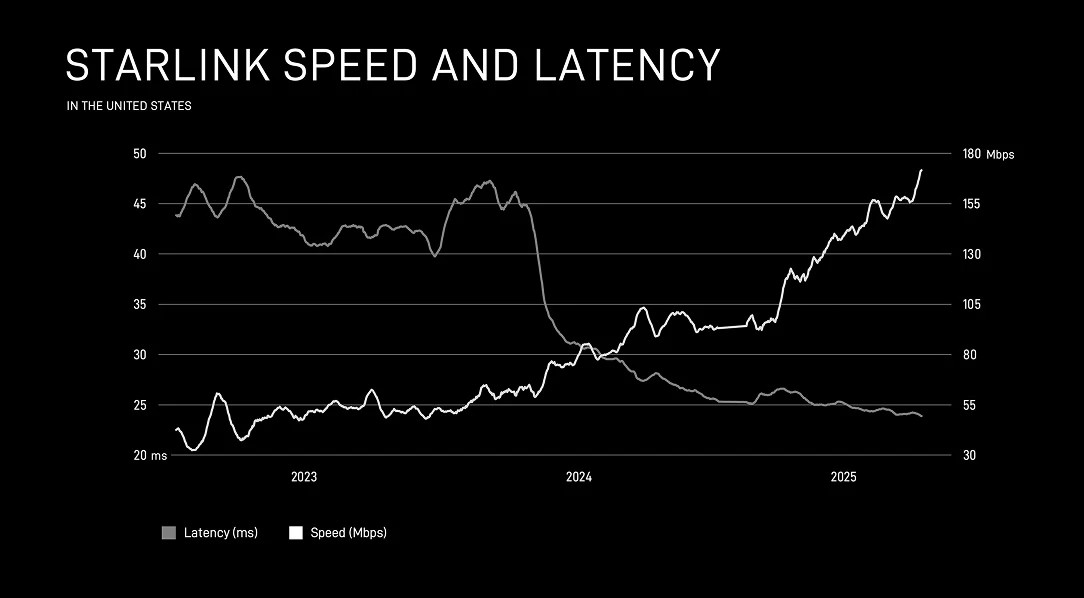
What Starlink publishes about its measurements
Starlink measures its own network automatically: according to the company, anonymised measurements are collected from millions of routers every 15 seconds, adding up to hundreds of thousands of speed tests and hundreds of billions of latency measurements every day in the US alone. For peak hours – defined as 6 pm to 9 pm local time – the company reports the following figures:
- Median peak-hour download speed in the US: almost 200 Mbit/s, as of July 2025
- Median peak-hour latency in the US: 25.7 milliseconds, as of June 2025
- Fewer than 1 per cent of US measurements exceed 55 milliseconds
- The company’s stated goal: a consistent median latency of 20 milliseconds with minimal packet loss
Our editorial assessment: these are robust figures based on a very large sample, but they apply to the United States. They cannot simply be transferred to Germany, because user density, gateway coverage and cell load differ. In its latency report, Starlink separately puts the improvement outside the US at a reduction of up to 25 per cent in median latency and up to 35 per cent in outliers – but gives no figures for individual countries.
That leaves only two reliable ways to check performance at your address: Starlink’s availability map, which offers a speed view for each region, and – after installation – the speed test in the Starlink app. Our own test showed how large the difference between afternoon and evening can be. This is exactly why the 30-day return window is the decisive tool: it is not a free trial, but a paid one: Starlink refunds the full hardware price if you return the undamaged kit within 30 days, but the first month of service is not free. Budget for that month’s fee and the shipping; the exact refund terms differ by market and are set out in your order summary.
The most honest measurement is the one at your own address. If you order via a referral link as an eligible new customer, you can also earn a referral reward (the current amount is shown during checkout) once your service has been active for two months. Bear in mind that the two options exclude each other: if you return the kit within the 30-day window, the two-month condition is not met and no reward is paid.
Why trees cause fewer problems than they used to
The most common disappointment with satellite internet happens at the installation site. The terminal needs an unobstructed view of the sky, and every branch, chimney and dormer can briefly interrupt the signal. In the past, that led to noticeable dropouts in the middle of video calls.
Starlink describes two mechanisms that help here. First, a terminal typically has not one but several satellites in its field of view at once, so there are multiple paths to choose from. Second, the system switches between them automatically and in real time – predictively for fixed installations, based on an obstruction map created during setup, and reactively for mobile terminals and unexpected blockages. According to Starlink, a reactive switch takes less than a tenth of a second.

In practice, this does not mean the installation site no longer matters – quite the opposite. It means that a partially obstructed view today usually causes occasional brief dips rather than an unusable connection. The Starlink app offers two useful tools for this: a preview of the installation site before mounting and a live obstruction map afterwards, which shows in which direction blockages occur. Move the mast two metres or trim a branch, and you can see the effect straight away in the app.
Check before mounting
The obstruction check in the Starlink app scans the sky with your phone camera and shows how clear the view is at the planned location.
Fine-tune after mounting
The obstruction map logs actual blockages over time, so you can judge whether moving the terminal really makes a difference.
Higher is almost always better
A roof, gable or mast beats a spot in the garden as soon as trees, neighbouring buildings or slopes get in the way.
Don’t cover it
Starlink explicitly advises against additional protective covers: they impair performance and the terminal’s ability to melt snow.

What hardware you really need
Starlink sells and rents out several terminal generations side by side in Germany. For homes, the Standard kit and the newer Starlink V5 are the most relevant, with the Starlink Mini added for mobile use. The main differences are size, weight, power consumption and whether the device may be used in motion.
| Specification | Starlink V4 (Standard) | Starlink V5 | Starlink Mini |
|---|---|---|---|
| Peak download (manufacturer figure) | Over 400 Mbit/s | Over 375 Mbit/s | Over 200 Mbit/s |
| Dimensions | 594 × 383 × 39.7 mm | 384 × 306 × 34 mm | 298.5 × 259 mm |
| Weight | 2.9 kg | 1.1 kg | 1.10 kg, 1.16 kg with kickstand |
| Average power consumption | 75 to 100 W | 35 to 50 W | 25 to 40 W |
| Field of view | 100° | No manufacturer figure available | 110° |
| Use in motion | Permitted for Standard 4 and 4 X | Not intended | Permitted |
| Router | Router 3 or Router 2 | Router 2, Router 3 and Router Mini | Integrated Wi-Fi, no router in the kit |
| Ingress protection | IP54 | No manufacturer figure available | IP67, Type 4 |
In everyday use, the biggest difference is not peak speed but power consumption. The V5 almost halves it compared with the V4, even though it delivers practically the same performance class – and for a device that runs around the clock, that is the more relevant figure. The Mini is even more frugal, but with around 112 square metres of Wi-Fi coverage it covers considerably less area than the Standard 4 X, at about 297 square metres.
What’s in the kit
According to Starlink, a Starlink kit contains the antenna, power supply, cable, a mount and a Wi-Fi router. One important exception: the Starlink Mini, Starlink Performance, Starlink Performance (GEN2) and Enterprise kits ship without a Wi-Fi router. The Mini has built-in Wi-Fi. The Mini X is different: our test kit also contained the separate Router Mini with its own power supply, so the antenna outside and the Wi-Fi inside can be set up separately. If you need to cover a larger area with the Mini, you can buy a router separately from the Starlink shop.
Cable
The Standard kit comes with 15.2 metres of Starlink cable, the Mini with 15 metres. Longer cables for specific kits are available in the shop – not every cable fits every terminal.
Mount
The Standard 4 X and the Mini have a fold-out kickstand for quick setup. Permanent roof or pole mounting requires additional accessories.
Router 3
Wi-Fi 6, tri-band with a dedicated backhaul channel and, according to Starlink, about 297 square metres of coverage. It is included with the Residential Max plan in most markets.
Mesh
Router 3, Router 2 and Router Mini can be combined into a mesh network. Starlink recommends no more than three mesh routers and, in large homes, a wired connection between them.
Wi-Fi doesn’t reach every room? Which terminal and router suit your home is covered in our Starlink hardware comparison. How to mount the antenna on a roof, wall, pole or balcony is explained step by step in our Starlink installation guide.
Step-by-step setup
Initial setup is one area where Starlink genuinely beats conventional broadband: no technician visit, no cable to lay and no appointment needed. According to Starlink, the process takes only a few minutes, provided the installation site is right. In our test, the first setup took about 17 minutes; every later re-setup was quicker.
1Find a location
Use the obstruction check in the Starlink app to scan the sky and pick the spot with the clearest view. In Central Europe, a clear view towards the north is particularly important.
2Set up the terminal
Unfold the kickstand or fit a mount, route the cable to the power supply and neatly seal the point where it enters the building. Do not kink or shorten the cable.
3Connect power
Plug in the power supply. Motorised models align themselves – don’t intervene manually. The Standard and Mini are positioned using the app’s alignment tool.
4Connect and update
Connect to the Starlink Wi-Fi and set a network name and password. After initial setup, the terminal usually downloads the latest software overnight.
5Measure and document
Run the speed test in the app at different times of day, especially between 6 pm and 9 pm. Note down the results – they are the basis for your decision within the 30 days.
6Optimise Wi-Fi
Place the router centrally, not in the basement or behind metal. In large homes, add mesh nodes or connect a second access point via Ethernet cable.
Watch the first invoice
Starlink issues the first invoice either on activation or seven days after delivery – whichever comes first. Leaving the kit unopened therefore does not postpone the start of billing indefinitely.
Power consumption and annual costs
One point many comparisons miss: Starlink uses considerably more electricity than a DSL or fibre router. A typical home router draws somewhere in the single-digit to low double-digit watt range; the Starlink terminal also heats itself in cold weather and runs an active antenna. Starlink gives the following average figures for its various models, each referring to the AC input power of the complete system – terminal, router, power supply and cable.
| Model | Average consumption | Sleep mode | Annual consumption (24/7 operation) | Electricity cost per year |
|---|---|---|---|---|
| Starlink Mini | 20 to 40 W | 15 W | 175 to 350 kWh | Approx. €61 to €123 |
| Starlink V5 | 35 to 50 W | Not available | 307 to 438 kWh | Approx. €107 to €153 |
| Standard Actuated | 50 to 75 W | 20 W | 438 to 657 kWh | Approx. €153 to €230 |
| Standard 4 and 4 X | 75 to 100 W | 20 W | 657 to 876 kWh | Approx. €230 to €307 |
| Performance GEN1 and GEN2 | 110 to 150 W | 45 W | 964 to 1,314 kWh | Approx. €337 to €460 |
How we calculated: the figures assume 8,760 operating hours a year, i.e. genuine 24/7 operation, and an assumed electricity rate of €0.35 per kilowatt hour. The formula is power in watts divided by 1,000, multiplied by 8,760 and by your electricity rate. If you pay a different rate, simply adjust: at €0.30, the figures fall by just over a seventh; at €0.40, they rise accordingly.
The range is considerable and, according to Starlink, depends on temperature, location and usage. In winter, consumption is at the upper end because the snow-melt function draws power. Another practical factor is the sleep schedule in the Starlink app: if you put the terminal to sleep at night, consumption during those hours drops to the 15 to 45 watts listed above. With eight hours of sleep a day, a Standard 4 X saves roughly €40 to €70 a year. During our test operation, with a few hours per session, the app showed 18 watts for the Mini X in the start-up phase; with occasional use, consumption hardly matters – it only becomes relevant in 24/7 operation.
Our editorial take
Electricity costs are no side issue. On the Residential 100 Mbps plan at €35 a month, a Standard 4 X with annual electricity costs of €230 to €307 adds around €19 to €26 per month – more than half the base fee on top. If you can choose between two terminal generations, factor this cost into your decision.
Rain, snow, storms and lightning
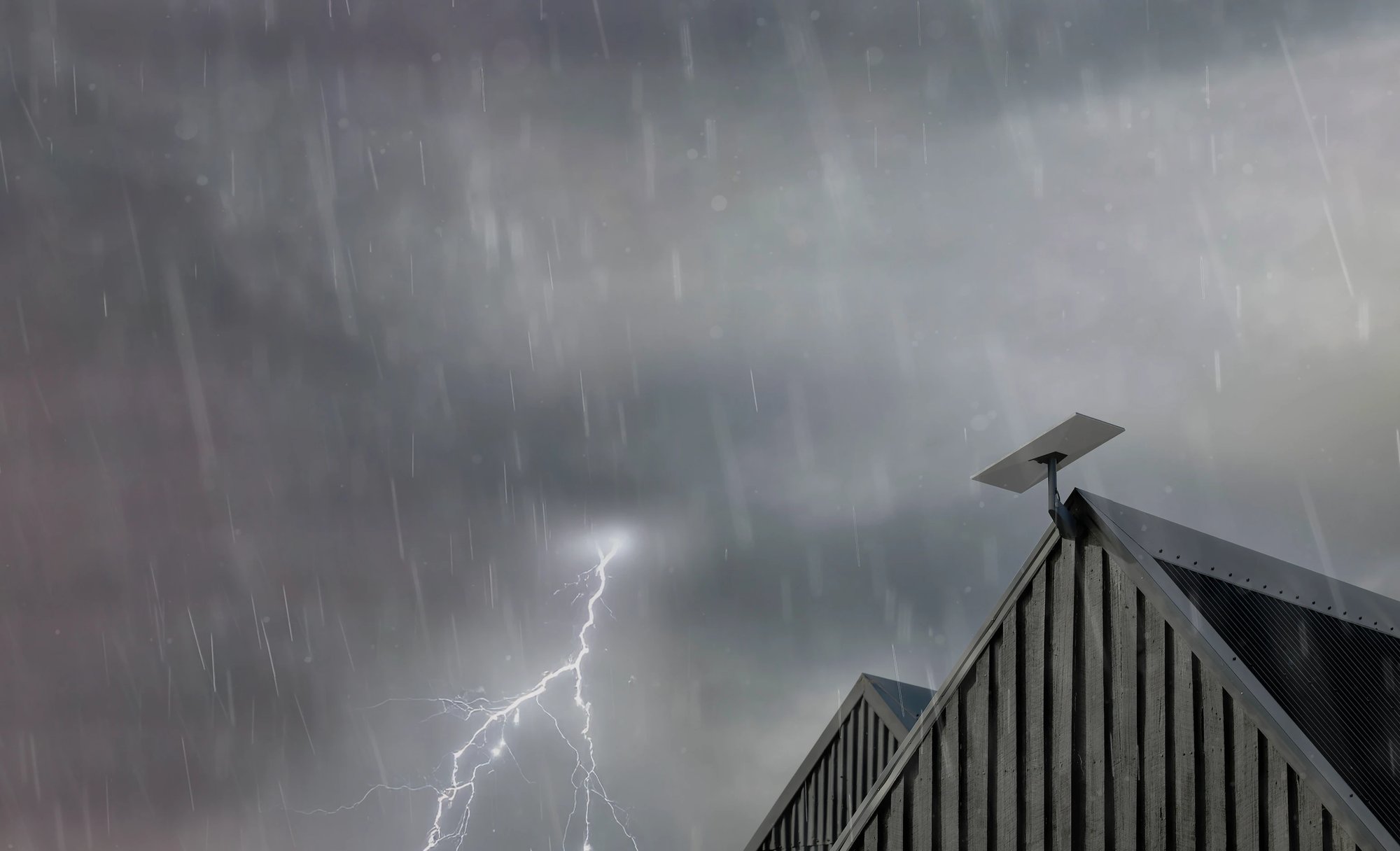
The obvious worry with satellite internet: what happens in bad weather? Starlink gives specific figures. The terminals are rated for outdoor operation from minus 30 to plus 50 degrees Celsius, while the router and power supply are designed for indoor use only, from zero to plus 30 degrees Celsius. For its latest kit generations, the company also states wind resistance of more than 160 kilometres per hour.
Rain
The surface is designed to be hydrophobic. Starlink concedes, however, that heavy rain or wind can affect the connection – resulting in slower speeds and, in rare cases, an outage.
Snow
The terminal can actively melt snow; for the Mini, Starlink quotes up to 25 millimetres per hour. Even so, choose an installation site where snow cannot pile up in front of it.
Lightning
Starlink meets the grounding requirements of the US National Electrical Code and also recommends an external lightning protection system in regions prone to thunderstorms.
Heat
Extreme heat or cold can reduce performance. The power supply belongs in a ventilated indoor space, not in a closed cabinet.
Our own observations fit this picture. In light rain, we often noticed no change while using the connection. During a heavier shower, by contrast, the connection briefly stalled. Without continuous logging, we cannot say for certain whether the weather alone was responsible; we did not record a precise outage rate.
For installations in Germany, two points are particularly important. Roof work and lightning protection must comply with the applicable German regulations and standards; Starlink’s instructions are no substitute for professional electrical installation or an assessment by a qualified specialist. Starlink also recommends that you disconnect the device from the mains and unplug the Starlink cable during a thunderstorm or a prolonged absence to avoid surge damage.
Streaming, video calls and gaming in everyday use
For an everyday assessment, peak speed matters less than which applications work reliably. The picture is mixed. This section draws on around six weeks with the Mini X – with two smartphones, a laptop and occasionally a TV on the Wi-Fi.
Streaming
Depending on the service, 4K streaming needs roughly 15 to 25 Mbit/s per stream. Even the 100 Mbps plan can therefore handle several streams at once, as long as the cell is not congested. In our test, a stream on the TV and a video on a smartphone at the same time mostly ran without problems, and brief fluctuations often went unnoticed. After a longer interruption, the loading spinner did appear once, or the picture briefly turned softer before the quality ramped back up.
Home office and video conferencing
Video conferencing depends more on latency than on bandwidth. In our test, meetings of half an hour to an hour were mostly perfectly usable. Occasionally the picture froze briefly or a sentence came through choppy – it got more disruptive when large files were being uploaded to the cloud at the same time, so we started such uploads after the call.
Online games
Usable for occasional gaming sessions. More noticeable than the normal ping were individual brief delays: the game ran smoothly, then one action responded noticeably later. A low ping in a speed test therefore does not guarantee a consistently even connection; brief satellite handovers can show up as occasional latency spikes. For competitive gaming with tight reaction times, fibre retains the edge.
Upload
In our test, upload was often between 8 and 20 Mbit/s; Starlink quotes typical speeds of 15 to 40 Mbit/s depending on the plan. That is enough for video calls and cloud backups, but much slower than symmetrical fibre. Large video files require patience.
What sticks after six weeks: for a permanent workspace, we would pay particular attention to three things – a permanently clear antenna location, tidy cable routing and good Wi-Fi at the desk. Then Starlink can carry your working day; ideally, keep important uploads away from video calls.
The underestimated bottleneck: CGNAT session limit
According to Starlink, Residential and Roam plans use carrier-grade NAT (CGNAT) and are limited to 1,200 simultaneous sessions. Once the limit is reached, the oldest connections are dropped automatically. Symptoms include dropped VoIP calls, one-way audio, frozen video conferences and VPN problems. In households with many devices and always-on services, this can become noticeable. For such cases, Starlink points to its Priority plans, which have no CGNAT session limit.
Where Starlink reaches its limits
An honest review also has to cover the points that count against Starlink. They are technical in nature and cannot be optimised away.
- No guaranteed bandwidth. Starlink explicitly quotes maximum speeds without any guarantee. When a cell is congested, speeds drop for all users in that cell.
- Fluctuations and brief interruptions. Speed tests started in quick succession can differ noticeably, and in games, individual delays stand out more than the average ping. In the event of large-scale outages, even the best installation site won’t help.
- Capacity limits by region. When a cell is at capacity, Starlink may temporarily stop offering new Residential plans there or charge a one-time congestion fee.
- No port forwarding. According to Starlink, the Starlink Wi-Fi router supports neither port forwarding nor custom firewall rules, for either IPv4 or IPv6.
- No public IPv4 by default. Inbound traffic is not possible under the default CGNAT policy. Starlink offers public IPv4 addresses only on Local Priority and Global Priority plans.
- Blocked ports. Outbound TCP port 25 (SMTP) and TCP port 445 (SMB), among others, are blocked. If you want to run your own mail server, you cannot do so over Starlink without a workaround.
- Power consumption. Considerably higher than with any conventional connection, as the annual calculation above shows.
- A clear view is essential. In densely built-up areas, on wooded plots or in narrow valleys, there may simply be no usable installation site.

Who Starlink is worth it for
The key question is not whether Starlink is good, but whether it is the best option available at your address. This is our editorial assessment based on the data above.
| Situation | Assessment | Suitable plan |
|---|---|---|
| No DSL above 16 Mbit/s, no fibre in sight | Clear recommendation. Starlink is usually the fastest option actually available here. | Residential 100 Mbps or 200 Mbps |
| Large household, several heavy users | Recommended if the Max plan is available. Its higher priority pays off precisely during the evening peak. | Residential Max |
| Working from home with regular video calls | Works well if the antenna location stays clear. In our test, meetings mostly ran well; start large uploads outside calls. | Residential, tier according to household size |
| Fibre connection already in place | Not worthwhile as a main connection. As a redundant backup line for businesses, however, it can make sense. | Business or Priority |
| Motorhome, boat, changing locations | Recommended, but only with a Roam plan. Residential plans do not allow use in motion. | Roam 100GB or Roam Unlimited |
| Own server, inbound connections, port forwarding | Only with limitations. The default configuration does not allow inbound traffic. | Local or Global Priority with public IPv4 |
| Plot with dense tree cover | Check first. Without a clear view of the sky, even the best plan won’t help. | Run the obstruction check first, then decide |
Only the address check shows whether your area has capacity, which plans are offered there and what the hardware costs at your address. Eligible new customers who order via our referral link also receive a referral reward based on the sign-up country. The current referral reward is shown during checkout.
Do the maths first: What Starlink costs in your country over 12 and 24 months is worked out in our Starlink price guide. Whether Starlink is available in your country at all is shown on our Starlink availability map.
First-year costs and how to order safely
The monthly fee is only part of the bill – hardware, electricity and the referral reward, which only arrives after two months, all make a difference. The table shows the pure service fees for twelve months, once without and once after deducting the referral reward of £40 in the UK or US$100 in the US (as of 11 November 2026). Hardware and shipping come on top; their price depends on the kit and the service address and is shown when you order.
| Plan | Per month | 12 months | With reward |
|---|---|---|---|
| UK · Residential 100 Mbps | £40 | £480 | £440 |
| UK · Residential 200 Mbps | £60 | £720 | £680 |
| UK · Residential Max | £80 | £960 | £920 |
| UK · Roam 100GB | £55 | £660 | £620 |
| UK · Roam Unlimited | £100 | £1,200 | £1,160 |
| US · Roam 100GB | $55 | $660 | $560 |
| US · Roam 300GB | $80 | $960 | $860 |
| US · Roam Unlimited | $175 | $2,100 | $2,000 |
UK Residential prices as listed on starlink.com on 19 October 2026 (the page now shows prices only after you enter an address); UK and US Roam prices checked on 2 November 2026. Our own calculation, excluding hardware, shipping and electricity. The reward (example with the reward as of 11 November 2026: £40 in the UK, US$100 in the US) requires a new customer order via a referral link and at least two months of service.
For comparison: in the UK, the £40 reward equals exactly one month on Residential 100 Mbps, two-thirds of a month on 200 Mbps and half a month on Max. In the US, US$100 covers almost two months of Roam 100GB, more than one month of Roam 300GB and just over half a month of Roam Unlimited. Electricity comes on top; we work out the annual consumption of each terminal above. How the total costs develop over 24 months and which other fees may apply is set out in our Starlink price guide.
How to order without detours – in four steps
1Check your address
Open the referral link and enter your address. Stay in the same browser tab: Starlink only stores the code there.
2Choose a plan
Residential for a fixed location, Roam for use on the move. Business and Priority plans are not eligible for the reward.
3Check the code
Before you pay, Starlink shows “Referral code applied” together with the amount. If the notice is missing, open the link again.
4Test it and choose your reward
For 30 days, you get the full hardware price back if you return the kit. If you stay for two months, choose a bank payout (where available) or service credit in your Starlink account.
Common mistakes that cost you the reward
Kit bought from a retailer
According to Starlink, kits from resellers or retailers and kits acquired via an account transfer are not eligible – the reward only applies to orders placed directly on starlink.com.
Returned within 30 days
A return and the reward exclude each other. If you send the kit back, you do not meet the two-month condition.
Order continued in a new tab
Starlink only remembers the code in the browser tab in which you opened the link. If you switch tab, browser or device, open the link again there.
Fell for a fake reward site
Only a link that leads directly to starlink.com is legitimate. Be wary of any site that asks for money, login details or an order outside starlink.com.
What the reward and a possible cancellation mean for your total costs is explained in our Starlink price guide, including one-off fees and rental options.
Your next step takes two minutes: enter your address and see the plans and the hardware price. If you order as a new customer via our referral link, Starlink pays a referral reward after two months of service. The current referral reward is shown during checkout. Checking your address does not commit you to anything.
Frequently asked questions about using Starlink
Is there a Starlink promotion or discount right now?
Yes. Until 1 December 2026 Starlink offers new customers 50 % off the first three months in Germany, Italy, Poland, Scandinavia, Indonesia, Vietnam and Japan, and 30 % off the monthly price in the UK, France, Spain, Portugal, the Netherlands, Canada, Australia, Mexico and Brazil (duration not stated by Starlink for the 30 % markets). Residential plans qualify “in select areas”; the address check on starlink.com shows your local price. The referral reward is paid on top. Checked 9 November 2026.
How fast is Starlink in Germany, really?
In our hands-on test with the Starlink Mini X, many daytime measurements came in at roughly 70 to 150 Mbit/s download and 8 to 20 Mbit/s upload; between about 7 pm and 10 pm, they more often dropped to 40 to 100 Mbit/s. During setup, the Starlink app measured 97 Mbit/s download, 22 Mbit/s upload and 21 milliseconds latency; a browser speed test against a server in Berlin reached 96.3 and 10.9 Mbit/s at 28 milliseconds. These are real-world figures from one location. Starlink does not publish separate median figures for Germany. The plans cap downloads at 100 Mbit/s, 200 Mbit/s or more than 400 Mbit/s on Residential Max; these are maximum speeds without a guarantee. The only reliable ways to check the actual speed are the speed view on the availability map and, after installation, the test in the Starlink app.
Is the latency good enough for online gaming?
For most games, yes. For the US, Starlink reports a median latency of 25.7 milliseconds at peak times, with fewer than 1 per cent of measurements above 55 milliseconds. For competitive gaming with very tight reaction windows, fibre retains the edge because it is more consistent. In our test, during occasional gaming sessions, it was not so much the normal ping that stood out as individual brief delays.
Is Starlink slower in the evening?
Often, yes, in our test: between about 7 pm and 10 pm, speed tests more often showed 40 to 100 Mbit/s instead of the 70 to 150 Mbit/s we saw during the day. Starlink itself defines 6 pm to 9 pm as peak hours, because more users share a cell then. When carrying on with a series, we usually noticed little of this; when downloading larger files, we did.
Is Starlink good enough for working from home with video calls?
Mostly, yes. In our test, meetings of half an hour to an hour were perfectly usable; occasionally the picture froze briefly or a sentence came through choppy. Parallel cloud uploads were the biggest disruption. Allow a little lead time after switching on, start large uploads after the call and make sure you have good Wi-Fi at your desk.
How much electricity does Starlink use per year?
Depending on the model, between around 175 and 1,314 kilowatt hours in 24/7 operation. A Standard 4 X, averaging 75 to 100 watts, uses about 657 to 876 kilowatt hours a year, which at €0.35 per kilowatt hour works out at around €230 to €307. The sleep schedule in the app reduces this noticeably.
Do I need a technician for the installation?
No. Starlink is designed for self-installation: choose a location, set up the terminal, connect power and pair it via the app. A professional installer is only worthwhile if you need a roof or pole mount or a connection to a lightning protection system.
How long does it take to set up Starlink?
In our test, about 17 minutes passed between opening the Starlink app’s App Store page and the first connection statistics. That included unboxing, setting up, scanning the sky with the phone camera and connecting to the Router Mini’s Wi-Fi. The obstruction map then continues to calibrate in the background; according to the app, the first minutes of statistics are labelled as the start-up phase. Later set-ups were quicker; the main effort then lay in the cable and choosing the spot.
Why does the Starlink app report a misalignment after setup?
Because the terminal is not facing the direction the app calculates for your location. In our test, the app showed a deviation of 41 degrees immediately after connecting and displayed an alignment aid with a target outline and direction of rotation. The connection still worked, but for stable performance you should rotate the terminal as indicated.
Does Starlink work in rain and snow?
Generally, yes. The terminal has a hydrophobic surface, can melt snow and, according to Starlink, operates from minus 30 to plus 50 degrees Celsius. However, heavy rain and strong winds can slow the connection and, in rare cases, interrupt it. In our test, light rain usually went unnoticed, while the connection briefly stalled during a heavier shower. Additional covers are explicitly not recommended.
Can I keep using my existing FRITZ!Box router?
Yes, you can connect a third-party router – Starlink offers a bypass mode for this. However, the Starlink app then loses some of its functions. For straightforward Wi-Fi management, Starlink Mesh is usually the simpler solution.
What happens if I want to cancel after two months?
Residential plans run month to month, and service stays active until the end of the paid billing period. A full hardware refund is only available within the 30-day return window; after that, according to Starlink, no refund is given. Separate return periods apply to rented kits.
Can I use Starlink in a motorhome?
Not on a Residential plan. Use in motion and at changing locations requires a Roam or Priority plan. Which hardware is approved for this and which countries restrict in-motion use is covered in our guide to motorhomes, travel and events (in German).
Is there a Starlink free trial?
Not quite – you pay for the kit, shipping and the first month when you order. According to the Starlink Help Center, the 30 days are a hardware trial: if you return the undamaged kit within that window, Starlink refunds the full hardware price, while the first month of service is billed at activation and is not free. The fine print varies by market: the German order page (checked on 26 and 27 October 2026) also listed a refund of the first service fee, whereas the French one excludes the first month of service and shipping. The order summary valid when you order is what counts, so check it before paying. A return within 30 days also means no referral reward, because the reward requires two months of service.
Is Starlink available at my address?
Starlink is available in the US, the UK, Canada and Australia. Whether there is capacity at your address right now and which plans are offered there is shown bindingly only by the address check on starlink.com. For a quick overview of every country, use the interactive world map at the top of this review.
Should I wait for Starlink V3, the Mini 2 or Amazon Leo?
For most households, no. The V3 satellites expand the existing network and benefit existing customers too. The Mini 2 has been official since 10 November 2026: according to Starlink, it has a swappable 71 Wh battery for up to 4.5 hours, USB-C charging at 60 W and Wi-Fi 6. Pre-orders are initially by invitation only in the US; launch dates and prices for other countries are still open. At the end of October 2026 Amazon Leo had not launched a commercial service or named a price or launch date for Europe. If you need fast internet today, you can cancel Starlink monthly and switch later.
How much does Starlink cost in the first year?
In the UK, twelve months of service fees come to £480 (Residential 100 Mbps), £720 (200 Mbps) or £960 (Max); with the £40 referral reward (as of 11 November 2026), that is effectively £440, £680 or £920. In the US, Roam costs $660, $960 or $2,100 a year, or $560, $860 or $2,000 after the US$100 reward. Hardware, shipping and electricity come on top. Our overview is in the section First-year costs and how to order safely.
Is the Starlink referral reward legitimate?
Yes, if you order directly on starlink.com. Starlink runs the referral programme itself and shows the amount at checkout as “Referral code applied”. Be wary of sites that ask for money, login details or an order outside starlink.com.
How do I cancel Starlink?
Residential and Roam plans run month to month. You cancel in your Starlink account, and the service stays active until the end of the paid billing period. If you return the kit within 30 days, Starlink refunds the hardware price. What cancelling means for your costs and the referral reward is covered in our Starlink price guide.
Verdict: strongest where nothing else is available
Starlink has evolved from a stopgap into a connection that can handle streaming, working from home and occasional gaming in everyday use. Our roughly six weeks with the Starlink Mini X confirm this: setup in about 17 minutes with no technician required, 97 Mbit/s and 21 milliseconds latency in the first measurement, often 70 to 150 Mbit/s during the day since then, and streams and video calls mostly without problems. The latency figures Starlink publishes are in a range that would have been unthinkable for satellite internet just a few years ago, and the plan tiers at €35, €55 and €75 make costs predictable. But the honest caveats remain: more often lower speeds in the evening, occasional brief hiccups in calls or games, no guaranteed bandwidth, noticeable power consumption in 24/7 operation, CGNAT restrictions and the absolute need for a clear view of the sky.
Our assessment: where fibre is available or will be built in the foreseeable future, it remains the better choice. Wherever the alternative is a sluggish copper line or an overloaded mobile network, Starlink is now the most practical solution – and the 30-day return window makes trying it low-risk. We work out how the costs add up over 12 and 24 months in our Starlink price guide; for a direct technology comparison, see our article Starlink vs fibre, DSL and LTE (in German).
After our November update, our verdict stands. Prices and referral rewards are stable, and the announced improvements – more satellites, V3, satellite service for smartphones – strengthen the network rather than devaluing what is on offer today. Waiting for a competitor or a new device therefore only makes sense if you can manage without fast internet for a while anyway.
Further reading: all Starlink guides on Drohnen.de
From the first question – “Is it worth it?” – to a finished installation: here are all Drohnen.de Starlink guides, sorted by topic.
Basics and real-world experience
Starlink vs fibre, DSL and 5G (in German)
Speed, latency, cost and security compared head to head.
Satellite internet (in German)
All providers, GEO vs LEO, cost calculator and technology finder.
Costs and plans
All plans, one-off fees, rental and cancellation in detail.
Starlink in a motorhome and when travelling (in German)
Roam plans, in-motion use and power supply in a camper.
Hardware and installation
Mini, Standard and Performance: dimensions and power consumption.
How to align Starlink correctly
Compass direction, obstructions and the app’s rotation aid.
Roof, wall, pole or balcony – with a cable planner.
Starlink mounts compared (in German)
Original or Amazon: mounts for the Mini and Standard.
Special use cases
Starlink in an allotment garden (in German)
Legal aspects, off-grid power, plans and winter shutdown for your garden shed.
Starlink for truck drivers (in German)
Internet for long-distance drivers: plans, installation and power in the cab.
Availability and countries
Starlink availability worldwide
World map with country check and a direct link to the Starlink map.
Starlink in Austria (in German)
Experience, costs in euros, tenancy law and a comparison with 5G Cube routers.
Starlink in Switzerland (in German)
Prices in Swiss francs, universal service, alpine pastures and mountain huts.
This review is also available in other languages
- Deutsch
- Français
- Italiano
- Español (España)
- Español (México)
- Nederlands
- Português (Portugal)
- Português (Brasil)
- Polski
- Čeština
- Norsk
- Bahasa Indonesia
- Tiếng Việt
Referral link, transparency and disclaimer
What a Starlink referral link actually does
Starlink runs a referral programme in most markets; in autumn 2026 it replaced the former free month with a fixed cash or credit reward. If you order on starlink.com via another customer’s referral link, the referrer and you as the referred customer each receive the same referral reward once your service has been active for two months. Per Starlink, as of 11 November 2026, new customers who sign up with our code receive £40 in the UK, €45 in Germany (€90 from late October to early November 2026, €45 before that), €45 in Ireland and most other euro countries (€40 in Cyprus, as of 9 November 2026), CHF 40 in Switzerland, US$100 in the US, CA$140 in Canada, A$110 in Australia and NZ$130 in New Zealand; the order flow shows the amount in a “Referral code applied” banner. Starlink may change amounts and terms. The current referral reward is shown during checkout. Because the process runs in several stages, it can cause confusion at checkout – so here is the full process as described in the Starlink Help Center.
- Sign-up: Order via the referral link directly on starlink.com, not through a reseller or retailer.
- First month: You pay for the first month as normal and activate your kit. Activation is part of confirming that the referral is eligible.
- After two months: Once the referred customer has stayed subscribed for two months, the reward becomes due – as soon as 60 days after activation, depending on the country, account settings and identity verification. By default, it is paid as service credit and deducted from the next invoice; in most countries, you can choose a cash payout to a bank account instead, while some countries offer credit only.
Requirements according to Starlink: the referral must be for a new Starlink customer account – existing and returning customers are excluded. You must order directly on starlink.com via the referral link, pay the first month, activate the kit and keep the service for at least two months. Eligible plans are Residential (including Residential Lite, Residential 100 Mbps, Residential 200 Mbps and Residential Max) and Roam (Roam 100GB, Roam 300GB and Roam Unlimited). Kits bought from resellers or retailers and kits acquired via an account transfer are not eligible. Full details are in the Starlink Help Center article on the referral programme.
Our disclosure: The links marked as “referral link” in this article contain the referral code of the drohnen.de editorial team. If you order through one as an eligible new customer, you receive the referral reward described above, and our account is credited with the same amount. This costs you nothing extra, and the price is the same as ordering without a code. There is no classic promo code or coupon code in the Starlink shop: our link applies the referral code automatically, in every market, and checkout shows “Referral code applied” with the amount for your sign-up country. Our editorial assessment is independent of this – the criticisms in the section on Starlink’s limitations are deliberately just as prominent.
Sources, methodology and liability notice
Technical specifications, prices and plan details in this article come from official Starlink sources for Germany: the Residential and Roam plan pages, the service plan overview, the Starlink Help Center, the network update and the product data sheets for the Standard kit and the Starlink Mini. The manufacturer information was retrieved on 16 September 2026 and re-checked on 23 September 2026; prices were last checked on 19 October 2026. Manufacturer information is labelled as such in the text; ratings, comparisons and projections are editorial assessments. The figures and observations in the “Our hands-on test” section come from the editorial team’s own use of a Starlink Mini X at one location in Germany, several times a week since mid-September 2026. The initial measurements were taken during setup; the everyday figures are typical ranges from repeated speed tests without continuous logging. They are not representative of performance at other locations, at other times of day or with other hardware. All photos and screenshots in the hands-on section are by Drohnen.de. Prices, availability and promotions reflect the day they were checked and may change at any time. This article was researched with AI assistance and reviewed by our editorial team. It provides general information and is no substitute for individual advice, a professional electrical or lightning protection installation, or a review of the specific contract terms. Only Starlink’s applicable terms of service are binding.
Transparency and editorial note: In view of the transparency requirements under Article 50 of the EU AI Act, which apply from 2 August 2026, our articles are reviewed, put into editorial context and approved before publication. Final assessment and editorial responsibility lie with our editorial team.
For our visuals, we use our own and supplied photographs as well as illustrative images and illustrations. These may be created or edited using digital tools. Where statutory transparency or labelling requirements apply to individual content, it is labelled accordingly.
Some product boxes and product links in this article are affiliate links. If you buy through them, our editorial team receives a small commission – the price stays the same for you. This has no influence on test results, ratings or recommendations.
Sources
Show all sources used
Manufacturer sources – Starlink / SpaceX:
- Starlink, public plan API (marketing/availability) and referral-code API for the United Kingdom, plus starlink.com/gb in the browser – retrieved on 9 November 2026: promotional prices, end date, reward.
- Starlink Residential – plans and prices for Germany
- Starlink service plans – overview of Residential and Roam
- Starlink network update – speed, latency and capacity
- Starlink reliability – weather resistance and resilience
- Starlink Standard product specifications (PDF)
- Starlink Mini product specifications (PDF)
Starlink Help Center (consulted in the German version):
- How much power does my Starlink need?
- Differences between Starlink V4 and Starlink V5
- Differences between Starlink Mini and Standard 4 X
- What is included in my Starlink kit?
- How can I set up Starlink?
- What are the Residential plans?
- Starlink in snow, heavy rain, storm and extreme temperatures
- CGNAT session limits and their impact
- Which IP addresses does Starlink assign?
- What is Starlink Mesh?
- Starlink kit returns and return policy
- What is an activation fee?
Further manufacturer documents:
- Improving Starlink’s Latency – Starlink technical report on latency development (PDF)
News timeline (November 2026):
- Jonathan McDowell: Starlink statistics on satellites in orbit (as of 29 Oct 2026)
- NewSpace Economy: FCC proposes expanded rules for supplemental coverage from space (30 Oct 2026)
Product images: Starlink / SpaceX. Our hands-on photographs: drohnen.de. The final header image is an AI-generated editorial illustration.

