GTA VI · Redeem the code and install · updated 19 November 2026
GTA 6 code: how to redeem it on PS5 and Xbox – a guide with our own photos
There is no disc in the GTA 6 box, only a download code. We redeemed a PS5 box ourselves on 12 November and photographed every screen. Here is where the code is, how to redeem it on PS5, in the PlayStation App, in a browser and on Xbox, how much storage to free up, what the Ultimate upgrade costs and what to do if the code will not work.
GTA VI has been playable since 19 November 2026 at midnight local time – in the UK since 00:00 GMT.
PS5 guide with photos Code not working?
- No disc in the box: the code is printed on the inside of the cover
- PS5 code: 12 characters · Xbox code: 25 characters
- Installed on our PS5: 209.9 GB
- Free space needed while downloading: 223.1 GB; the case says “230 GB minimum”
- UK PS5 boxes only work with UK PlayStation accounts
- Codes can only be redeemed by account holders aged 18 or over
Steps and error messages as described by PlayStation Support, Xbox Support and Rockstar Games, checked on 19 November 2026. Screenshots from our own test on a PS5 (German menu language) on 12 and 13 November. Menus may vary slightly between system versions.
Open the box of Grand Theft Auto VI and you will not find a disc – just a card and a download code. Redeem your GTA 6 code as soon as the box arrives: the download only starts after redemption, and at around 210 GB it takes hours even on a fast connection. Since Thursday, 19 November 2026, the game has been unlocked at midnight local time, so once the download has finished you can start playing straight away.
We tested this ourselves. On the evening of 12 November our editor opened the PS5 box, entered the code in the PlayStation Store and started the download. On the evening of 13 November the pre-load had finished, and we bought the upgrade to the Ultimate Edition. Our test box was the German retail version and our PS5 runs in German, which is why the screenshots show German menus; next to each step we give the English menu names used by PlayStation Support. We did not have an Xbox box, so the Xbox steps follow Microsoft’s official help pages.
Updated: Thursday, 19 November 2026. Screenshots of our PS5 from 12 November (about 18:42 CET) and 13 November (19:07–19:12 CET). Steps, region rules and error messages checked against the UK pages of PlayStation Support and Xbox Support on 19 November.
Update 19 November 2026
GTA 6 is out – what matters now
- Unlocked: according to Rockstar Support GTA VI unlocks at midnight local time in every region; in the UK that was 00:00 GMT on 19 November.
- Still locked after midnight? Wait a few minutes, then restore licences on PS5. How it works
- Reviews: critics are giving GTA 6 a Metascore of 99. All scores in our review roundup
- Download times: our pre-load guide has the size, start times and a download-time calculator.
Redeem your GTA 6 code: the key facts in 30 seconds
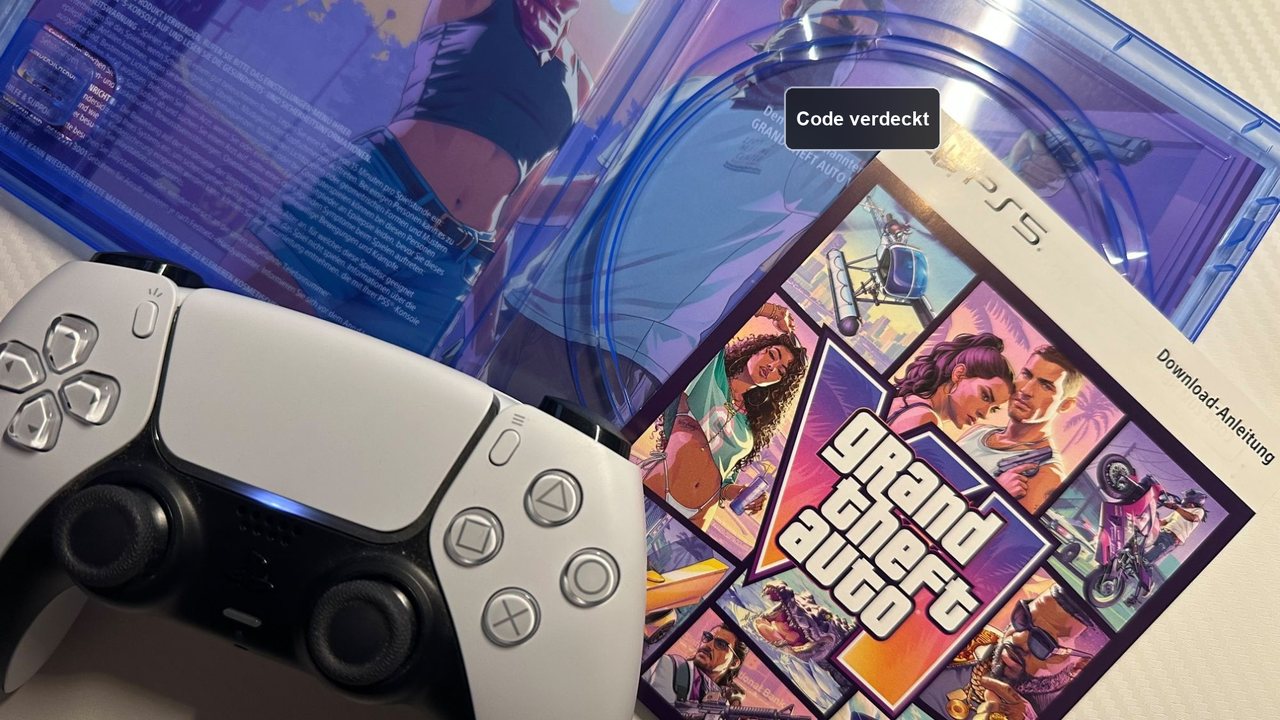
On the inside of the cover of the PS5 case. A card in the case points to it. There is no disc.
PS5: PlayStation Store › “… (More)” › “Redeem Code” › enter the 12 characters. Xbox: Store › View button › “Redeem” › 25 characters, or in a browser at xbox.com/redeem.
Installed, GTA VI takes 209.9 GB on our PS5. During the download the console wanted 223.1 GB free, and the case says “230 GB minimum”. Keep at least 230 GB free.
Yes. Since 19 November the game unlocks at midnight local time. If the download is complete you can start immediately.
We tried it: redeeming the GTA 6 box on a PS5
On Thursday, 12 November 2026, at around 18:42 CET, our editor-in-chief opened the PS5 version of the box and redeemed the code. Redeeming took less than two minutes; according to the console, the download would take almost a day. It had finished by Friday, 13 November, at 19:07 CET – we did not log the exact finishing time. The menu texts below are translated from the German menu.
Tabelle seitlich wischen – weitere Spalten rechts
| Step | What the PS5 showed (translated) | What it means |
|---|---|---|
| Code field | “Enter the 12-digit voucher code”; note: 10-digit discount codes are entered at checkout | The GTA code is a voucher code and goes into this field, not into the basket. |
| Check | “This code contains 1 item” – Grand Theft Auto VI, button “Redeem” | The code is valid for this account. |
| Confirmation | “You have redeemed your code for 8 items” | The number apparently counts individual packages; Sony does not explain it. Two entries were visible. |
| Content | Grand Theft Auto VI (full game) and “Extra2” (add-on), both with an expected release date of 19/11/2026 | According to the card in the box, the code includes the Vintage Vice City Pack. |
| Size | 223.1 GB required, 209.758 GB download | The PS5 reserves more space than it downloads. |
| Time left | “23 hours left”, shortly afterwards “20 hours left” | Depends on your connection; early estimates jump around. |
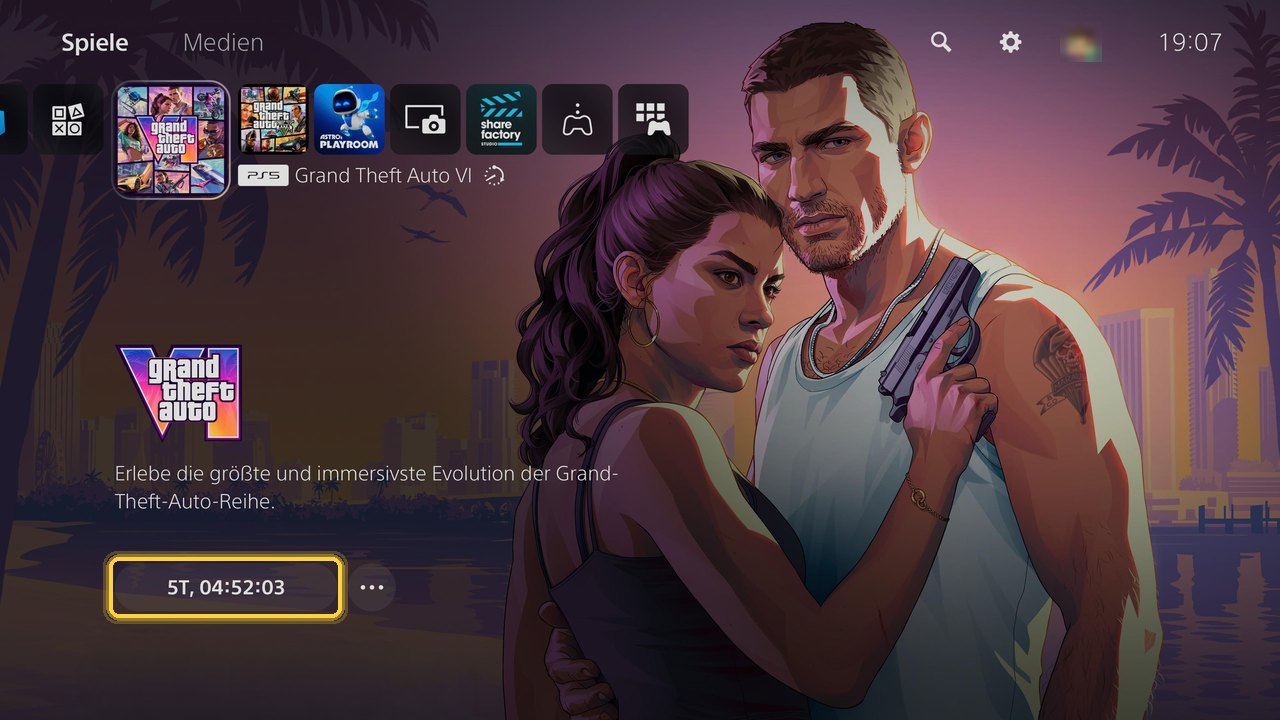
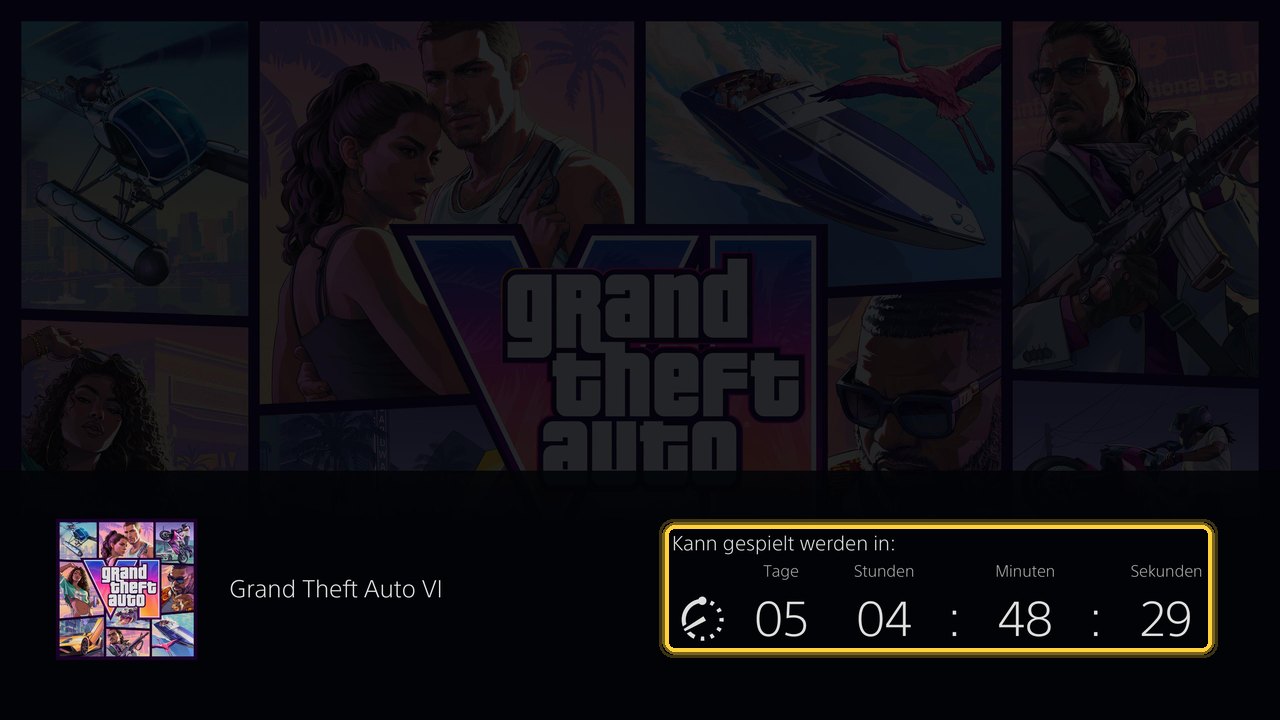
| 13 Nov, 19:07 | Home screen shows a countdown button instead of a progress bar | The pre-load had finished; the countdown pointed to 19 November, 00:00 CET. |
| 13 Nov, 19:11 | Storage overview “Games and Apps”: Grand Theft Auto VI 209.9 GB | That is the installed size – less than the 223.1 GB needed during the download. |
Our impression
Redeeming the code is as simple as any other PlayStation voucher. Two things surprised us: the message about “8 items”, although the console had announced one item and listed two, and the space reserve. The PS5 wanted 223.1 GB free, even though it “only” downloads 209.8 GB. Anyone who cleared exactly 212 GB would not have had enough.
Where is the GTA 6 code? Inside the cover – there is no disc
The most important answer first: there is no disc in the GTA 6 box. Sony says on its GTA VI support page that the physical versions contain only a download code, and Rockstar confirms it in its support pages and store. In our PS5 case, a card sits where the disc would normally be. It says the download code for Grand Theft Auto VI and the Vintage Vice City Pack is printed on the inside of the cover.
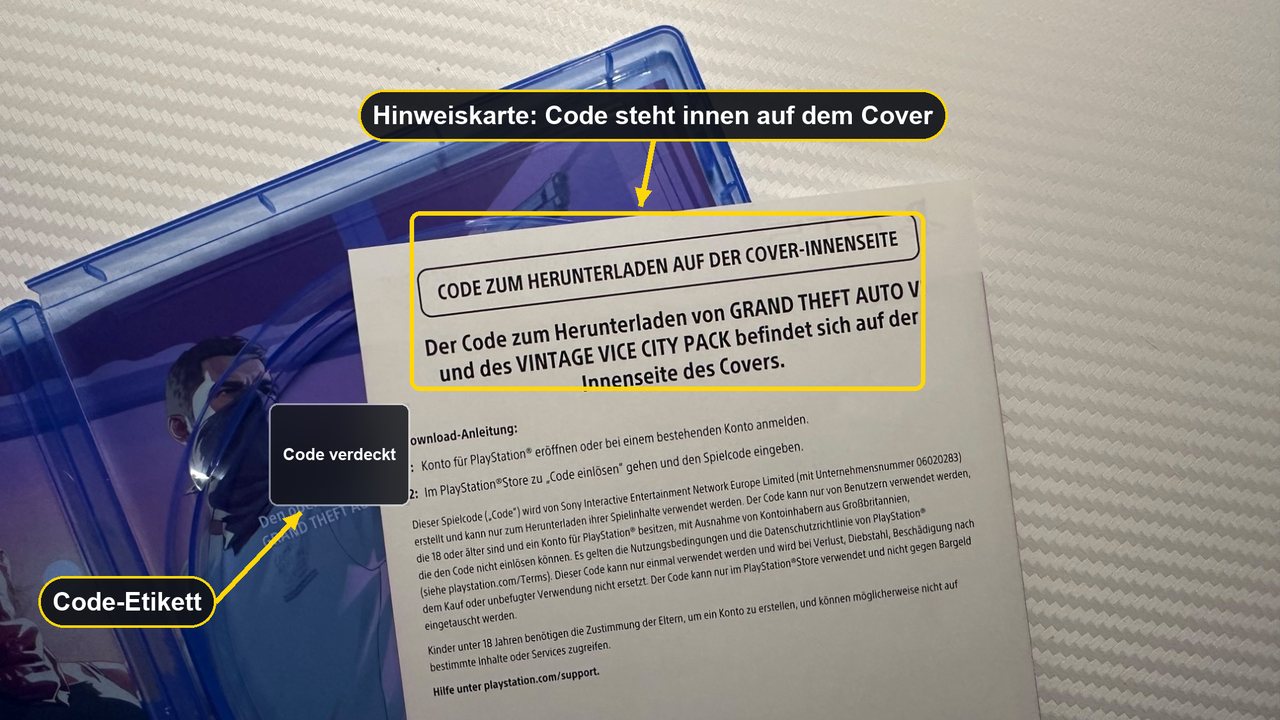
The small print on the card explains most of the errors that can come up later. On our German box it says: the code may only be used by account holders aged 18 or over, it works only once, it is not replaced if lost, stolen or damaged after purchase, and it is only valid in the PlayStation Store. It also explicitly excludes account holders in the United Kingdom.
Important for UK players
Buy the UK box for a UK account
- UK box: according to Sony’s compatibility page for GTA VI codes, the UK version can only be used with PlayStation accounts registered in the United Kingdom.
- European box: the version for “Europe (excluding UK)” covers Ireland, Germany, France, Spain, Italy and many other countries – but not the UK.
- No region change: Sony says the country of a PlayStation account cannot be changed after it has been created.
- Xbox: according to Rockstar, Xbox codes for GTA VI are not tied to a region.
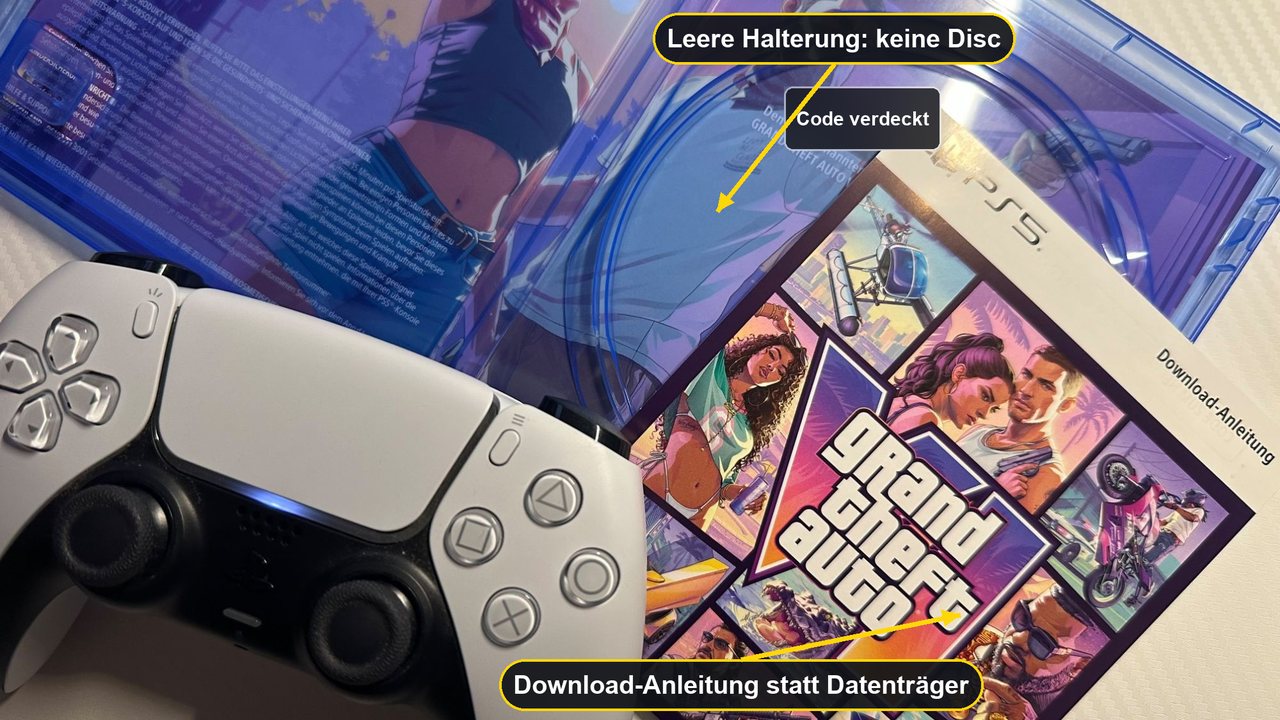
Tip: do not photograph the code or share a photo of the open case in which it can be read. A code works only once and is not replaced if someone else uses it, so it is best to redeem it right after unboxing. We did not open an Xbox box ourselves, so we have not checked exactly where the code is printed there.
How to redeem the GTA 6 code on PS5: step by step with photos
The route matches PlayStation Support’s official guide: open the PlayStation Store, press the triangle button for the menu, select “… (More)” › “Redeem Code”, enter the 12-digit code and select “Redeem”. First make sure you are signed in to the account you want to play GTA 6 on – Sony does not move content between accounts. Our screenshots show the German menu.
-
Open the PlayStation Store and the “…” menu
On the home screen, open the PlayStation Store. The menu with three dots sits at the top right next to search, wishlist and basket. Sony describes it as pressing the triangle button to open the menu.
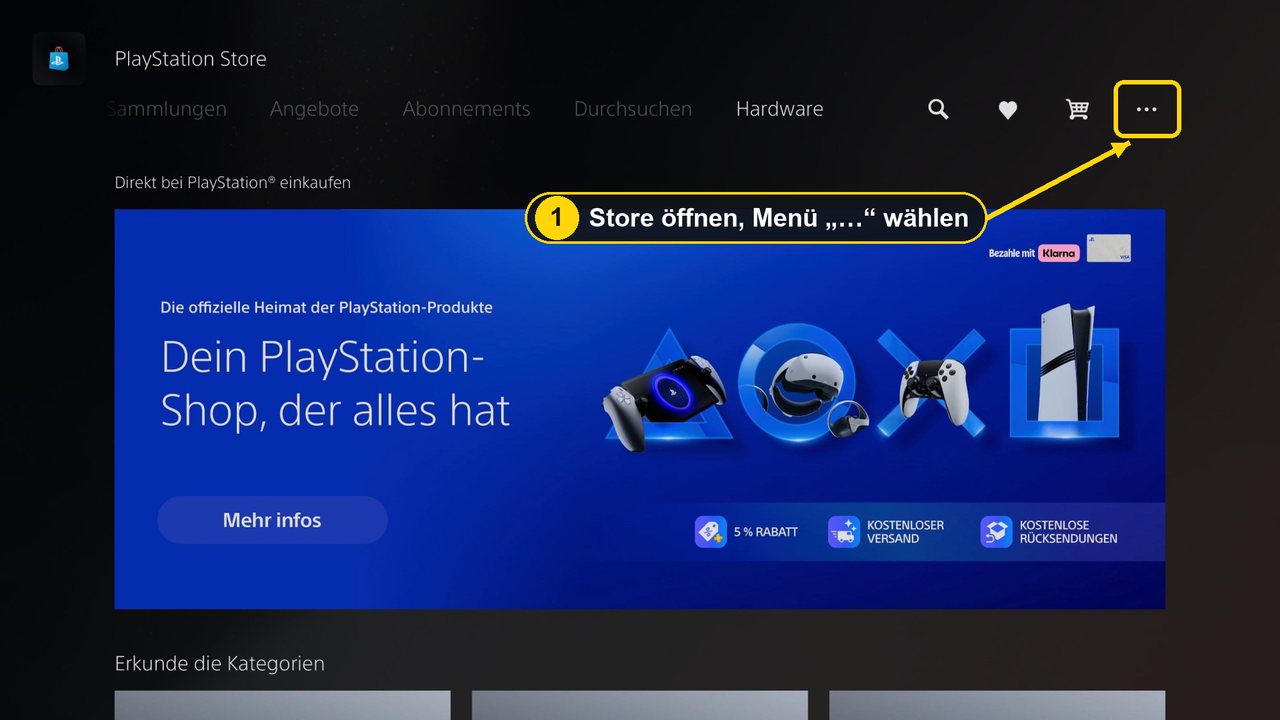

Step 1: open the “…” menu at the top right of the PlayStation Store. Image: own screenshot, drohnen.de (PS5 in German; game artwork © Rockstar Games) -
Select “Redeem Code”
The menu lists payment methods, Redeem Code, subscriptions, transaction history and, further down, the store country. Quickly check the account name at the top: is this really the account you play on?
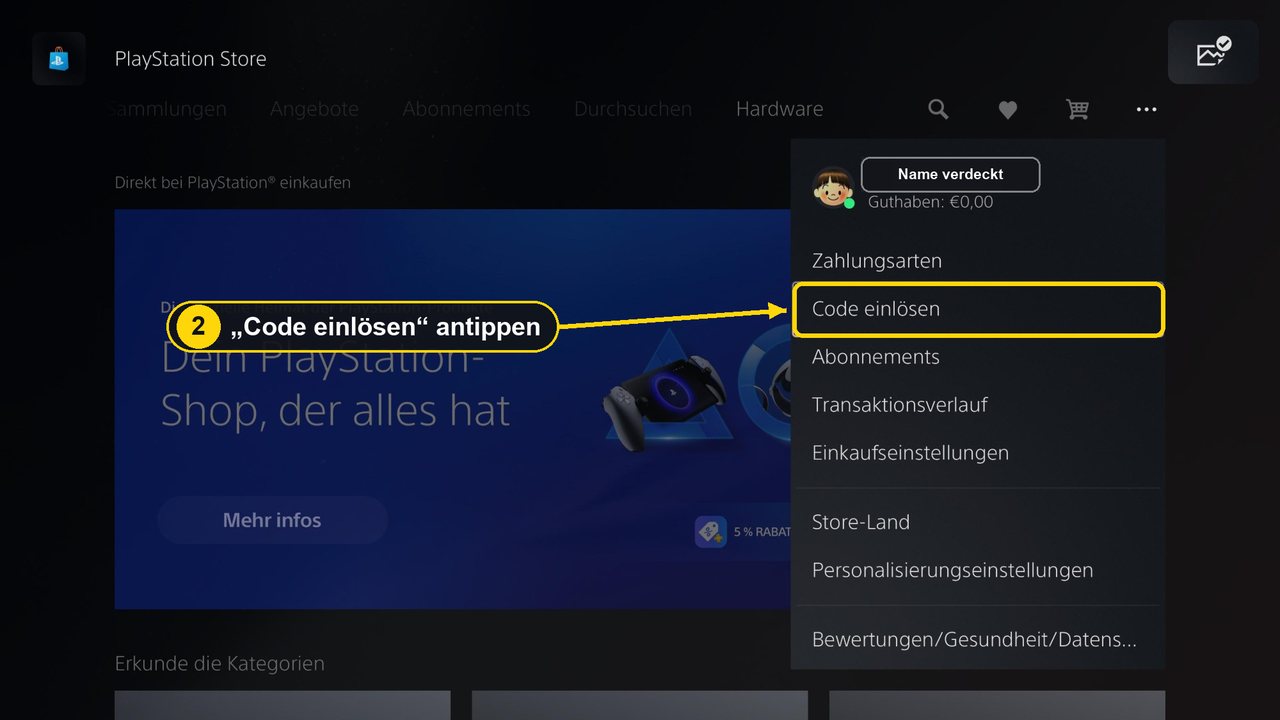
Step 2: select “Redeem Code” (in German: “Code einlösen”). We have hidden the account name. Image: own screenshot, drohnen.de (PS5 in German; game artwork © Rockstar Games) -
Enter the 12-digit code from the inside of the cover
The field asks for the 12-digit voucher code. The note next to it says that 10-digit discount codes are entered at checkout – that does not apply to the GTA code. According to Sony, all PlayStation Store voucher codes have 12 digits.
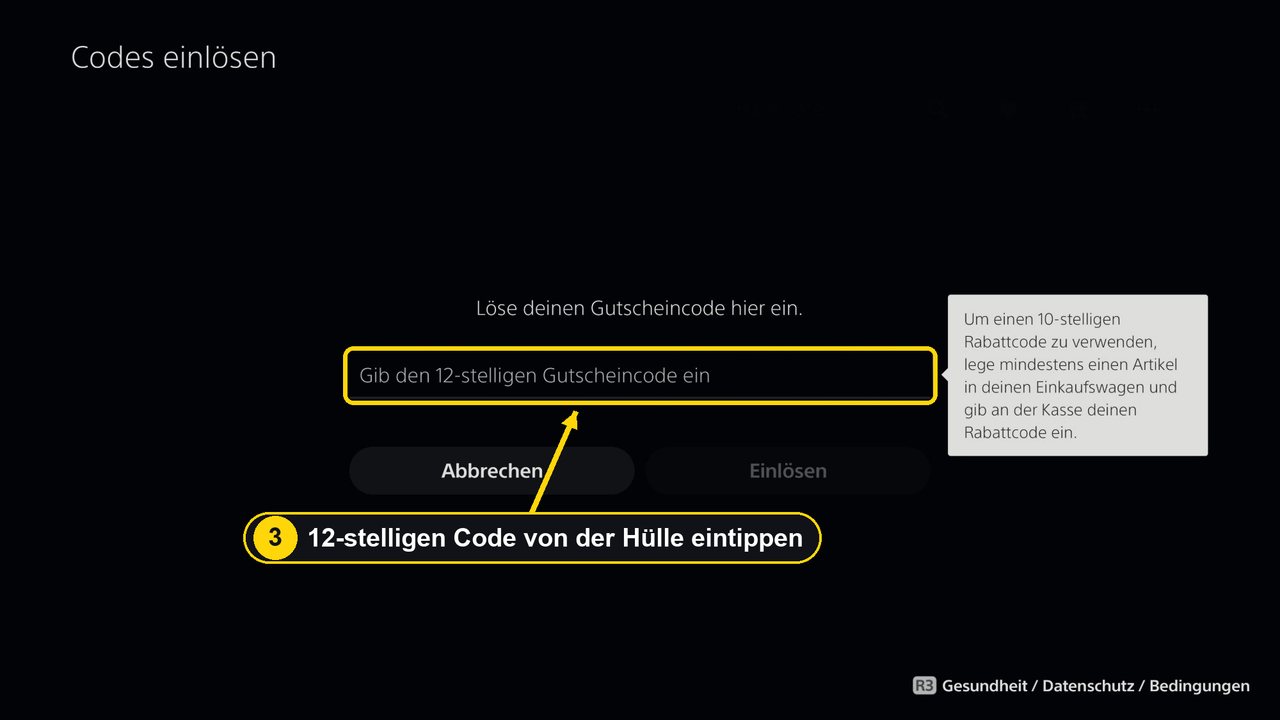
Step 3: the code from the case goes into the field for the 12-digit voucher code. Image: own screenshot, drohnen.de (PS5 in German; game artwork © Rockstar Games) -
Check the content and select “Redeem”
If the code is valid, the PS5 shows that it contains one item, Grand Theft Auto VI. If an error appears instead, go to When the code will not work.
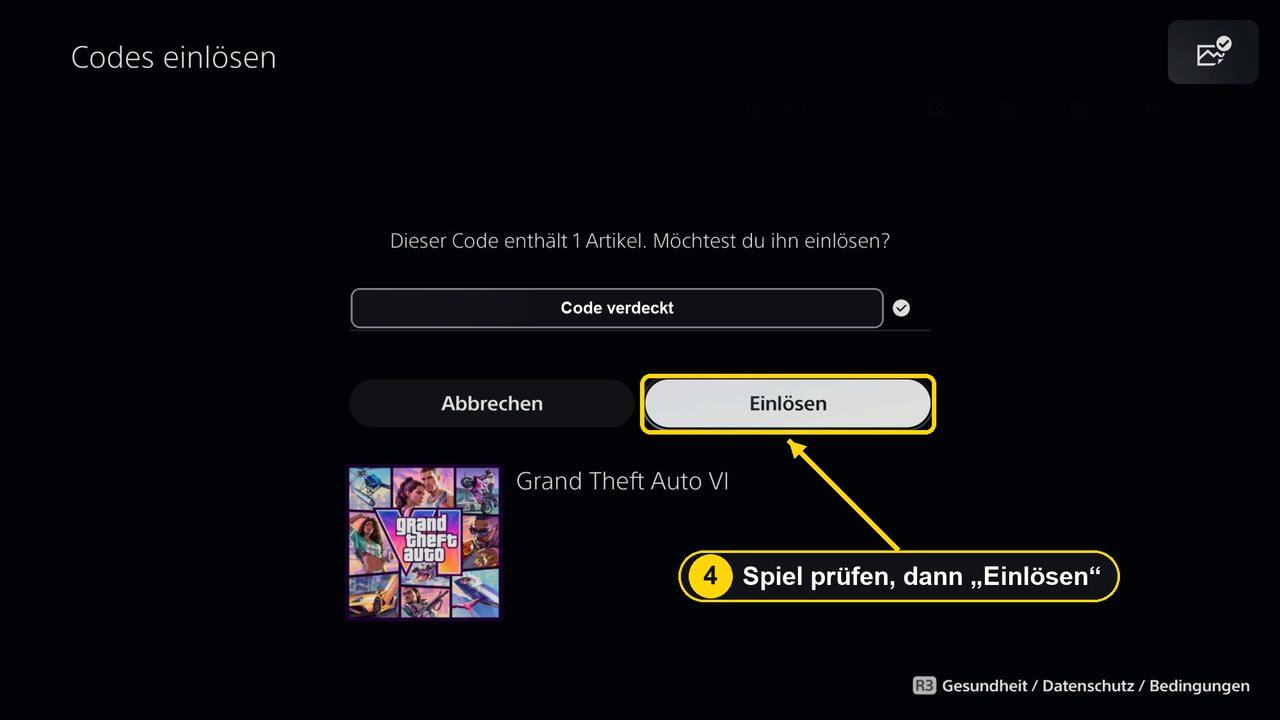
Step 4: the PS5 shows the game; “Redeem” ties the code to your account. Image: own screenshot, drohnen.de (PS5 in German; game artwork © Rockstar Games) -
Confirmation with countdown
Next, the PS5 said the code had been redeemed “for 8 items”. Listed were Grand Theft Auto VI (full game) and an add-on called “Extra2”, both with 19/11/2026 as the release date. A timer counted down to the unlock.
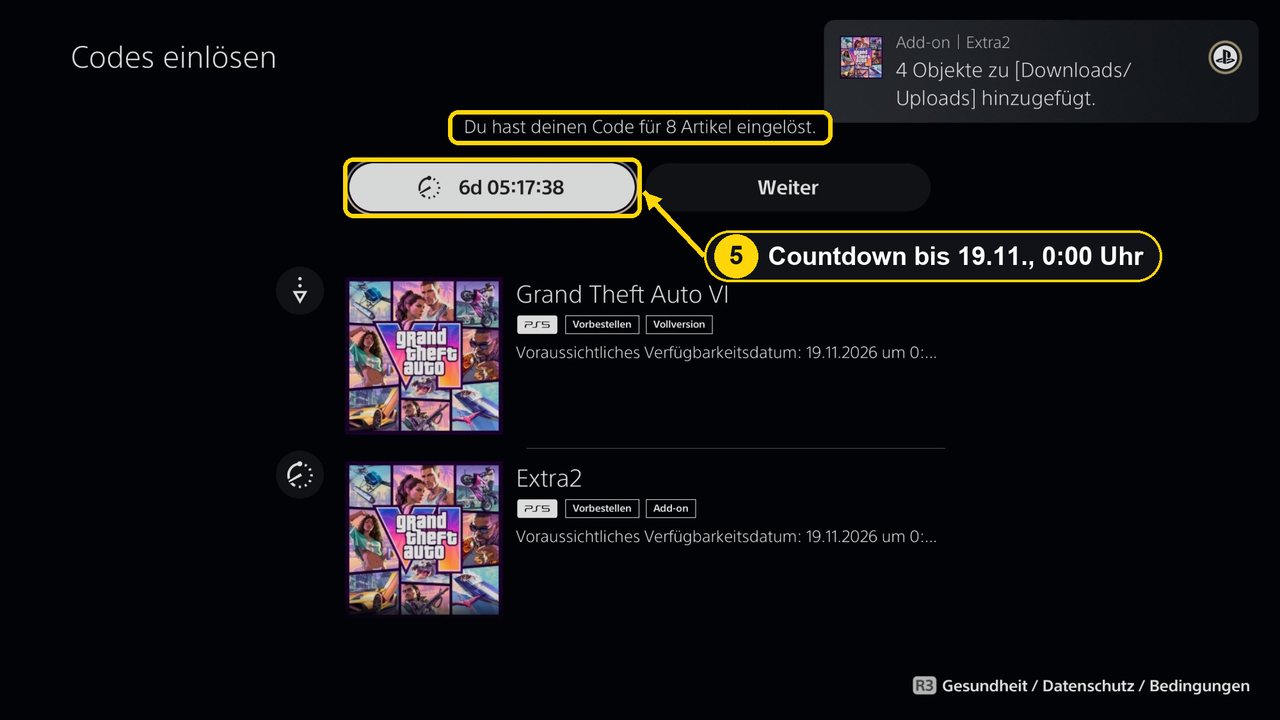
Step 5: code redeemed. On 12 November the countdown ran to 19 November, 00:00 CET. Image: own screenshot, drohnen.de (PS5 in German; game artwork © Rockstar Games) -
Check the download: 209.8 GB, 223.1 GB required
With “Next” you reach the overview. Our download started automatically. Next to the game the console showed the required space of 223.1 GB, below it the progress with a download size of 209.758 GB. If nothing starts, Sony says to select GTA VI in your game library and start the download there.
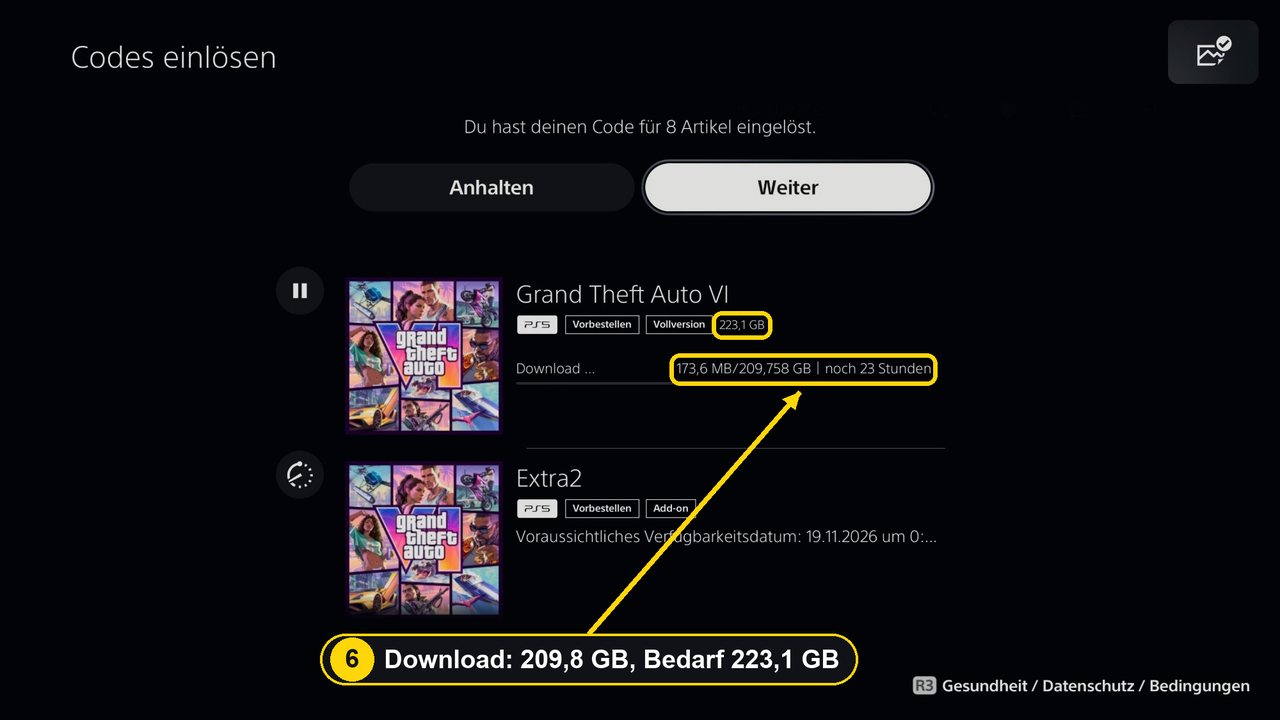
Step 6: the download is running – 209.758 GB to download, 223.1 GB required, “23 hours” at first. Image: own screenshot, drohnen.de (PS5 in German; game artwork © Rockstar Games)
The code is now used up and permanently tied to your account. Sony says voucher codes can be used only once and content cannot be transferred to another account.
Redeem the GTA 6 code in the PS App or a web browser
You do not have to be at the console. Sony describes two more routes, which we have checked against its help pages but not photographed. In both cases the console only downloads when it is switched on or in rest mode with an internet connection.
PlayStation App on your phone
- Sign in to the PS App with the account you want to play on.
- Select the PS Store icon, then the menu icon on the right of the screen.
- Select “Redeem Code”.
- Enter the 12-digit code and select “Continue”.
- On the PS5, check in your game library that the download is running, or start it there.
Web browser on a computer or phone
- Open the PlayStation Store in your browser and sign in.
- Select your profile or avatar at the top of the page.
- Choose “Redeem Code” from the drop-down menu and enter the code. Sony names exactly this route on its GTA VI code page.
- On the PS5, select GTA VI in your game library and start the download.
This is handy when the box arrives while you are out. The downside: you only see the space requirement and download status on the console itself, so check it in the evening.
How to redeem the GTA 6 code on Xbox Series X|S
We have no Xbox photos of our own because we only tested the PS5 box. The steps come from Xbox Support (checked on 19 November 2026). Xbox codes have 25 characters in five blocks of five (XXXXX-XXXXX-XXXXX-XXXXX-XXXXX). According to Rockstar, Xbox codes for GTA VI are not tied to a region.
On the console
- Sign in with the Microsoft account you want to play GTA 6 on.
- Press the Xbox button to open the guide and select “Store”.
- Press the View button to open the side menu and select “Redeem”.
- Enter the 25-character code, select “Next” and follow the prompts.
- Check the download under “My games & apps” › “Manage” › “Queue”.
In a browser at xbox.com/redeem
- Open xbox.com/redeem – Xbox Support names this address.
- Sign in with the same Microsoft account you use on your Xbox.
- Enter the 25-character code and confirm.
- On the console, check under “My games & apps” that the installation is queued and start it if needed.
Avoid typos: Microsoft names typing errors as the most common cause of code problems. Xbox Support also says it cannot move redeemed codes to another Microsoft account.
Install GTA 6: the download starts when you redeem
Redeeming starts the download. Rockstar confirmed in its Newswire post of 10 November that owners of the code-in-box version could activate the code and pre-load as soon as they received it. After redeeming, our PS5 home screen showed the GTA VI artwork with the status “Pre-order and pre-load”. The download continues in the background, and you can follow it in the control centre under “Downloads/Uploads”.
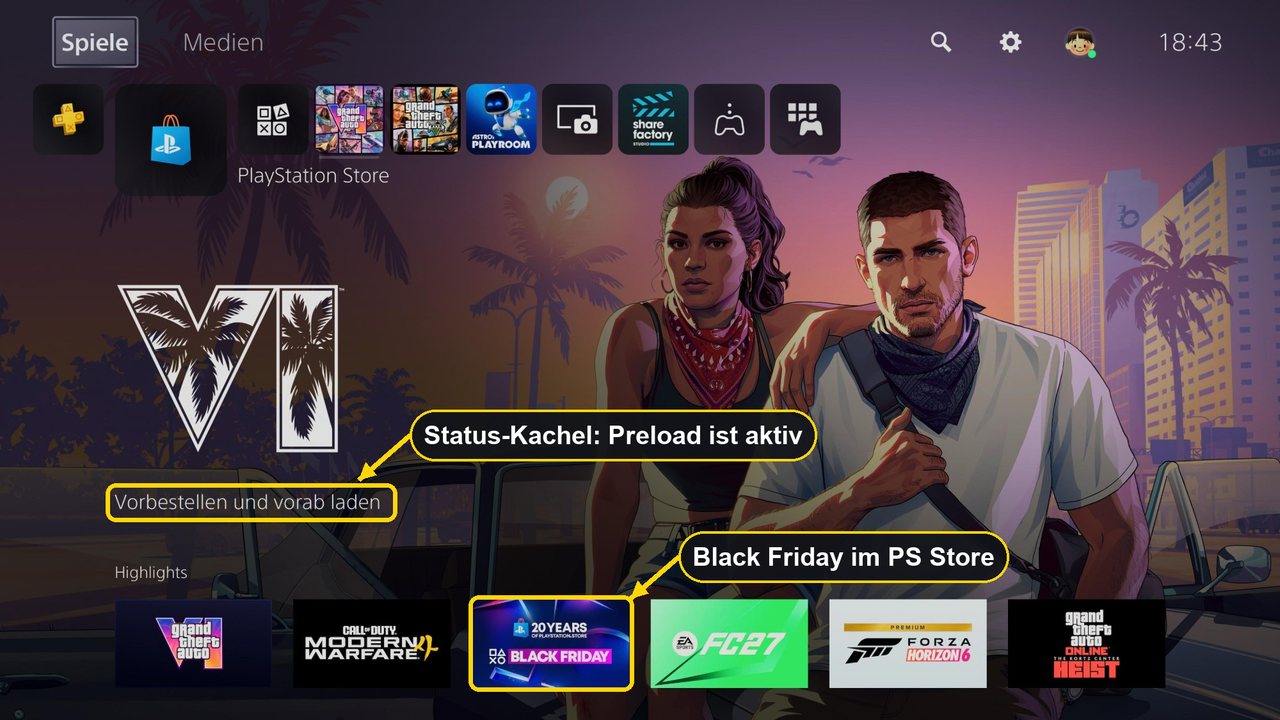
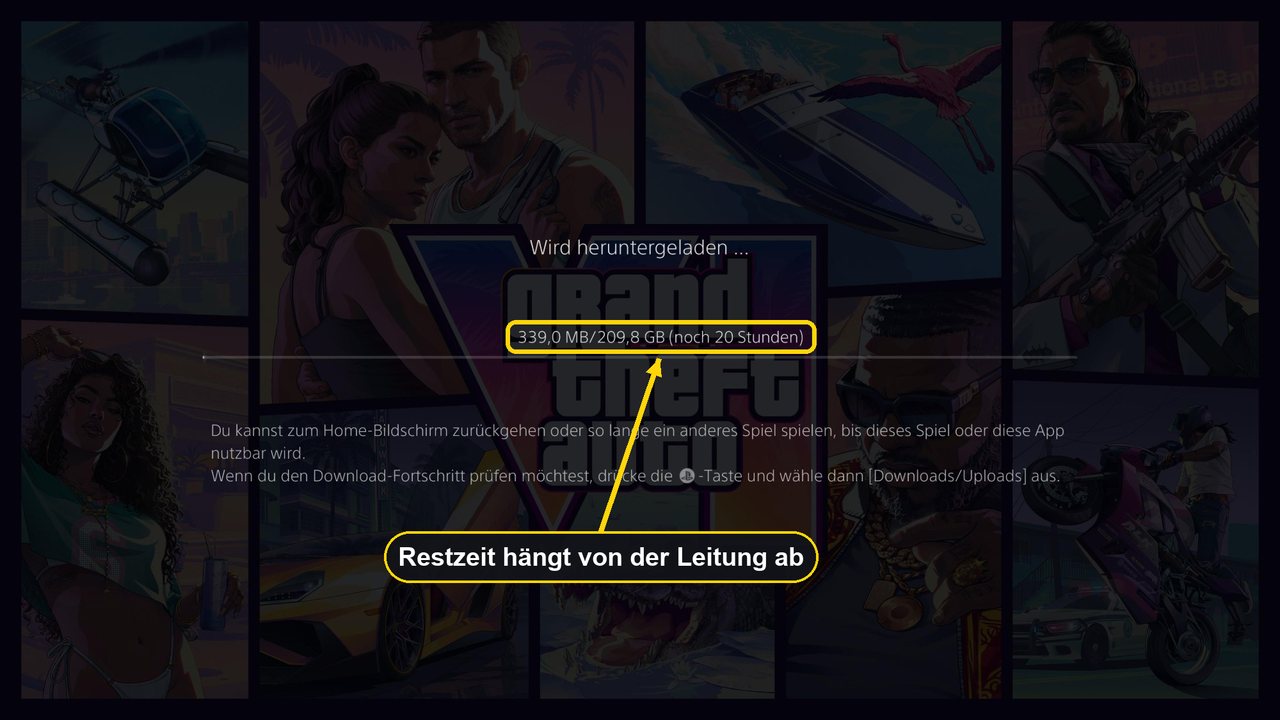
How long does it take? In theory, downloading 209.8 GB without losses takes about 4 hours 40 minutes at 100 Mbit/s and just over 9 hours at 50 Mbit/s (209.8 × 8,000 megabits ÷ line speed). In practice, Wi-Fi losses and busy servers add time; a network cable often helps more than any setting. Our pre-load guide has a calculator for your own connection.
Pre-load finished: what it looks like on the PS5
How can you tell everything is done? On our PS5 it was obvious on Friday, 13 November, at 19:07 CET: under the GTA VI logo the home screen no longer showed a progress bar but a button with a countdown to the unlock. Counting forward, it ended exactly at midnight on 19 November, Central European Time – which matches Sony’s statement that the game unlocks at midnight local time. Now that the game is out, the same button simply starts it.
Storage: 209.9, 212, 223 or 230 GB – how much do you need?
If you do the maths you will come across four different numbers. None of them is wrong; they describe different things:
According to Rockstar, the pre-load needs “up to 212 GB depending on the device”. Sony’s GTA VI help page also says 212 GB should be available.
The download was 209.758 GB; while downloading, the PS5 kept 223.1 GB free. Installed, the storage overview showed 209.9 GB on 13 November.
The back of our PS5 case shows the symbol “230 GB Minimum”. That is the highest and safest figure for you.
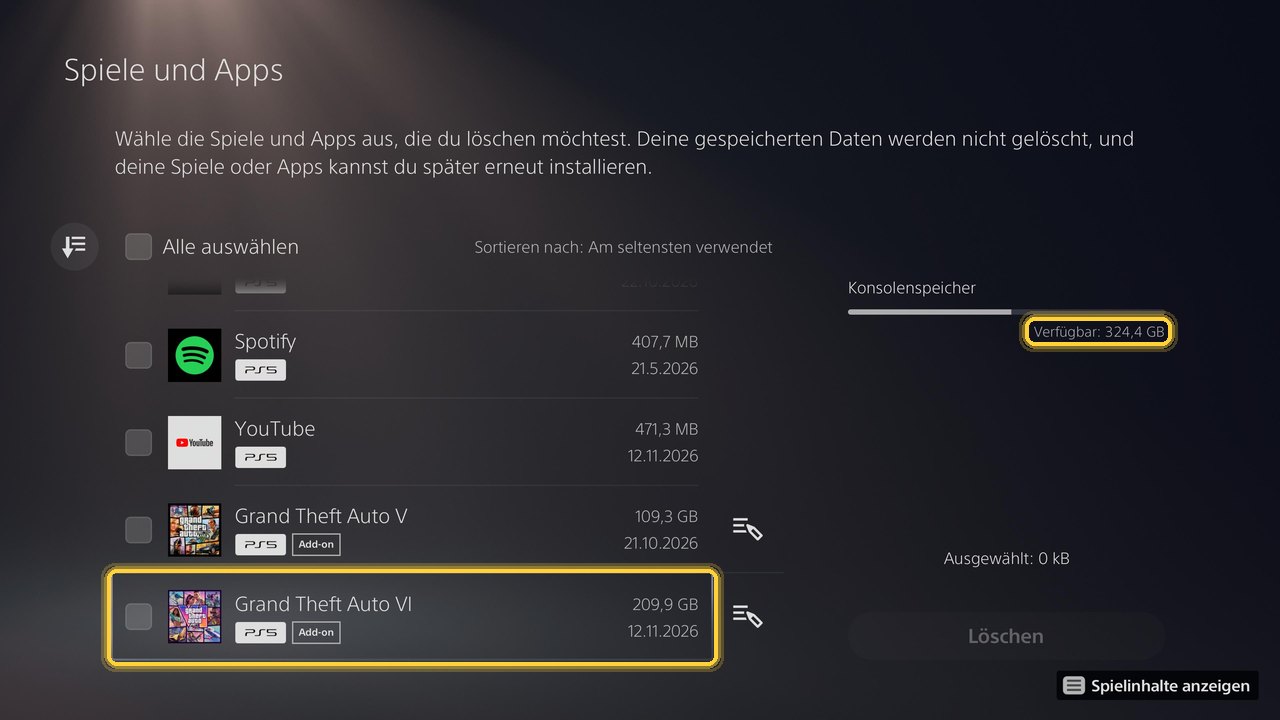
Our recommendation: keep at least 230 GB free for GTA 6. That covers the figure on the case and is more than the PS5 asked for during the download. We have no measurement of our own for the Xbox, and future game updates will need extra room, too.
Making room on PS5
- Check free space under Settings › Storage.
- Move instead of delete: PS5 games can be moved to USB extended storage, but not played from there.
- Internal expansion: an M.2 SSD in the expansion slot counts as internal storage. Sony requires a PCIe Gen4 x4 M.2 NVMe SSD with 250 GB to 8 TB and cooling such as a heatsink.
Making room on Xbox
- Check storage in the system settings under storage devices.
- USB only for storing: according to Microsoft, games optimised for Xbox Series X|S must run from internal storage or a Storage Expansion Card; the Xbox Store lists GTA VI as optimised for Series X|S.
- Series S: the 512 GB model has much less usable space than its label suggests. With 230 GB set aside for GTA 6 there is little left, so an expansion card is worth considering.
Rest mode, updates and the launch time
So that downloads and patches arrive while you are away, the console has to stay online. Both manufacturers describe it like this:
Settings › System › Power Saving › Features Available in Rest Mode › turn on “Stay Connected to the Internet”. Game updates: Settings › Saved Data and Game/App Settings › Automatic Updates.
Source: PlayStation Support (automatic updates), 19/11/2026
Rockstar’s pre-load FAQ asks for automatic updates to be switched on and the console to be on or in standby mode. You find the power options in the general settings.
Source: Rockstar Support (pre-load FAQ), Xbox Support
Launch time: according to Rockstar Support, GTA VI unlocks at midnight local time in every region; PlayStation Support confirms this for PS5. In the UK that meant Thursday, 19 November, at 00:00 GMT – one hour after Germany, France, Spain and Italy. Before the first start, PlayStation Support also lists the latest system software (Settings › System › System Software › System Software Update and Settings).
GTA 6 code not working: errors and fixes
For retail codes, Rockstar refers you to the retailer, and for technical questions to the console makers. Sony draws the same line: questions about accounts, downloads, codes and installation go to PlayStation Support, errors in the game itself to Rockstar Support. The table summarises the official answers; details follow below.
Tabelle seitlich wischen – weitere Spalten rechts
| Problem | Likely cause | What helps |
|---|---|---|
| “Code has already been used” | Already redeemed by you, on another account, or the code was passed on | Check your order history on all your own accounts; otherwise contact the retailer |
| “The code is incorrect or is no longer valid” | Typo, wrong platform, region does not match | Check code and platform; on PS5 compare the account country with the code region |
| UK account, European box | The European PS5 version excludes UK accounts | Use a UK box or buy digitally in the UK store |
| Account under 18 | Codes may only be redeemed by users aged 18+ | Redeem with an adult account; the child-account route is not available in the UK and Europe |
| Code missing or damaged | Printing or packaging fault | Contact the retailer; the card says damaged codes are not replaced after purchase |
| Download stuck | Console in power-saving mode, network, pending update | Pause and resume, rest mode with internet, test the connection, install updates |
| Not enough space | Less than about 223 GB free | Free up 230 GB, move games or add an SSD/expansion card |
| Redeemed on the wrong account | A family member’s or second account was signed in | No transfer possible; on PS5 use console sharing |
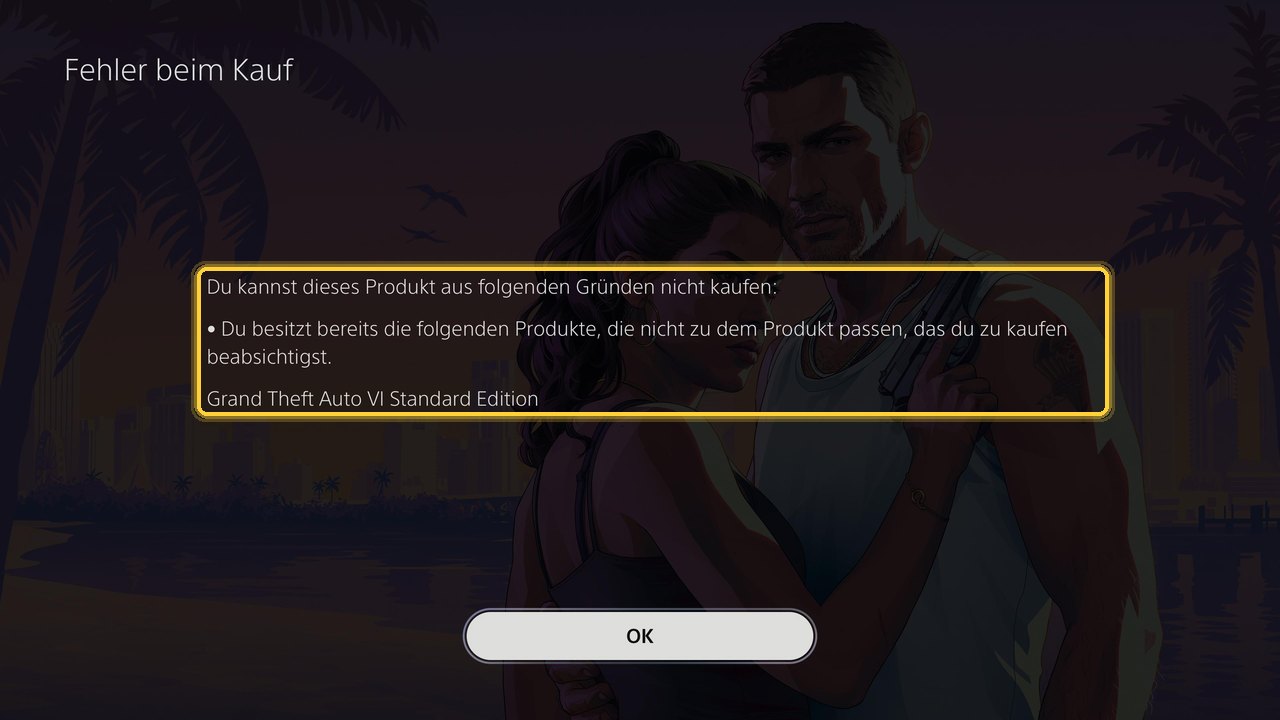
| “Purchase error” for the Ultimate Edition | The Standard Edition (also from a box code) is already on the account | Buy the “Ultimate Edition Upgrade”, not the full Ultimate Edition |
| Padlock after midnight | Licence not yet retrieved, busy servers | Wait a few minutes; on PS5 restore licences |
Code invalid or already used
If the PS5 says “Code has already been used”, Sony’s GTA VI code page recommends checking your order history first and asks whether you entered the code on another account. For “The code is incorrect or is no longer valid”, Sony points to its compatibility guide. Also check the platform: a PS5 code does not work on Xbox and vice versa. If the code is missing or unreadable, Sony says the retailer is responsible.
Wrong region or UK account
On PS5, GTA codes are tied to regions. The UK box only works with UK accounts, and the European box only with accounts from the countries it lists, which do not include the UK. Sony says an account’s country cannot be changed after it has been set up – you can see yours in the store menu. On Xbox, Rockstar says the codes are not region-locked.
Accounts under 18
GTA 6 is rated PEGI 18, and the code card only allows users aged 18 or over to redeem it. Sony’s GTA VI code page describes a family-manager workaround, but its general page on voucher problems says this process is only available in the US, Canada, Brazil, Mexico, Japan and Korea; elsewhere, age-restricted codes cannot be redeemed by account holders who are not old enough. In the UK and Europe that means: redeem the code with an adult’s account.
Download stuck or not running in rest mode
Sony recommends this order for GTA VI: open “Downloads/Uploads” in the control centre, select the download, choose “Pause” and then “Resume”. If that does not help, cancel and delete the download, select GTA VI in the game library and start it again. On Xbox you find the download under “My games & apps” › “Manage” › “Queue”; Microsoft recommends pressing the Menu button and selecting “Resume installation” if it shows as paused.
Redeemed on the wrong account
This cannot be undone: Sony and Microsoft do not transfer redeemed content between accounts. On the same PS5 there is a way round it: if the account that holds the game turns on console sharing and offline play, Sony says other users of that PS5 can play it too.
Still locked after midnight
If the download is complete but the game is still locked after midnight, Sony recommends restoring licences on PS5: Settings › Users and Accounts › Other › Restore Licenses (PlayStation Support); your saved data is not affected. With a launch of this size, servers may also be busy for the first few minutes. Be wary of offers promising an earlier start or “unlock codes”: they are scams.
Ultimate upgrade after the box code
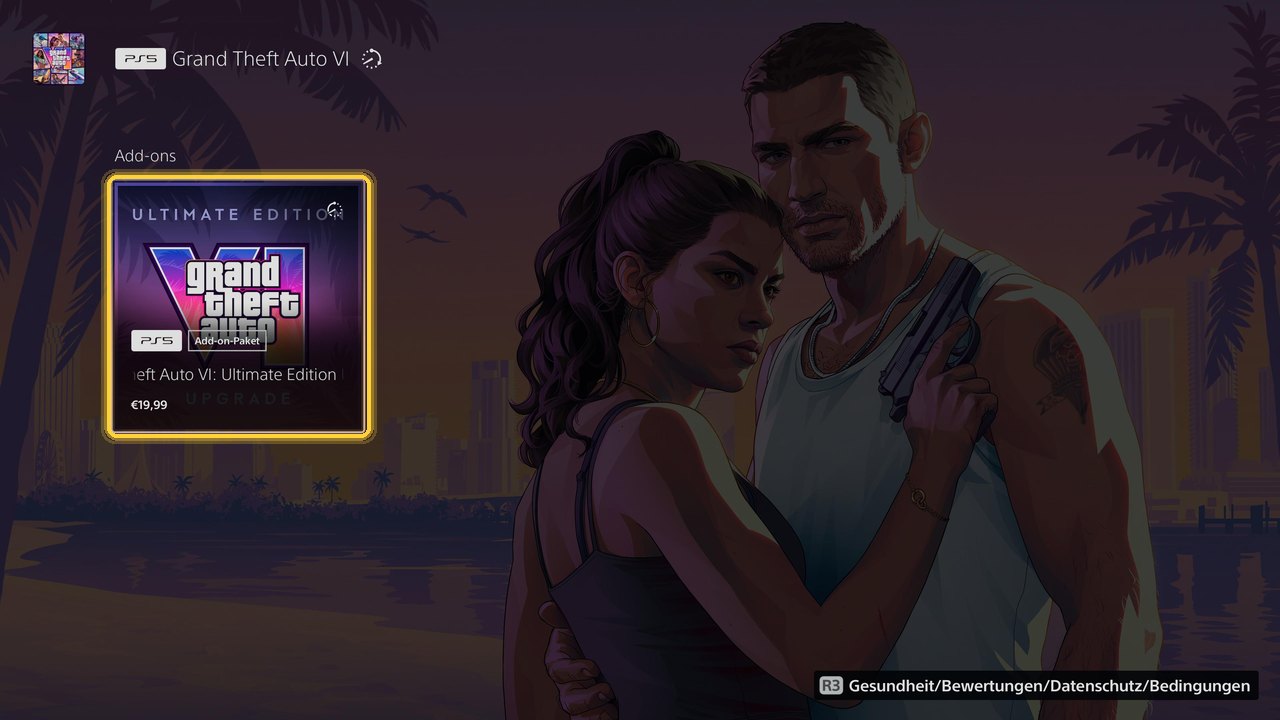
The box always contains the Standard Edition; according to Rockstar there is no physical Ultimate Edition. Box owners can upgrade at any time after redeeming their code. Sony says upgrades from the code-in-box version are only available in the PlayStation Store, either via a QR code in the packaging or via the product page “Grand Theft Auto VI: Ultimate Edition Upgrade”.
- Order: redeem the box code first, then buy the upgrade. The upgrade requires GTA VI on your account.
- Price: we paid €19.99 in the German PlayStation Store on 13 November. PlayStation.com lists the Standard Edition at £69.99 and the Ultimate Edition at £89.99 in the UK – a £20 difference, which matches Gaming Bible’s report of a £20/$20 upgrade. Your store shows the binding price.
- Not the full version: if you buy the full Ultimate Edition while the Standard Edition is already on your account, the PS5 reports a purchase error.
- No rush: the upgrade can still be bought after launch.
Checklist: GTA 6 code redeemed and ready to play
Eight points from unboxing to the first start. Your ticks are saved only in your browser.
GTA 6 code redeemed
0 of 8 done
FAQ: redeeming and installing your GTA 6 code
Where do I find the GTA 6 code?
In the PS5 case it is printed on the inside of the cover, and a card in the case points to it. There is no disc. We did not open an Xbox box ourselves.
Is there a disc in the GTA 6 box?
No. Sony and Rockstar confirm that the box only contains a download code, so the whole game is downloaded.
How do I redeem the GTA 6 code on PS5?
Open the PlayStation Store, press the triangle button, select “… (More)” › “Redeem Code”, enter the 12-digit code and select “Redeem”. The download then starts.
How do I redeem the GTA 6 code on Xbox?
Press the Xbox button, open the Store, press the View button for the side menu and select “Redeem”, then enter the 25-character code. In a browser, go to xbox.com/redeem.
Can I redeem the code on my phone or computer?
Yes. For PS5 via the PlayStation App (PS Store › menu › Redeem Code) or the PlayStation Store in a browser via your profile menu; for Xbox via xbox.com/redeem. The download then runs on the console when it is on or in rest mode or standby.
Does a European or German PS5 box work with a UK account?
No. According to Sony, the European version excludes the UK, and the UK version only works with UK-registered PlayStation accounts. Xbox codes are not region-locked, according to Rockstar.
Can I redeem the code on a child account?
Not in the UK or Europe. The code card only allows users aged 18 or over, and Sony limits the family-manager workaround to the US, Canada, Brazil, Mexico, Japan and Korea. GTA 6 is rated PEGI 18.
Why does the PS5 say “8 items”?
After redeeming, our PS5 said the code had been redeemed for 8 items, while it listed the game and one add-on. The number apparently counts individual packages; Sony does not explain it, and it makes no difference to the game.
How much storage do I need for GTA 6?
Rockstar says up to 212 GB. Our PS5 downloaded 209.8 GB, wanted 223.1 GB free while downloading and used 209.9 GB once installed. The PS5 case says “230 GB minimum”. Keep at least 230 GB free.
How long does the download take?
In theory around 4 hours 40 minutes at 100 Mbit/s and just over 9 hours at 50 Mbit/s. Our PS5 initially estimated 20 to 23 hours. The real time depends on your connection, Wi-Fi and server load.
What time could I start playing in the UK?
At 00:00 GMT on Thursday, 19 November 2026. According to Rockstar Support, GTA VI unlocks at midnight local time in every region.
I redeemed the code on the wrong account. What now?
Sony and Microsoft cannot transfer redeemed content. On the same PS5, the account that holds the game can turn on console sharing so other users of that console can play it.
My code is missing or unreadable. Who can help?
The retailer you bought the box from – Sony and Rockstar agree on this. According to the code card, a code is not replaced if it is lost or damaged after purchase.
Can I upgrade to the Ultimate Edition after redeeming the box?
Yes, via the “Ultimate Edition Upgrade” in the PlayStation Store or Xbox Store. We paid €19.99 in the German PlayStation Store; in the UK the editions differ by £20.
Why does the PS5 show a purchase error when I try to buy the Ultimate Edition?
Because the Standard Edition is already on your account, even if it came from a box code. Buy the add-on “Grand Theft Auto VI: Ultimate Edition Upgrade” instead.
Does the console have to stay switched on?
No. Rest mode with an internet connection (PS5) or standby with automatic updates (Xbox) is enough for downloads and updates.
Verdict: redeem, keep 230 GB free, check your region
Redeeming the GTA 6 code on a PS5 takes less than two minutes: open the Store, select “… (More)”, then “Redeem Code” and type in twelve characters. The time-consuming part is the download of almost 210 GB, which only starts once the code has been redeemed; installed, GTA VI takes 209.9 GB on our PS5. If your box arrives now, redeem it straight away, free up at least 230 GB and leave the console in rest mode with internet. On Xbox the same works via the Store or xbox.com/redeem, and the codes there are not tied to a region.
Most errors can be ruled out in advance: the right account, the right region, no child account and enough space. UK players need the UK box for a UK PlayStation account. And if you want the Ultimate Edition, buy the upgrade after redeeming – not the full version.
More about GTA 6 on drohnen.de
TransparencySources and data15 entries
This guide is based on our own test with a German PS5 retail box on 12 and 13 November 2026 and on the official help pages of Sony, Microsoft and Rockstar Games (UK versions checked on 19 November 2026). Download times are our own calculation.
- Own test by drohnen.de, 12 November 2026 (about 18:42 CET): German PS5 retail box (code in box), card, back of case, screenshots of redeeming and downloading (primary evidence)
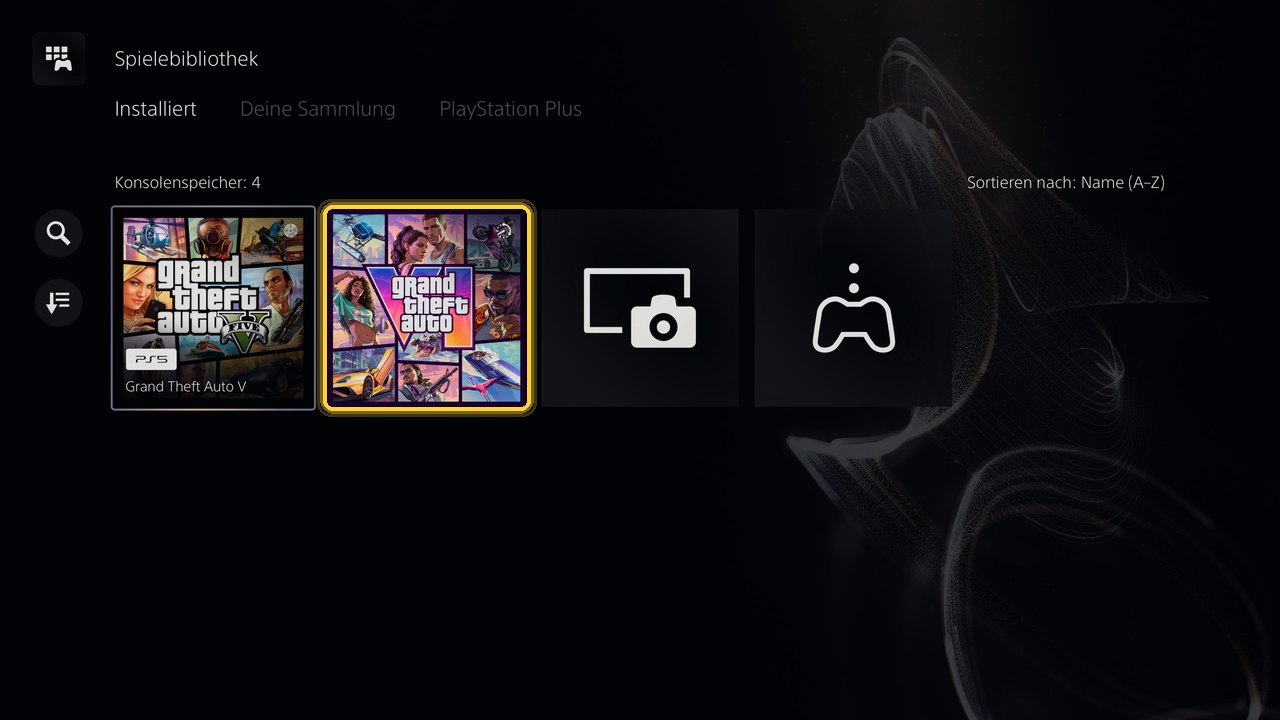
- Own test by drohnen.de, 13 November 2026, 19:07–19:12 CET: screenshots after the finished pre-load (home screen, “Can be played in”, storage 209.9 GB, game library), purchase error and purchase of the Ultimate Edition Upgrade for €19.99 in the German PlayStation Store (primary evidence)
- PlayStation Support: Redeem codes on PlayStation Store – PS5, PS App and web routes, 12-digit codes (manufacturer source)
- PlayStation Support: GTA VI code support – redeem on receipt, error messages, retailer responsibility, upgrade via QR code (manufacturer source)
- PlayStation Support: GTA VI code compatibility – versions for the United Kingdom and for Europe excluding the UK (manufacturer source)
- PlayStation Support: Grand Theft Auto VI – midnight local time, no disc, 212 GB (manufacturer source)
- PlayStation Support: Problems with voucher codes – region not changeable, age-restriction workaround only in some countries (manufacturer source)
- PlayStation Support: Automatic updates – “Stay Connected to the Internet” (manufacturer source)
- PlayStation Support: Restore licences – menu path (manufacturer source)
- PlayStation.com UK: Grand Theft Auto VI – Standard £69.99, Ultimate £89.99, checked 19/11/2026 (manufacturer source)
- Xbox Support: Redeem gift cards, codes and offers – console route, xbox.com/redeem, 25 characters, no transfer (manufacturer source)
- Rockstar Newswire, 10 November 2026: Pre-load Grand Theft Auto VI now – code-in-box can be activated and pre-loaded on receipt (manufacturer source)
- Rockstar Support: regional pre-load and release times – unlock at midnight local time (manufacturer source)
- Gaming Bible, 5 November 2026 – Ultimate upgrade for £20/$20 (trade media)
- PC Guide, 11 November 2026 – box without a disc (trade media)
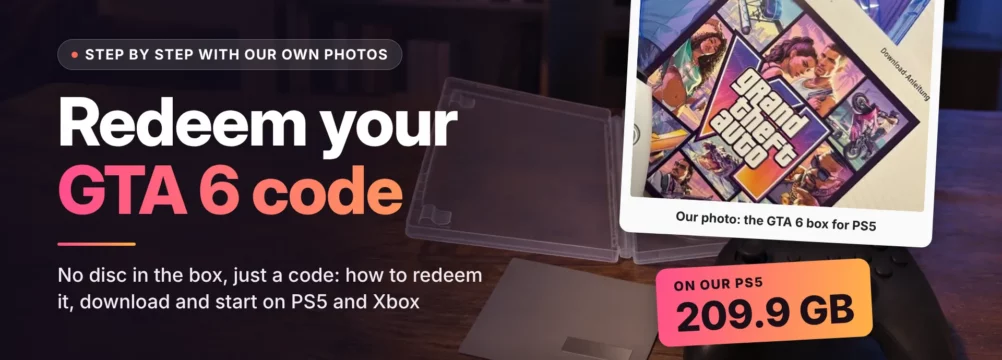
Image sources: all photos and screenshots in this guide are our own, taken on 12 and 13 November 2026 (game artwork © Rockstar Games). The code, code label, account name and friends’ avatars have been hidden. The header image combines our photo of the box with an AI-generated background and is labelled accordingly.
TransparencyEditorial notesEvidence and limits
Evidence: we carried out the PS5 steps ourselves with a German retail box and a PS5 set to German, and compared them with Sony’s UK help pages. The Xbox steps are based on Xbox Support; we did not have an Xbox box. Region rules come from Sony’s compatibility page.
Uncertainties: storage – Rockstar “up to 212 GB”, our PS5 209.8 GB download and 223.1 GB required, 209.9 GB installed, case “230 GB minimum”. The upgrade price of €19.99 is our own purchase in the German store; we did not buy it in the UK store. Sony does not explain the “8 items” message. Menus may differ between system versions.
Deliberately left out: download size on Xbox (no official figure, no own measurement), ways to change an account region, key shops and region tricks.
Note: this guide is general information. Menus, terms and prices may change; Sony, Microsoft, Rockstar Games and your retailer have the final say. We are not affiliated with Rockstar Games, Take-Two Interactive, Sony Interactive Entertainment or Microsoft.
Transparency and editorial note: in view of the transparency requirements under Article 50 of the EU AI Act, which have applied since 2 August 2026, our articles are checked, put into context and approved by our editors before publication. This English edition was researched and written with AI assistance on the basis of our German guide and checked by our editorial team; the hands-on test was carried out by our editors on their own PS5. Final assessment and editorial responsibility lie with our editorial team.
All photos and screenshots in the article are our own. The header image uses an AI-generated background and is labelled “AI-generated”.

